Construction job costing is the discipline of tracking every dollar of expense against a specific project rather than across your business as a whole. In QuickBooks, it is not a setup problem. It is a maintenance problem. Most contractors get the configuration right: Projects enabled, cost codes defined, chart of accounts organised by job. The part that breaks down is what comes next. Keeping every transaction correctly assigned to the right project and cost code, in real time, across every active job at once.
A contractor running five to ten jobs receives dozens of transactions every week. Materials, subcontractors, labour, equipment, fuel. Each one needs to be entered, assigned to the right project, and tagged to the right cost code. When that does not happen, and it often does not, job profitability reports become unreliable.
According to a QuickBooks survey of more than 600 construction business owners, one in four construction companies would go out of business from just two or three inaccurate estimates. Wrong job costing data does not just create accounting headaches. It leads to underbidding, shrinking margins, and financial decisions built on numbers that do not reflect reality.
This guide covers what construction job costing actually is, how to set up QuickBooks Online for project-based cost tracking, why the manual tagging process fails even when the setup is correct, and how AI automation handles transaction-to-project assignment without manual entry.
What Is Construction Job Costing and Why Does It Matter?
Job costing is the practice of tracking every dollar of cost against a specific project, not just across your business as a whole.
Regular bookkeeping tells you whether your company made money this month. Job costing tells you whether this particular project made money. Those are very different questions, and for a construction business, the second one is the one that decides whether you stay in business.
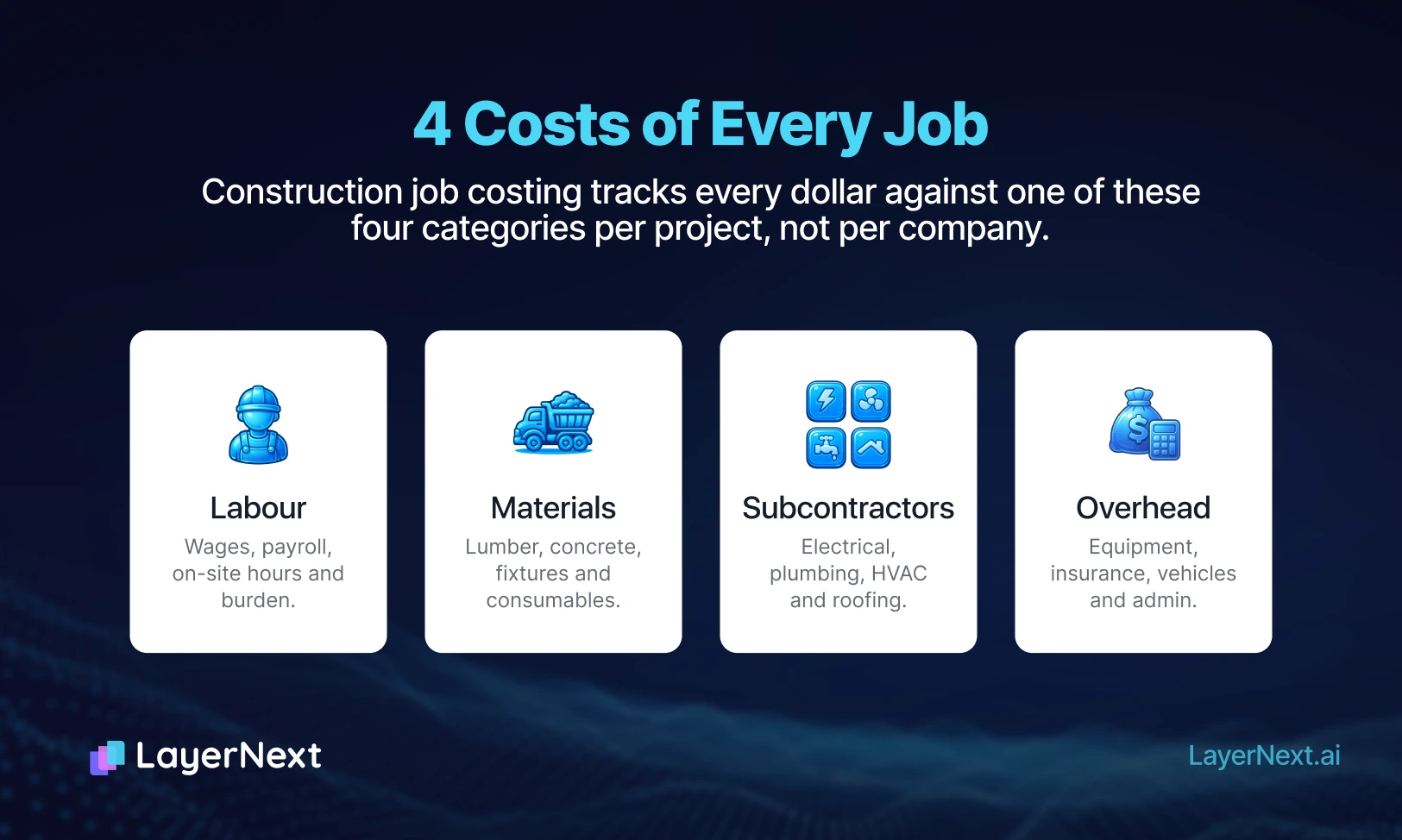
Every active project has four main cost buckets:
- Labour
Wages, payroll, time on site - Materials
Lumber, concrete, fixtures, supplies - Subcontractors
Trades you bring in per job - Overhead
Equipment, insurance, admin costs allocated per project
When these are tracked correctly at the job level, you get a profit and loss statement per project. You can see which jobs are most profitable, which ones run over budget, and what your real margin is before you price the next bid.
When they are not tracked correctly, you are running your business on guesswork.
As construction accounting specialists at REA explain, job costing is the core discipline of construction bookkeeping and the foundation for accurate bidding on future work. A business might run 12 active jobs simultaneously and without the right systems, those numbers blur together.
1 in 4 construction companies would go out of business from just two or three inaccurate estimates.
Source: Intuit QuickBooks, survey of 600+ construction business owners.
Construction Job Costing vs Project Costing: What Is the Difference?
The two terms get used interchangeably, but construction accountants treat them slightly differently. Job costing tracks cost at the level of a discrete, billable engagement: a kitchen renovation, a commercial fit-out, a new build. Project costing is sometimes used more broadly to include internal cost centres or multi-phase work that does not map cleanly to a single customer invoice.
For most small and mid-size contractors, the two are functionally the same. The discipline is the same: assign every transaction to the engagement it belongs to, report profitability per engagement, use historical data to price the next one.
How QuickBooks Handles Construction Job Costing
QuickBooks Online is one of the most widely used accounting tools for small construction businesses and for good reason. Its Projects feature provides a solid foundation for job-level financial tracking.
Here is what QuickBooks does well for contractors:
- Projects
Tracks all income, expenses, and time associated with each job in one place
- Estimate vs Actual reports
Shows exactly where you are relative to budget at any point in a project
- Progress invoicing
Lets you invoice clients for a percentage of work completed, not just on completion
- WIP reports
Tracks work in progress across all active jobs simultaneously
- Job Profitability reports
Gives you a P&L per project
According to Peak Advisers, the Projects feature in QuickBooks Online eliminates guesswork from job costing. When it is configured correctly, it tracks labour, materials, and subcontractor costs in one centralised location, enabling decisions while jobs are still active rather than weeks after completion.
The key phrase there is when configured correctly.
Here is where QuickBooks falls short in practice:
Every transaction has to be manually assigned to the right job and cost code. Every bill. Every receipt. Every labour entry. Every subcontractor payment. If your team enters expenses without assigning them to a project, which happens constantly on busy job sites, those costs disappear into a general ledger and your job reports become inaccurate.
As Foundation Software points out, QuickBooks is not built to maintain a construction job cost structure. Users typically have to create workarounds using items and sub-customers to represent cost codes, which works, but requires consistent discipline across everyone entering data.
Common problems in practice:
- Expenses posted to the wrong job
- Receipts entered days or weeks late
- Cost codes used inconsistently across team members
- Month-end reconciliation taking hours to untangle
Setting Up QuickBooks for Construction Job Costing — Step by Step
Before automation can help, the foundation needs to be right. Here is how to configure QuickBooks Online properly for construction job costing.
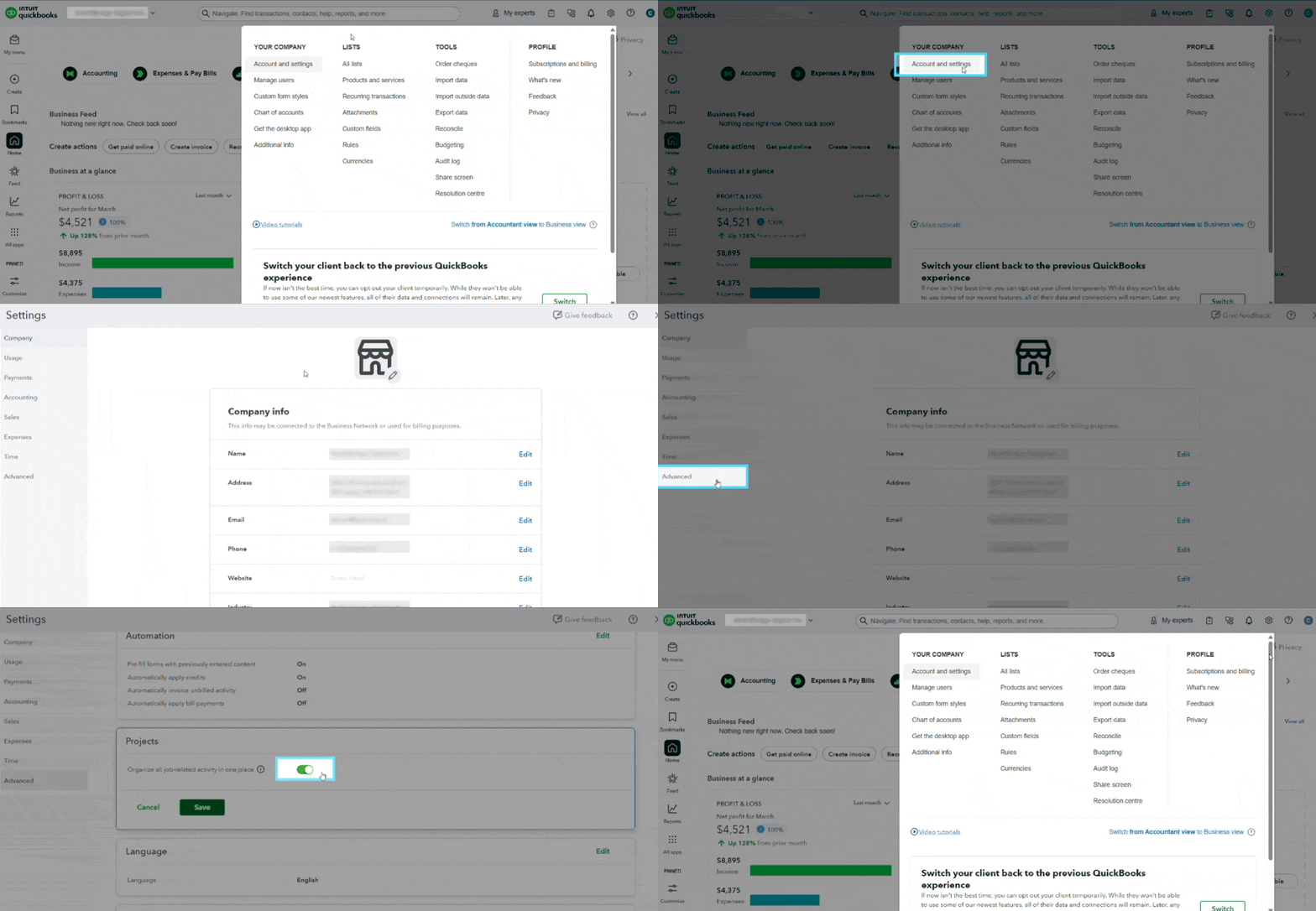
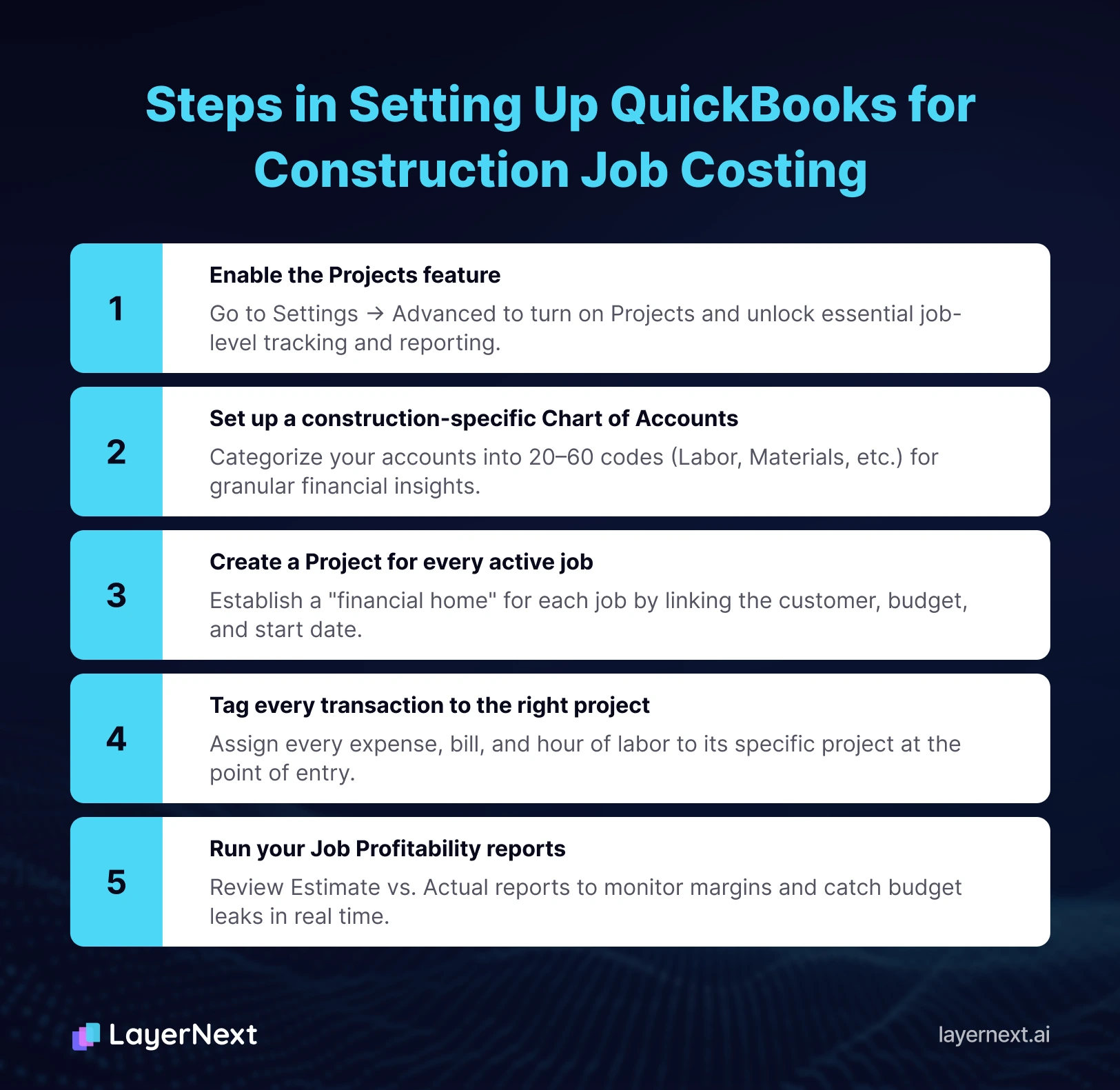
Step 1: Enable the Projects feature
In QuickBooks Online (Pro or Advanced), go to Settings → Advanced → Projects and turn it on. This unlocks the job-level reporting that makes everything else work. Note that job costing is only available on QuickBooks Online Pro and Advanced subscriptions.
Step 2: Set up a construction-specific Chart of Accounts
Your chart of accounts needs to reflect how construction costs actually work. Set up cost categories for Labour, Materials, Subcontractors, Equipment, and Overhead at a minimum. Within those, add cost codes for specific scopes such as concrete, framing, electrical rough-in, mechanical, and so on.
Construction accounting experts recommend aiming for 20 to 60 cost codes, enough granularity to be useful, not so many that nobody uses them consistently.
Step 3: Create a Project for every active job
For each new job, create a Project in QuickBooks and link it to the correct customer. Add a start date, description, and budget. This becomes the financial home for every transaction associated with that project.
Step 4: Tag every transaction to the right project
Every expense, bill, receipt, time entry, and subcontractor payment needs to be assigned to its project and cost code at the point of entry. This step is where most construction businesses fall behind, and we will come back to it.
Step 5: Run your Job Profitability reports
Once transactions are flowing in correctly, QuickBooks gives you powerful reporting. The Estimate vs Actual report shows budget versus real spend in real time. The Job Profitability Summary shows which projects are on track and which ones are leaking.
Steps 1 through 3 are a one-time setup. Step 4 is the ongoing problem, and it never stops requiring attention.
Construction Job Costing Best Practices
The contractors who make QuickBooks job costing work follow a few disciplines consistently.
Enter Transactions the Same Week They Happen
Weekly entry, not month-end catch-up. A receipt entered three weeks late gets assigned from memory, not from context, and memory is where errors originate.
Use a Standard Cost Code Set Across Every Job
If concrete is cost code 03-300 on one job, it is 03-300 on every job. Variable coding across jobs makes historical comparison impossible, which defeats the point of tracking.
Assign Subcontractor Bills on Arrival, Not on Payment
The project a subcontractor worked on is obvious when the invoice arrives. Two weeks later, after three more invoices from the same sub across three different jobs, it is not.
Photograph Receipts at the Job Site
Every major supplier purchase should be photographed on site and tagged to the project immediately. Paper receipts in a truck glovebox never become accurate job cost data.
Reconcile Labour Weekly Against Timesheets
Labour is the cost category most often misallocated because crews move between jobs mid-week. Weekly reconciliation catches this while memory is fresh.
Review Estimate vs Actual Mid-Project, Not Post-Completion
A project 40 percent over on materials at the 60 percent mark is still salvageable. At completion, the loss is locked in.
The Manual Tagging Problem: Why Most Contractors Fall Behind
A contractor running five to ten active jobs receives dozens of transactions every week, material deliveries, subcontractor invoices, equipment hire, labour timesheets, fuel receipts, tool purchases.
Every single one needs to be:
- Entered into QuickBooks
- Assigned to the correct project
- Tagged to the correct cost code
In a small construction business, who does this? Usually the owner. Often on weekends. Frequently two weeks after the transactions happened.
A report by ProcureDesk found that a mid-size HVAC contractor had been understating material costs by an average of 12% across their commercial projects, and had been using those reports to price new work, consistently underbidding and wondering why their margins kept shrinking.
The errors that creep in are predictable:
- Lumber invoice tagged to the wrong project
- Labour hours entered a week late after the crew has moved to a different job
- Subcontractor bill sitting unprocessed in the inbox
- Receipts photographed on site but never actually entered
The consequence: your job cost report is always a few days behind, never quite complete, and not reliable enough to make confident pricing decisions.
This is exactly the problem that automation solves.
How to Automate Construction Job Costing with AI
AI bookkeeping automation works as a layer on top of QuickBooks. It does not replace QuickBooks, your accounting system of record stays exactly where it is. What it does is handle the manual work of reading, categorising, and assigning every incoming transaction so that nothing falls through the cracks.
Here is how it works in practice:
- Transaction arrives
A bill from your lumber supplier, a receipt from a hardware store, a subcontractor invoice
- AI reads it
Recognises the vendor, amount, expense type, and which active project it relates to
- Auto-assigns
Assigns the transaction to the correct project and cost code in QuickBooks
- Flags for review
Anything ambiguous is flagged for your approval rather than guessed at
- Syncs to QuickBooks
The transaction appears correctly in your job reports immediately
A real workflow example: A materials invoice arrives from a building supplier. The AI reads it, recognises it as a materials expense, identifies it belongs to the active Maple Street Renovation project based on the supplier and timing, assigns it to cost code: Materials, and syncs it to QuickBooks. No manual entry. No wrong project. No delay.
As JobTread's integration research explains, when job costing software integrates with QuickBooks, every billable item is automatically accounted for, removing redundant data entry and allowing contractors to spend more time on site and less time managing finances.
For Canadian contractors, GST/HST on materials is automatically handled per project. For US contractors, state sales tax rules are applied correctly by job. No manual tax categorisation required.
The result is job cost reports that are always current, not just accurate at month-end after hours of reconciliation.
Understanding Your Construction Job Cost Report
A construction job cost report is a single-project P&L. It shows what you estimated, what you actually spent, and where the variance lives.
A useful job cost report contains:
1. Project Header
Customer, project name, start date, budget, and percentage complete.
2. Cost Category Summary
Total spend against each of the four cost buckets, with budgeted versus actual and a variance column.
3. Cost Code Detail
Line-level spend within each cost code. This is where you see that concrete came in 8 percent over while framing labour came in 15 percent under.
4. Committed Cost View
Subcontractor commitments that have been issued but not yet billed. Without this, the report understates your real position.
5. Revenue Recognition Status
How much has been invoiced, how much is still to invoice, and what that means for gross margin at the current point in the project.
A contractor who reads their job cost report weekly makes different pricing decisions than one who reads it at completion. The former adjusts. The latter absorbs losses.
What to Look For in Construction Job Costing Software
Most small contractors do not need enterprise construction software. QuickBooks Online with a real automation layer covers 90 percent of what Procore, Sage 300, or Foundation do for job costing, at a fraction of the cost.
When evaluating any construction job costing tool, the criteria that matter:
- Two-Way Sync With Your Accounting System
Read-only integrations produce stale data. The tool needs to write transactions back to QuickBooks in real time.
- Automatic Vendor and Project Recognition
Tools that require you to map every vendor to a category and every invoice to a project manually are not automation. They are expensive data entry interfaces.
- Cost Code Intelligence
The tool should learn your existing cost code structure rather than force you to rebuild it.
- Exception Handling That Actually Flags
Ambiguous transactions should be flagged to a human, not auto-assigned by guess. Confidence scoring matters.
- Native Tax Handling by Jurisdiction
GST/HST for Canada, state and local sales tax for the US, applied per-project rather than per-company.
- Audit Trail
Every automated assignment should be reviewable and reversible. You should be able to trace why the system assigned any transaction to any project.
Who This Is For
This approach works best for:
- General contractors and renovators running 3–20 active jobs at any one time
- Trades businesses electricians, plumbers, HVAC, roofing, with multiple concurrent jobs
- Owner-operators who currently do the books themselves and want those hours back
- Small bookkeeping teams managing QuickBooks for multiple construction clients
- Businesses not yet ready for enterprise construction software like Procore or Sage 300 QuickBooks works perfectly well as the accounting backbone with the right automation layer on top
If you are managing fewer than three jobs and entering transactions daily, manual QuickBooks job costing is workable. Once you are running more jobs or your transaction volume grows, the manual approach starts breaking down and costing you accuracy, and money.
The Bottom Line
QuickBooks is the right tool for construction job costing. The Projects feature, the Estimate vs Actual reports, the WIP tracking, all of it works. The only problem is keeping every transaction correctly assigned, in real time, across every active job. For a busy contractor, that manual work is simply not sustainable.
Automation removes that bottleneck entirely.
The contractor who gets this right ends up with:
- Real-time project profitability
Not a month-end approximation - Accurate estimates for future jobs
Based on real historical cost data - Hours back every week
No more weekend data entry sessions - Confidence in the numbers
Job reports you can actually make decisions from
Frequently Asked Questions