Summary
Roofing contractors using QuickBooks face a financial problem no other trade shares: multiple insurance payment types (ACV, RCV, supplements) arriving at different times for the same job, layered on top of two parallel revenue streams storm restoration and retail work, that have completely different margins. This guide covers how to structure QuickBooks to separate those revenue streams using Classes and Projects, why the manual system breaks during high-volume storm season, and how LayerNext's AI bookkeeping automation handles transaction assignment automatically so your job reports stay accurate without weekend catch-up sessions.
What you will learn:
- Why roofing bookkeeping is structurally different from general contracting
- How to set up a roofing chart of accounts in QuickBooks
- How ACV, RCV, and supplement payments create a reconciliation gap
- A 5-step QuickBooks setup for roofing revenue separation
- Best practices for crew-level job costing and insurance payment tracking
- How AI automation eliminates the post-storm bookkeeping backlog
Roofing bookkeeping is the practice of tracking every dollar of revenue and cost against the type of work that generated it, storm restoration, retail re-roof, new construction, or commercial contract. In QuickBooks, it is not a setup problem. It is a revenue separation problem.
Standard contractors invoice for work, collect payment, and move on. Roofing companies running storm restoration work manage a multi-stage payment process involving insurance carriers, depreciation holdbacks, supplement negotiations, and final releases, sometimes across several months. At the same time, most roofing businesses run two parallel revenue streams: storm restoration and retail re-roof jobs with completely different margins, close rates, and cost structures.
Mixing those revenue streams into a single QuickBooks account produces a blended P&L that tells you almost nothing useful. This guide covers how to structure QuickBooks correctly for roofing, why insurance supplement billing breaks every manual system, and how AI automation handles the transaction volume without errors.
Is QuickBooks Good for Roofing Contractors?
Yes, with the right setup. QuickBooks Online Plus and Advanced include two features that make roofing-specific bookkeeping possible: Classes for revenue stream separation and Projects for job-level cost tracking. These are not optional extras. For a roofing company managing storm and retail revenue simultaneously, they are the foundation of any accurate financial reporting.
The honest limitation is the insurance payment workflow. QuickBooks does not have a native payment stage structure for ACV, RCV, and supplement tracking. That gap requires manual workarounds, custom fields, or automation at the transaction level.
For roofing companies running fewer than ten jobs per month with simple retail billing, standard QuickBooks entry is workable. Once storm volume hits, or once you are managing insurance supplements across multiple active jobs, the manual approach starts producing errors that cost real money.
What makes roofing bookkeeping different from general contracting
Most construction bookkeeping guides treat roofing as a subcategory of contracting. It is not. Roofing has a financial structure that does not exist in any other trade, and it creates accounting problems that a generic QuickBooks setup cannot resolve.
The Insurance Restoration Workflow
When a storm hits, a roofing company does not simply invoice a customer and collect payment. A typical insurance job produces at minimum two separate payments: an Actual Cash Value (ACV) payment and a Replacement Cost Value (RCV) release, paid after work is completed and documented. Most jobs generate at least one supplement on top of these, an additional payment negotiated with the carrier for scope changes or items the adjuster missed.
QuickBooks has no native workflow for this process. Each transaction arrives at a different time, from a different source, in a different amount. Without a structured tracking system, payments get applied to the wrong jobs, revenue gets recognised at the wrong time, and outstanding supplements disappear from view entirely.
The Storm vs. Retail Revenue Split
Most roofing companies run two businesses simultaneously: storm restoration work triggered by weather events, and retail re-roof jobs driven by inbound leads. These two revenue streams carry different margins, different material costs, different labour profiles, and different close rates. Running them through a single revenue line makes it impossible to know which side of the business is actually profitable.
According to the National Roofing Contractors Association (NRCA), residential roofing generates more than $56 billion in annual US revenue. A significant share of that revenue is insurance-driven, making accurate revenue stream separation a business-critical function, not a bookkeeping preference.
The four revenue and cost categories a roofing company needs to track separately:
- Storm restoration
Insurance-driven jobs, ACV and RCV payments, supplement billing - Retail re-roof
Direct customer sales, standard invoicing, margin-focused pricing - Commercial contracts
Progress billing, longer timelines, larger subcontractor spend - Service and repair
High-frequency, low-ticket, often cash-based
When these are tracked correctly, you can compare margin by division, forecast by season, and price each type of work based on real historical data. When they are not, you are averaging four different businesses into one number that reflects none of them accurately.
How to Set Up a Roofing Chart of Accounts in QuickBooks
Before enabling Classes or Projects, your chart of accounts needs to reflect how roofing revenue and costs actually flow. A generic contractor chart of accounts will not separate what needs to be separated.
Income Accounts
Set up separate income accounts for each revenue stream: Storm Restoration Revenue, Retail Re-Roof Revenue, Commercial Contract Revenue, and Service and Repair Revenue. Some roofing companies prefer a single Revenue account with separation handled via Classes. Either approach works. The important thing is that the separation happens at the account or class level before any transactions are entered.
Cost of Goods Sold Accounts
Set up COGS accounts that distinguish:
- Direct labour by crew (subcontractor labour vs. employee labour)
- Materials by type (shingles, underlayment, metal, accessories)
- Equipment costs
- Permit and inspection fees by job type
The distinction between subcontractor labour and employee labour matters for margin analysis and payroll compliance across multiple job sites.
Accounts Receivable for Insurance Jobs
For insurance work, consider separate AR sub-accounts for ACV Receivable and RCV Receivable. This makes aging reports useful in practice. Outstanding RCV holdbacks and pending supplements become visible without manual review of individual job records.
The insurance supplement billing problem
Insurance restoration work generates a payment structure that QuickBooks Online was not designed to manage.
ACV, RCV, and Supplement Payments
A typical insurance job produces at least two payments. The first is the Actual Cash Value (ACV) payment: the depreciated value of the roof, minus the deductible. The second is the Replacement Cost Value (RCV) release: the depreciation holdback paid after work is completed and documented. On top of these, most jobs generate at least one supplement, an additional payment negotiated with the carrier to cover code upgrades, items the adjuster missed, or scope changes discovered during installation.
Each payment arrives at a different time, from a different source, in a different amount. AccuLynx reports that supplement claims are standard on nearly every storm job, yet most roofing accounting systems have no dedicated workflow to track their status or expected receipt date.
The Reconciliation Gap
A roofing company doing $5 million in annual storm revenue, with an average of 2.3 payments per job, is managing hundreds of separate payment events every year. Without a system that tracks each stage (ACV received, RCV pending, supplement submitted, supplement approved, final payment received), revenue never reconciles cleanly.
The average roofing company processes 2 to 4 separate payment events per insurance job. Without job-level payment tracking in QuickBooks, revenue recognition is always behind, and often wrong.
How to structure QuickBooks for roofing revenue separation
The QuickBooks setup that works for roofing requires three things: revenue class separation, job-level project tracking, and a payment stage structure for insurance jobs.
Step 1: Enable Classes for Revenue Stream Separation
In QuickBooks Online Plus or Advanced, go to Settings, then Advanced, then Categories, and turn on Track Classes. Create a class for each revenue stream: Storm Restoration, Retail Re-Roof, Commercial, and Service and Repair. Every invoice and every payment gets assigned to the correct class at the point of entry. This is what makes the division-level P&L possible.
For a detailed walkthrough, see QuickBooks' guide to class tracking.
Step 2: Create a Project for Every Active Job
Enable Projects in Settings, then Advanced, then Projects. Create a project for each job and link it to the customer. The project becomes the financial container for every transaction on that job: material costs, labour, subcontractor bills, and all associated payments.
See QuickBooks' Projects setup guide for full instructions. Projects are available on QuickBooks Online Plus and Advanced only.
Step 3: Build a Payment Stage Structure for Insurance Jobs
For every insurance restoration job, create a custom field or memo structure that tracks payment stage: ACV Received, RCV Pending, Supplement Submitted, Supplement Approved, Closed. This does not need to be complex. It needs to be consistent. Without it, outstanding payments become invisible.
QuickBooks Online Advanced supports custom fields on invoices and transactions, which is the most straightforward way to implement this tracking natively.
Step 4: Separate COGS by Crew and Material Type
Set up cost of goods sold accounts that separate labour by crew, materials by type (shingles, underlayment, metal, accessories), and subcontractor costs from direct employee costs. The distinction between sub labour and employee labour matters for margin analysis and payroll compliance across multiple job sites.
LayerNext's deep financial insights surface crew-level and material-level breakdowns automatically once your chart of accounts is structured correctly.
Step 5: Assign Every Transaction to Its Project and Class on Entry
This is where most roofing bookkeeping systems break down. Every bill, receipt, and payment needs to be tagged to the correct project and revenue class at the point of entry, not in a weekly catch-up session, not at month-end. LayerNext's automated bookkeeping handles this assignment using AI so nothing falls through the cracks regardless of transaction volume.
Storm Restoration Bookkeeping Best Practices
- Reconcile insurance payments weekly, not monthly
Insurance payments arrive on irregular schedules. A payment that sits unreconciled for three weeks gets applied from memory, not from context. LayerNext bank reconciliation keeps every insurance payment matched to the correct job continuously, without a weekly manual session. - Separate storm and retail revenue from day one of the job
The revenue class is obvious at the point of estimate. It becomes ambiguous six weeks later when the invoice arrives and the adjuster has changed twice. Tag it at intake, not at billing. - Track supplement submissions as a separate line item
Every supplement submitted to an insurance carrier should appear as a pending receivable in QuickBooks the day it is submitted, not the day it is approved. This is the only way to maintain an accurate picture of what is owed. - Log crew hours by job, not by week
Roofing crews move between jobs mid-week. If hours are entered as a weekly total rather than allocated per job, labour costs blur across projects and crew-level profitability becomes invisible. QuickBooks Time supports per-job mobile time entry, which is the most reliable way to capture this in the field. - Photograph and tag receipts at the job site
Material purchases at supply houses should be photographed and tagged to the project immediately. Paper receipts that leave the job site in a truck rarely make it into QuickBooks with the correct project assignment. The QuickBooks mobile app supports receipt capture directly from the field.
Why Roofing Bookkeeping Breaks After a Storm
A retail roofing company running 15 jobs a month has a manageable bookkeeping load. A storm restoration company running 60 jobs in the six weeks after a hail event does not.
After a major weather event, transaction volume spikes exactly when the operations team is at maximum capacity. Crews are being dispatched. Adjusters are being met. Materials are being ordered. The bookkeeping backlog builds in the background.
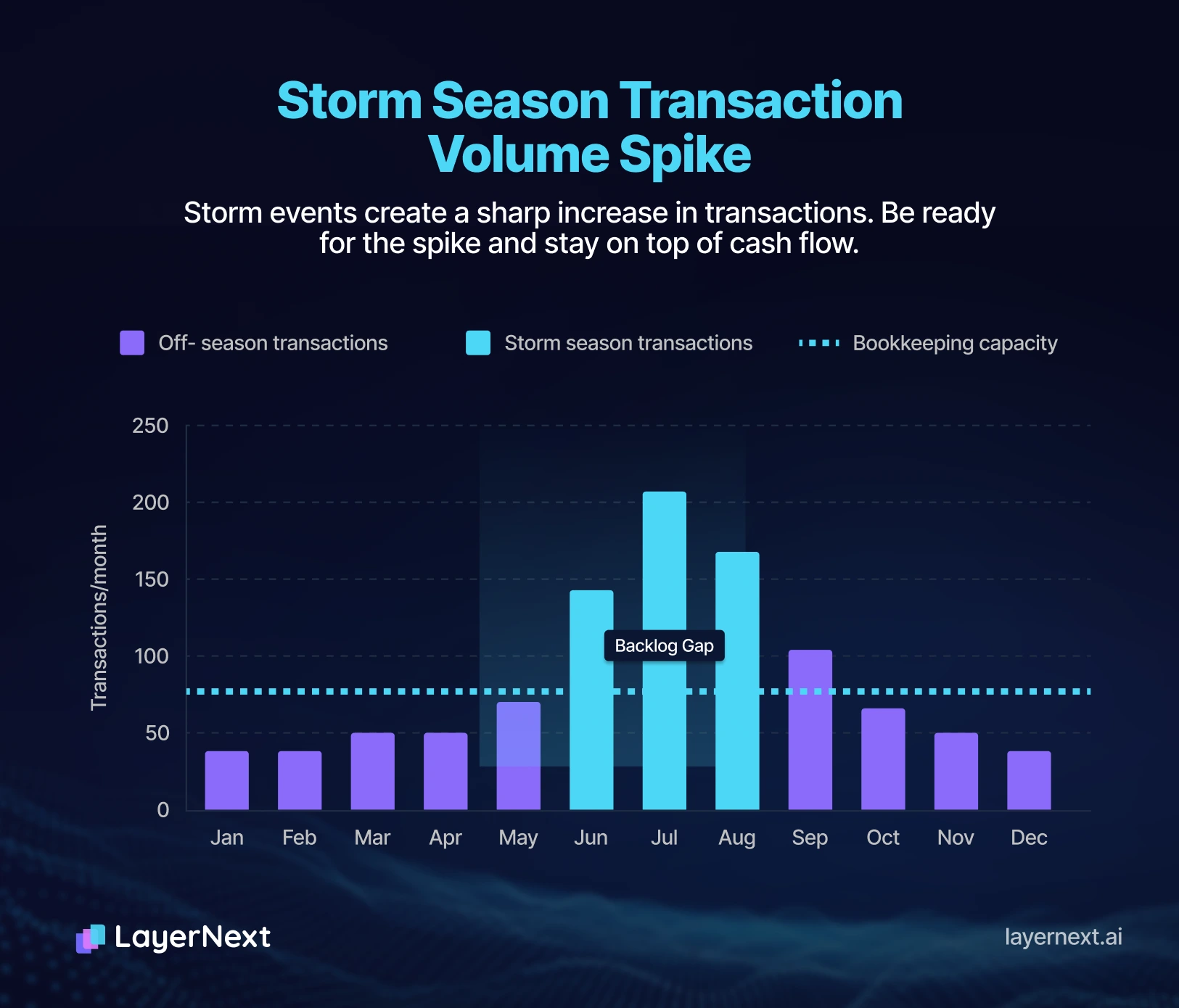
The errors that accumulate during storm season are predictable:
- Insurance ACV payments applied to the wrong job
- Supplement payments recorded as final payments, closing jobs that are still open
- Material invoices from the same supplier tagged to the wrong project
- Crew labour entered without job assignment during the surge period
- RCV holdbacks untracked because nobody is watching the aging receivables
By the time storm season ends, the books reflect an approximation of what happened, not an accurate record. The margin analysis that should be informing next season's pricing is built on data that does not match reality.
This is the problem that LayerNext automation solves.
How to automate roofing bookkeeping with AI
LayerNext AI bookkeeping automation works as a layer on top of QuickBooks. Your accounting system of record stays exactly where it is. What changes is the work required to keep every transaction correctly assigned, in real time, across every active job.
Here is how it works for a roofing company:
- Transaction arrives
A material invoice from a roofing supplier, an insurance ACV payment, a subcontractor bill - AI reads it
Recognises the vendor, amount, payment type, and which active project it relates to - Auto-assigns
Tags the transaction to the correct project, revenue class, and cost code in QuickBooks - Flags ambiguity
Anything that cannot be matched with confidence is flagged for review rather than guessed at - Syncs to QuickBooks
The transaction appears correctly in your job reports immediately
A practical example: An ACV check arrives from a carrier for the Riverdale Drive job. The AI reads it, identifies it as an insurance payment, matches it to the correct project, assigns it to the Storm Restoration class, marks the payment stage as ACV Received, and syncs it to QuickBooks. The RCV holdback is automatically flagged as pending. No manual entry. No wrong project. No missed follow-up.
The same logic applies to material invoices during a storm surge. Forty invoices from the same supplier, across thirty different jobs, assigned correctly without a single manual tag.
For a deeper look at how the same AI layer works for general contractors, see our guide to Construction Job Costing in QuickBooks.
Who this is for
This approach works best for:
- Storm restoration contractors managing high job volumes after weather events
- Mixed-model roofing companies running both storm and retail revenue simultaneously
- Owner-operators currently handling the books themselves and losing weekends to catch-up entry
- Growing roofing businesses with 5 to 50 active jobs at any one time
- Bookkeepers managing roofing clients in QuickBooks who need transaction volume handled automatically
If you are running fewer than ten jobs a month with simple retail billing, manual QuickBooks entry is workable. Once storm volume hits, or once you are managing insurance supplements across multiple active jobs, the manual approach starts producing errors that cost real money. See LayerNext pricing to find the right plan for your job volume.
The bottom line
QuickBooks is the right accounting platform for roofing contractors. The Projects feature, the class-based P&L, the payment tracking, all of it works. The problem is keeping every transaction correctly separated by job, revenue stream, and payment stage, in real time, across a pipeline that doubles in size after every major weather event.
Automation removes that bottleneck entirely.
The roofing contractor who gets this right ends up with:
- A clean storm vs. retail P&L
Not a blended number that obscures both - Insurance payment tracking that never falls behind
ACV, RCV, and supplements reconciled automatically via LayerNext - Crew-level job costing
Real labour costs per project, not averaged payroll - Margin data you can actually price from
Next season's bids built on accurate historical numbers - Hours back every week
No more post-storm bookkeeping backlogs
Frequently asked questions