Summary
The AP month-end close is the process that locks the accounts payable subledger for a closed period: capturing all in-period invoices, running three-way match, clearing exceptions, accruing GRNI, and reconciling to the GL. Median cycles run 6 to 8 business days. Top-performing teams close in 4 to 5.
- Median AP month-end close cycles in North America run 6 to 8 business days. Ardent Partners places the gap between top-performing AP teams and everyone else at 3.1 days versus 17.4 days per invoice.
- The cycle stalls in two places: clearing match exceptions (Step 4) and calculating the GRNI accrual (Step 5). Together these account for 60 to 70 percent of close-window labor at most firms.
- Ardent Partners pegs manual invoice processing at $12.88 per invoice for teams without automation, with top performers saving over $10 per invoice. A 1,500-invoice month is roughly $19,000 in labor a Controller can quantify.
- Three-way match between PO, receipt, and invoice is the largest single source of close-window friction. Automating it inside the existing ERP, including legacy systems with no API, is what moves a team from median to top quartile.
- A Controller can audit their own close cycle in one period without buying anything: measure the cycle days, time-track each of the nine steps, and calculate close cost. Most teams have never measured this precisely.
The AP month-end close is the operational test that exposes everything weak about the rest of the month. Late-arriving invoices, unresolved match exceptions, fuzzy GRNI estimates, statement gaps that no one had time to reconcile. This guide walks every step of the close, names where the cycle actually gets stuck, and gives a Controller a way to compress it without buying anything new.
Why the AP Month-End Close Takes Longer Than Anyone Plans For
Most close timelines assume the AP team starts the close window with clean books. They almost never do. The cycle inherits unresolved work from the month being closed, and the close becomes the place where everything that didn't get handled in real time has to be handled at once.
Chasing missing invoices and approvals after the cutoff
The cutoff is set; the work isn't done. Vendors deliver invoices late, requesters approve invoices late, and the AP team spends day one of the close window chasing both. A meaningful share of the close labor is spent on invoices that were never going to be in the system in time.
Three-way match exceptions stack up across the month
PO, receipt, and invoice mismatches accumulate during the month and have to be cleared during the close window. Price variances, quantity variances, missing receivers, partial shipments billed across multiple invoices. Three-way match exceptions are the single largest source of close delay at most firms, and they multiply with supplier count, not invoice count.
GRNI accrual depends on data the ERP rarely produces cleanly
Goods received but not invoiced have to be estimated and accrued. In theory the ERP exposes the open receipts; in practice the Controller is reconciling receiving records against open POs in a spreadsheet because the ERP report misses partial receipts, unmatched receipt timing, or service receipts that were never recorded against a PO at all. The accrual that lands in the GL is the AP team's best estimate, not a calculated number.
Vendor statement reconciliation is the work that gets skipped
Reconciling vendor statements against the AP record is mostly manual. It rarely happens during the close window because there is no time, which is exactly why duplicate payments, missed credits, and missing invoices accumulate across months. The work that gets skipped is also the work that protects the books.
Where the Standard Close Breaks Down at Scale
A close cycle that worked at 500 invoices a month does not work the same way at 2,000. The same workflow stretches non-linearly, and the breakdowns shift from staffing problems to structural ones.
Crossing 1,500 to 2,000 invoices per month is the inflection point
Below this volume, a competent AP team can hold the close window to 5 or 6 business days through hard work and overtime. Above it, the same effort produces an 8 or 9 day cycle because exception handling, GRNI estimation, and statement reconciliation all reach the limit of what a manual workflow can absorb in a fixed window.
Cutoff slippage from late-arriving invoices
Supplier behavior does not respect the AP calendar. Vendors send invoices on their own cycle, which means a meaningful share of period-relevant invoices arrive after cutoff. The choice becomes either to extend the close window or to push the invoice into the next period and accrue, which makes the GRNI estimate larger and less accurate.
PO mismatch backlogs accumulate during the month
Price variance, quantity variance, receipt timing, and unit-of-measure conflicts are not catastrophic individually. They become catastrophic in aggregate during the close window because every exception requires the AP team to chase context across procurement, receiving, and the supplier itself. A 500-invoice month with a 22 percent exception rate is 110 invoices a Controller has to clear in the close window, every cycle.
Multi-entity and multi-currency reconciliation multiplies the work
A close that touches three entities is not three times harder than a single-entity close. It is harder than that. Intercompany matches, currency revaluation at period end, consolidated reporting all add work that the single-entity workflow does not have to do. The close window stays the same length; the work inside it expands.
No real-time AP-to-GL tie-out
The AP-to-GL control account variance is found at reconciliation, with no time left to chase it. By the time the Controller sees a variance at Step 6, the source could be a posting error from week one of the month. Reconstructing it under close-window pressure is the kind of work that produces post-close adjustments and audit findings.
Median vs. Top-Quartile AP Close: The Numbers
The gap between an average AP team and a top-performing one is not marginal. It shows up in every metric that matters to a Controller.
The AP Month-End Close, Step by Step
Nine steps, in the order they execute. Each step has a clear deliverable, a common failure mode, and a practical compression opportunity. The right time markers (T-3, T+1, etc.) are relative to the period end date; "T+1" means the first business day after period close.
Step 1: Set the cutoff and communicate it (T-3 days)
Three business days before period end, lock the cutoff date for invoice receipt and approvals and notify operations, procurement, AR, and any requesters who route invoices through their own desks. Most close cycles slip here because the cutoff is set verbally inside the AP team and never enforced upstream. Make the cutoff a written commitment, with the time of day specified, sent on the same date every month.
Step 2: Capture all outstanding invoices through cutoff (T-2 to T+1)
Sweep every channel invoices arrive on, not just the AP inbox. Email forwards from requesters, downloaded PDFs sitting in shared folders, supplier portal exports, freight bills that ops handles before AP sees them, recurring subscriptions auto-charged to the company card. Anything captured here clears Steps 3 through 8 inside the close window. Anything missed accrues to GRNI in Step 5 and lengthens the estimate.
Step 3: Run three-way match across all open POs
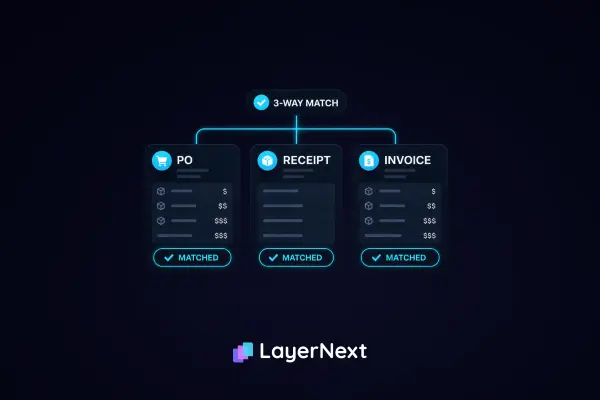
Match each PO-backed invoice against the purchase order and the receiving record on the seven fields that matter: vendor name, invoice date, total amount, PO number, quantity, unit price, and unit of measure. Anything that agrees within tolerance clears immediately; anything that doesn't enters the exception queue. This is the single highest-leverage step for AP automation, because every cleared three-way match removes labor from Step 4.
Step 4: Clear or accrue match exceptions
Investigate variance line by line. Price variance: contract rate, discount missed, currency rounding, or supplier error. Quantity variance: partial shipment, over-ship, backorder. Missing receipt: warehouse forgot, receipt entered late, or the goods didn't actually arrive. Each exception ends in one of three decisions: clear and post, accrue and hold to next period, or dispute with the supplier. According to Ardent Partners, the median exception rate runs 22 percent and the top-performer rate runs 9 percent. The difference is exactly the labor inside Step 4.
Step 5: Calculate the GRNI accrual
Goods or services received before period end but not invoiced are estimated and accrued. The accrual is built from open receipts that have no matching invoice, plus services delivered in the period without invoicing. Accuracy here is the single biggest determinant of clean financials, because the GRNI estimate is reversed in the next period and replaced by actual invoices. A wide GRNI estimate means two months of noisy financials, not one.
Step 6: Reconcile the AP subledger to the GL control account
The AP subledger total has to tie to the GL AP control account. Variances must be investigated and resolved before close. Common sources of variance: posting errors from earlier in the month, manual journals that bypassed the subledger, intercompany entries that posted to AP instead of intercompany, and bank-clearing entries that hit the wrong account. Each variance becomes a manual investigation if it was not caught earlier.
Step 7: Reconcile statements for top vendors
For the top 10 to 20 vendors by spend, match the supplier's statement against the AP record. This step catches missed invoices, duplicates, credit memo timing issues, and disputed charges that have not been escalated. It is the step most often skipped under close-window pressure, and skipping it is the single largest source of duplicate payments. Top performers automate vendor statement reconciliation; median teams treat it as a quarterly exercise.
Step 8: Close the AP subledger and post entries to the GL
Lock the AP period. No further AP posting is allowed for the closed period. Final entries flow to the GL: invoices posted, accruals booked, intercompany entries reconciled. On legacy and desktop ERPs without an API, this step is done through the system's own UI, which means the close happens at human speed unless a computer-use agent operates the screens in bulk.
Step 9: Prepare the close package and hand off
AP-specific schedules go to the GL team for the broader close: AP aging, GRNI detail with accrual support, exception log with disposition, statement reconciliation results, and a manager sign-off on the period totals. The close package is also the audit trail. If it is built as a byproduct of the workflow, it takes minutes. If it has to be reconstructed from emails and notes, it takes a full day.
How LayerNext Compresses the AP Close
LayerNext is built to remove the work that concentrates in Steps 2, 3, 4, and 8, the steps where labor compounds. Each capability below maps to a specific step from the section above, not a generic feature claim.
Continuous invoice ingestion eliminates the Step 2 scramble
LayerNext reads invoices from any channel they arrive on throughout the month: a dedicated AP email address, monitored shared folders, AWS S3, Google Cloud, internal SQL databases, and direct API connections into systems like QuickBooks. For desktop applications and accounting packages without an API, the computer-use agent retrieves files and data from the system's UI. The cutoff window stops being a sweep, because invoices have been entering the workflow all month.
Three-way match handled by AI agents inside the existing ERP
Per LayerNext's own documentation on three-way matching, the system's AI agents match line by line on the same seven fields a clerk would: vendor name, date, amount, PO number, quantity, unit price, and unit of measure. The match runs against the PO and the receiving record, applies tolerance from the Business Rules section, and clears anything that agrees. The agents operate the existing ERP through its own interface, which means three-way match works on QuickBooks Desktop, Epicor, older Sage installations, Microsoft Dynamics, and custom Windows applications, not just modern cloud systems.
Tolerance and vendor-specific rules in plain English
The Business Rules section holds vendor-specific contract rates, category-level tolerances, jurisdiction-specific tax treatment, and any other exception logic the AP team has in its head or in a spreadsheet. The finance team writes the rules directly. No coding, no developer ticket, no waiting for an integration cycle. An indexed query engine pulls the right rule by supplier in real time, even when the rule set runs into the thousands. Step 4 exceptions get smaller because more invoices are clearing Step 3.
Posting into the ERP at Step 8, including legacy desktop systems
Most AP automation requires an API on the receiving system. A meaningful share of mid-market finance still runs on legacy ERPs without one: QuickBooks Desktop, Epicor, older Sage versions, Microsoft Dynamics, and custom in-house systems. LayerNext's computer-use agent operates these systems through their UI, posting invoices and closing the subledger the way an AP analyst would, but in bulk. Step 8 stops being constrained by data-entry throughput.
Exceptions as structured tasks, not an inbox of edge cases
When LayerNext is uncertain about a field, it creates a structured task tied to the specific invoice. The example from LayerNext's own documentation: an invoice whose tax does not match the shipping province creates a task asking a human to verify it, searchable by invoice number, resolvable inside the portal. When every task shows "Done," the automation is running without intervention. Inside the close window, the Controller looks at the Insight Board and sees a real-time count of tasks open and tasks closed, instead of asking the AP team for a status update.
What Finance Teams Actually Gain
The point of compressing the close is not faster financials as an end in itself. It is what the AP team can do once the work shifts and what the CFO can see once the books close on schedule.
Close cycle compression to top-quartile pace
Ardent Partners' benchmarks place top-performing AP teams at 3.1 days per invoice processing cycle, against 17.4 days for everyone else. Translated into close-window math, an AP team that processes invoices in real time during the month enters the close window with no backlog, which is the only sustainable way to hold a 5-day close. Overtime and heroics work once or twice; they do not work as a permanent operating model.
Cleaner GRNI accruals and fewer post-close adjustments
When invoices are captured continuously through the month and matched against POs as they arrive, the GRNI estimate at close is a smaller number with less uncertainty. Smaller GRNI means less accrual reversal next month, which means cleaner financials in both periods. The accountant who used to spend day three of the close window estimating GRNI gets that day back.
Per-invoice cost compression and discount capture
Ardent Partners reports that manual invoice processing costs about $12.88 per invoice at firms without best-practice automation, with top performers saving over $10 per invoice in hard costs. The same Ardent Partners data, alongside Institute of Financial Operations and Leadership figures cited by Stampli, shows the average AP team captures only 58 percent of available early-payment discounts, while centralized, automated teams capture 85 to 95 percent. On $10 million in annual spend with a 2 percent discount window, NetSuite estimates capturing half versus all of the available discounts is a $100,000-per-year delta. Faster close cycles and faster invoice processing are the same investment paying out in two places.
Audit-ready documentation as a byproduct of the workflow
Auditors want to see the path each invoice took: when it arrived, who approved it, what rule applied, what exception was raised, who resolved it. A task-based workflow produces that trail as a byproduct of normal operation. Year-end and SOX audit work compresses because the documentation is already structured. Board reporting on AP cycle time, exception rate, and supplier compliance becomes a query against the Insight Board rather than a special data pull.
How to Audit Your Own AP Close Cycle Before Buying Anything
Before evaluating LayerNext or any other vendor, a Controller can run a one-cycle audit of the existing close that exposes where the time actually goes. The protocol works regardless of which solution comes next.
Step 1: Measure the close in business days
Time closes precisely. T+1 (first business day after period end) to close-complete, including the AP-to-GL handoff. Most teams have never measured this number cleanly because the close end date is fuzzy: "we mostly closed Thursday, except for the variance investigation Friday morning, except for the late vendor invoice that hit Monday." Pick the date and time the AP subledger was actually locked. That is the cycle length.
Step 2: Time-track each of the nine steps for one cycle
For the next close cycle, log the hours each step consumed across the AP team. The pattern is consistent across firms: Steps 4 and 5 (exception clearance and GRNI calculation) typically account for 60 to 70 percent of close-window labor. Steps 7 and 9 (statement reconciliation and close package) are usually the next biggest. Step 3 (three-way match) is large in person-hours but distributed across the month, not concentrated in the close window.
Step 3: Calculate close cost in dollars
Multiply close-window hours across the AP team by loaded labor rate. Loaded rate is salary plus benefits plus overhead, which for an AP analyst in North America typically runs $45 to $65 per hour. Most Controllers have never put a number on what the close actually costs them per cycle. A 1,500-invoice month with a 22 percent exception rate, eight people on the close team, and a 7-day close window is roughly $19,000 in close-window labor alone, not counting the work that fed the close from earlier in the month.
Step 4: Identify the steps where compression is possible
Compare the time-tracked numbers against the structure of each step. Steps 2 and 3 are highly automatable (channel ingestion and three-way match). Steps 4 and 5 compress when Step 3 throughput improves. Step 8 compresses when the ERP posting throughput improves. Steps 6, 7, and 9 are partially automatable but harder. The audit is not about hitting a specific number; it is about knowing which steps would actually move with the kind of investment the firm is considering.
Step 5: What to ask a vendor in a pilot RFP
Ask any vendor under evaluation to run a no-cost pilot on a real sample of invoices, including the messy categories: scanned PDFs from long-tail suppliers, freight bills with handwritten BOL numbers, foreign-currency invoices, credit memos, and invoices arriving outside the AP inbox. Compare their straight-through rate to the current baseline. Ask specifically how the system handles three-way match exceptions, GRNI estimation, AP-to-GL reconciliation, and posting into the firm's actual ERP, including any legacy or desktop ERP in the environment. Vendors who answer in generalities are selling general AP automation that probably will not move the close.
Frequently Asked Questions