Construction accounts payable software captures, codes, approves, and posts subcontractor and vendor invoices into a construction ERP. Most tools handle capture well and fail at the last step, when a coded invoice has to land inside Sage 300 CRE, Foundation, or Viewpoint Vista and there is no usable API to put it there. The workflow is called automated, yet it still ends with a person retyping approved invoices by hand.
That gap matters more in construction than in almost any other industry. A construction invoice is not a flat bill. It carries a job number, a cost code, retainage, and a place in a progress-billing sequence that generic AP tools were never built to handle.
Why is construction accounts payable harder than standard AP?
Construction AP is not harder because of volume. It is harder because each invoice carries obligations a standard two-line vendor bill does not: AIA progress billing, retainage held across the life of a job, line-level job and cost-code coding, and lien-waiver compliance that gates payment.
Progress billing runs on AIA G702 and G703, not flat invoices
Most commercial construction is billed through the American Institute of Architects pay-application format: the G702 Application and Certificate for Payment as the summary, and the G703 Continuation Sheet breaking the contract into schedule-of-values line items. A subcontractor does not send a $130,000 invoice. They send a pay application claiming a percentage of completion against each line, which the general contractor rolls up and the architect certifies. An AP system that treats that document as a single-sum invoice loses the line-level detail the ERP needs.
Retainage is held across the entire life of a job
On most commercial contracts, the owner withholds a portion of every progress payment until the work is substantially complete. That withholding, retainage, is commonly 5% or 10% of each line item and is confirmed by the Construction Financial Management Association as standard on commercial contracts. It is not a one-time deduction. It applies to both the current period's work and previously completed work still being held, so cumulative retainage has to be tracked, not just the current month's holdback. Many contracts also step the rate down, for example from 10% to 5% once a job reaches 50% completion. A tool that cannot carry that balance forward per job creates a reconciliation problem at closeout.
Every line needs job and cost-code coding
A manufacturer's invoice hits one or two GL accounts. A construction invoice for a single delivery of rebar might split across three jobs and five cost codes. That coding has to happen before the invoice posts, because job-cost accuracy is what feeds work-in-progress reporting. If coding is wrong, the WIP is wrong, and the project manager is working from bad numbers.
Lien waivers and Notice to Owner compliance gate payment
Construction AP clerks routinely hold payment until a signed lien waiver is on file, and track Notice to Owner filings that preserve lien rights. This shows up in the job description itself: construction AP roles are posted specifically for "NTO and lien compliance." A generic approval workflow that releases payment on a two-approver rule, with no waiver gate, exposes the company to double-payment and lien risk.
Where standard AP automation software falls short in construction
The AP automation market is large and mature, but most of it was built for companies running QuickBooks, NetSuite, or a modern cloud ERP with a clean API. Construction breaks three of its core assumptions.
The integration gap: most tools write to QuickBooks, not Sage 300 CRE
This is the failure discovered after purchase. A tool advertises ERP integration, and the fine print is that it integrates with QuickBooks Online and a short list of cloud ERPs. The systems a large share of contractors actually run either expose no public API or a limited one the AP vendor never built to. "Integration" then means CSV export and manual import, or a person re-keying. Automation stops exactly where the value would have been. The table below maps where the wall sits.
Generic three-way match breaks against progress billing
Standard AP automation matches an invoice to a purchase order and a receiving report. Progress billing has no clean PO-to-line match, because the claim is a percentage of a schedule-of-values line, revised every cycle and adjusted by change orders. Bolting three-way match onto a G702 produces exceptions on nearly every application. The cost of the manual fallback is documented: Ardent Partners research puts the average cost to process an invoice around $13.11, IOFM puts manual processing as high as $16 per invoice, and roughly 39% of invoices contain errors in manual environments. Construction's coding complexity sits at the high end of that range.
Retainage, waivers, and committed-cost tie-out have no native home
Even AP tools that capture and route invoices well usually have nowhere to record that 10% is being withheld on this line, that a conditional waiver is required before release, or that this invoice draws against a specific committed cost on a subcontract. Those fields live in the construction ERP. If the AP layer cannot see or write them, the ERP stays the system of record and the AP tool is reduced to a scanning front-end.
How construction AP automation actually works when it fits your ERP
The version that works treats the ERP as the destination, not an afterthought, and handles construction's specific data on the way there.
Capture comes from every channel subcontractors actually use
Subcontractor invoices and pay applications arrive by email, as PDF attachments, in shared folders, and sometimes pulled from a project management system. Capture has to cover all of them without asking the sub to change how they bill. A dedicated AP inbox that ingests emailed pay apps, plus folder and cloud-storage retrieval, removes the manual download step that precedes coding today.
Coding to job, phase, and cost code happens before approval
The system reads the line detail, assigns the job, phase, and cost code, applies the retainage percentage, and presents a coded invoice for review. The reviewer confirms coding rather than entering it. This is where the labor sits: labor is roughly 62% of total AP cost according to APQC research, and coding is the labor-heaviest part of construction AP.
Writing back into the ERP, with or without an API
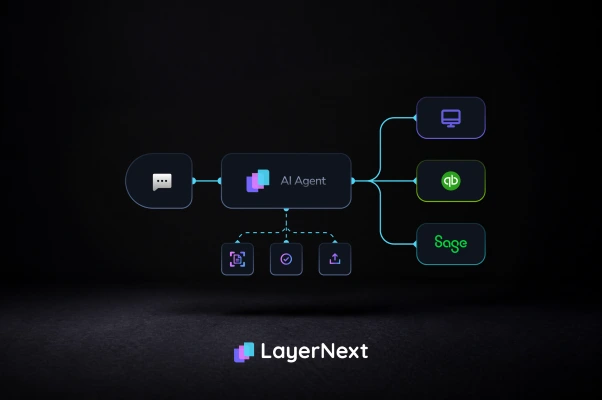
If the ERP has a usable API, the coded invoice posts through it. If it does not, the invoice still has to land in the system somehow. The two honest options are a person keying it or software operating the ERP's own interface the way a person would. Any construction AP evaluation should force this question into the open, because it decides whether automation reaches the finish line or stops one step short.
Exceptions become searchable tasks, not email threads
When an invoice has a tax discrepancy, a missing waiver, or a coding conflict, it should create a structured, trackable task, not a message that dies in an inbox. A construction controller needs to pull up every held invoice by number and see why it is held. Cleaner exception handling is measurable: top-performing AP teams complete invoice-to-payment in under three days, against more than a week for the rest.
Why LayerNext fits ERPs other tools cannot reach
LayerNext was built around the integration wall that stops most construction AP projects. Its computer-use agent operates the ERP through its own user interface, so it runs Sage 300 CRE, Foundation, or Viewpoint the way a clerk does, with no API, no middleware, and no IT project to stand up. The invoice that gets coded also gets posted, in the system you already run.
The rest of the platform maps to construction's specifics. Per-entity business rules are written in plain English by the finance team, so a different retainage rate or waiver requirement per subcontractor is a rule the AP lead edits directly, with no development cycle, scaling to thousands of rules. Invoice ingestion runs across a dedicated AP inbox, shared folders, cloud storage such as AWS S3 and Google Cloud, and SQL databases. Every exception becomes a task searchable by invoice number, and an Insight Board shows real-time processing status. All of it sits in a single enterprise portal rather than a stack of disconnected tools.
What construction finance teams actually gain
The outcome is not "less typing." It is a set of numbers a controller or CFO can defend.
Processing cost moves toward the automated benchmark. IOFM figures put automated processing as low as about $3 per invoice against manual costs in the mid-teens, and the coding step is where construction captures most of that gap. Cash timing improves: faster, accurate pay applications mean fewer rejected G702s, and automated AP teams capture 80 to 90% of available early-payment discounts versus 30 to 40% under manual processing, on discounts that commonly run 1 to 2% for payment inside 10 days. Retainage tracked per line and per job removes the closeout scramble where held funds get lost. And because rules and workflows change without a development cycle, the finance team stops waiting on IT to adjust a process.
The trade-off worth naming: software that operates an ERP through its UI depends on that interface staying stable, and complex custom screens need validation up front. That is a real implementation step, not a switch you flip. It is also far shorter than the API-integration project most construction ERPs would otherwise require, because there is no integration to build.
How to evaluate construction accounts payable software
Use a pass or fail checklist, not a feature grid. One "no" in the first three questions means the tool will not finish the job in your environment.
- Does it post coded invoices into your specific ERP, by name: Sage 300 CRE, Foundation, Viewpoint, or CMiC, and how? If the answer is CSV export, that is manual entry with extra steps.
- Does it handle AIA G702/G703 progress billing and carry cumulative retainage per line, including step-downs?
- Does it gate payment on lien waivers and track Notice to Owner status?
- Does it code to job, phase, and cost code at the line level, before approval?
- Can your team change a rule or workflow without a development cycle or an IT ticket?
- What is the real implementation path, and what does it require from your IT staff?
Score vendors on those six. A tool that captures and routes well but fails question one is a scanning front-end, and the ERP is still where the actual work happens.
See a live G702 posted into your ERP, no API required
If your construction ERP has no usable API and your AP clerk still retypes approved invoices by hand, book a working session, not a slideshow. We will take one of your real subcontractor pay applications and show LayerNext code it to job and cost code, apply retainage per line, and post it into your own Sage 300 CRE, Foundation, or Viewpoint instance through the interface you already use. You will also see an exception, a missing lien waiver, become a task searchable by invoice number. Bring the ERP you were told could not be automated.
Frequently asked questions