Back

Best Nonprofit Accounting Software Tools in 2026 (Free & Paid)

Last updated
August 21, 2026
Link copied!

Summary

  • Nonprofit accounting software tracks whether money was spent the way a donor or grantor intended, using a method called fund accounting. Standard business accounting software isn't built to do this.
  • Wave and MoneyMinder are the strongest free nonprofit accounting software options. Neither includes true fund accounting or Form 990 tools.
  • QuickBooks Online, discounted through TechSoup, is the best value for most small to mid-sized nonprofits managing a handful of restricted funds.
  • Aplos is the standard choice once restricted funds and grant reporting become central to the job. It includes true fund accounting on its entry plan and is rated 4.6/5 on G2.
  • Sage Intacct, Blackbaud Financial Edge NXT, and MIP Fund Accounting serve large, multi-entity, or federally funded nonprofits. All three are priced by custom quote.
  • Choosing software solves half the problem. The manual entry, receipt matching, and reconciliation that still eat hours every month are the other half, and that's a separate decision worth solving on its own.

Nonprofit accounting software is built to answer a question standard business accounting software was never designed to ask: was this money spent the way the donor or grantor said it could be spent? A for-profit accounting system tracks revenue, expenses, and profit. A nonprofit accounting system tracks funds, restrictions, and compliance on top of that same revenue and expense data.

That distinction is called fund accounting, and it's the core factor separating dedicated nonprofit platforms from a general ledger a nonprofit is stretching to fit its needs. Fund accounting matters because a grant, a building campaign gift, or a donor-restricted contribution isn't the organization's money to use freely. It's money held in trust for a specific purpose, and the organization has to prove, on request, that it was spent that way.

This guide compares the best nonprofit accounting software in 2026 by fund accounting depth, organization size, and cost, and covers where free tools genuinely work and where they stop being enough.

What Fund Accounting Actually Means

Fund accounting is a method that tracks money by the purpose it was given for, rather than by overall organizational profit. Take a concrete case: a donor gives $10,000 for a building fund. In a standard accounting platform, that $10,000 shows up as income and cash on hand, identical to unrestricted revenue the organization could spend on anything. It isn't unrestricted. The organization has to demonstrate later that the money went only toward the building project.

A true fund accounting platform tracks that $10,000 as a separate fund from the point of entry. It can produce a balance sheet and an income statement for that single fund, not a class or tag buried inside the organization's overall numbers. Organizations managing one or two restricted gifts a year can usually track this by hand without much trouble. Organizations managing several grants, multiple restricted funds, or federal money need software to do it, because the manual version is what turns a routine audit into a long one.

Some platforms handle fund accounting natively. QuickBooks Online and Xero approximate it using classes, tags, or tracking categories, workarounds that hold up fine for a small number of funds and become harder to manage as fund count grows.

What to Check Before Comparing Products

  • True fund accounting versus workarounds.
    Confirm the software can generate a balance sheet and income statement by fund, not just a tagged transaction report.
  • Cloud access.
    Nonprofit finance work today usually involves a remote treasurer, a part-time bookkeeper, and a board that expects to see current numbers without an email chain.
  • An audit trail.
    Every transaction should be traceable back to its source. This matters at grant renewal and at the organization's next financial statement audit.
  • Real integrations versus CSV exports.
    "It integrates" and "it exports a file you reformat by hand" are different claims. Confirm how a donor CRM or payroll tool actually connects before signing.
  • Cash versus accrual support.
    Many small nonprofits start on cash basis. Accrual accounting is generally required for an audit and expected by most grantors, so the software should support both.
  • Pricing that holds up over time.
    The right nonprofit accounting software is the one the organization can keep paying for in year three, not just the one it can afford at signup.

Comparing Nonprofit Accounting Platforms

Software

Best For

True Fund Accounting

Starting Price

QuickBooks Online

Most nonprofits, roughly $250K to $10M revenue

No, uses classes and tags

$38/mo, or $80/yr through TechSoup

Aplos

Small to mid-sized nonprofits and churches

Yes

$79/mo

Sage Intacct

Large and multi-entity nonprofits

Yes

Custom quote

Blackbaud Financial Edge NXT

Enterprise nonprofits, universities, foundations

Yes

Custom quote

MIP Fund Accounting

Grant-heavy nonprofits, government, K-12

Yes

Custom quote

Xero

Small teams without restricted funds

No, uses tracking categories

$25/mo, nonprofit discount available

Wave

All-volunteer and brand-new organizations

No

Free core plan, paid tier at $16/mo

MoneyMinder

Volunteer treasurers, PTAs, booster clubs

No, fund-style tracking

Free and paid plans

GnuCash

Technical users wanting a free, offline ledger

No

Free, open source

How We Evaluated Nonprofit Accounting Software

We compared these platforms across the factors that matter most once nonprofit finances become more complicated:

  • Fund and restriction tracking: whether the system handles funds natively or requires classes, categories, subaccounts, or other workarounds.
  • Financial reporting: whether finance teams can report clearly across programs, grants, funds, departments, entities, and other dimensions.
  • Grant and compliance support: how well the platform supports restricted funding, audit trails, grant reporting, and year-end financial workflows.
  • Ease of use: whether the system is realistic for a volunteer treasurer, a small finance team, or requires experienced accounting staff.
  • Integrations: whether information can move between accounting, fundraising, banking, payroll, and other systems without repeated manual work.
  • Scalability: how well the platform holds up as funding sources, programs, entities, locations, and transaction volume increase.
  • Price: including whether the published entry price provides the functionality a nonprofit actually needs.

Published vendor documentation was used to assess current capabilities and pricing. G2 and Capterra ratings are included as a secondary signal, rather than as the basis for the rankings.

1. QuickBooks Online

Best for most nonprofits already comfortable in the Intuit ecosystem

G2 Score: 4.0 / 5

Pros

  • Discounted to about $80/yr for eligible 501(c)(3)s through TechSoup
  • Deepest accountant and support network of any tool on this list
  • Familiar interface, minimal training needed for new staff

Cons

  • No native fund accounting, relies on classes and tags as a workaround
  • Cannot generate a true balance sheet by fund
  • Standard pricing has increased sharply for existing customers in recent years

QuickBooks Online is general business accounting software adapted for nonprofit use rather than built for it from the ground up. It tracks restricted funds using classes and locations instead of native fund accounting, which is a reasonable fit for organizations with simple funding needs and becomes harder to manage once grants and restricted funds multiply. The TechSoup discount makes it one of the cheapest options in this list on a dollar basis.

2. Aplos

Best for small to mid-sized nonprofits and churches

G2 Score: 4.6 / 5

Pros

  • True fund accounting included on the entry-level plan
  • Built for staff with no accounting background
  • Strong, responsive customer support

Cons

  • Base Lite plan leaves out most third-party integrations
  • Costs increase once budgeting, AP, or higher tiers are added
  • Report naming can confuse teams new to fund accounting

Aplos is a cloud-based fund accounting platform built specifically for nonprofits and churches. It produces fund reports and donor summaries without workarounds, which is the main reason it's the standard upgrade path once QuickBooks Online's classes-and-tags approach stops holding up. It fits organizations that need real fund accounting without enterprise-level complexity.

3. Sage Intacct

Best for large and multi-entity nonprofits

G2 Score: 4.3 / 5

Pros

  • Recognized by the AICPA as a preferred nonprofit financial solution
  • Multi-entity consolidation and dimensional reporting
  • Built-in FASB ASC 958 compliance for restricted funds

Cons

  • Pricing isn't published, quote-based only
  • Steep learning curve for a small or first-time finance team
  • Implementation usually requires a consultant or partner

Sage Intacct is a cloud accounting platform built for nonprofits managing complex grant portfolios or multi-entity structures. Its dimensional chart of accounts lets finance teams report by fund, grant, program, department, or location without maintaining a separate account structure for each one. Organizations typically move to Sage Intacct once QuickBooks and Aplos both run out of room, usually when federal grants or multiple legal entities enter the picture.

4. Blackbaud Financial Edge NXT

Best for enterprise nonprofits and institutions

G2 Score: 4.0 / 5

Pros

  • Deep integration with Raiser's Edge NXT fundraising data
  • Purpose-built fund accounting for complex, large organizations
  • Strong audit and compliance tooling

Cons

  • Typically needs dedicated finance staff to operate well
  • Custom pricing, among the most expensive platforms in this list
  • Smaller review base relative to its market position

Blackbaud Financial Edge NXT is fund accounting software designed for large nonprofits, universities, and foundations with complex reporting requirements. Its main advantage over other platforms in this list is native integration with Blackbaud's fundraising suite, particularly Raiser's Edge NXT, so gifts and pledges flow directly into financial journal entries with the correct fund and restriction codes. Outside of organizations already standardized on Blackbaud, Sage Intacct usually delivers similar fund accounting depth for less overhead.

5. MIP Fund Accounting

Best for grant-heavy and government-funded nonprofits

G2 Score: 3.8 / 5

Pros

  • Tracks unlimited funds and grants on a multi-dimensional chart of accounts
  • FASB and GASB compliant
  • Integrated payroll and HR modules available

Cons

  • Steep setup and configuration process
  • No public pricing, quote-based only
  • Lowest G2 score among the fund accounting platforms in this list

MIP Fund Accounting, now part of Momentive Software, is built for nonprofits, government agencies, and school districts managing many simultaneous funding sources on a multi-dimensional chart of accounts. It supports strict compliance tracking, detailed audit trails, and multidimensional budgeting, features that matter most to organizations handling federal or state grants with tight reporting rules. It's the right tool once fund complexity is real, not something the organization is planning to grow into.

6. Xero

Best budget option for small teams without restricted funds

G2 Score: 4.4 / 5

Pros

  • Unlimited users included on every plan
  • Fast, clean bank reconciliation
  • Nonprofit discount available on standard pricing

Cons

  • No true fund accounting, tracking categories capped at two
  • Fewer nonprofit-specific templates and reports than Aplos
  • Outgrown quickly once restricted funds start multiplying

Xero is a cloud accounting platform, not built specifically for nonprofits, but widely used by them for its clean interface and simple setup. It relies on tracking categories to approximate fund designations rather than offering native fund accounting, which works for small teams without restricted funds and becomes a liability once an organization is running multiple grants.

7. Wave

Best free option for all-volunteer and brand-new nonprofits

G2 Score: 4.3 / 5

Pros

  • Core plan is genuinely free, not a time-limited trial
  • Simple enough for a volunteer treasurer to run alone
  • Invoicing and expense tracking included out of the box

Cons

  • No fund accounting or Form 990 tooling on any tier
  • Automatic bank feeds now sit behind a paid Pro tier
  • Not built to scale past a very small organization

Wave is a genuinely free, cloud-based double-entry accounting tool with no fund accounting, grant management, or Form 990 support built in. It's a reasonable option for all-volunteer or newly formed nonprofits operating on a small annual budget, and most organizations move off it once they take on real grants or restricted donations.

8. MoneyMinder

Best for volunteer treasurers, PTAs, and booster clubs

Capterra Score: 4.9 / 5

Pros

  • Built for non-accountants, plain-language treasurer reports
  • Free tier available
  • Fund-style tracking without double-entry bookkeeping

Cons

  • Not a full general ledger
  • Scales poorly once an organization adds paid staff or grants
  • Smaller integration ecosystem than the larger platforms

MoneyMinder is web-based bookkeeping software built for volunteer-led organizations rather than trained accountants, which is why it's common among PTAs, HOAs, and booster clubs. It offers fund-style tracking and board-ready reports without requiring double-entry bookkeeping knowledge. It solves a specific, narrow problem well and isn't meant to be used as a system for a growing, staffed nonprofit.

9. GnuCash

Best free, offline option for a technically comfortable treasurer

G2 Score: N/A

Pros

  • Free and open source, no subscription cost
  • Full double-entry general ledger
  • Runs offline, no dependency on a vendor's servers

Cons

  • No fund accounting or nonprofit-specific reporting
  • Community support only, no vendor help line
  • No cloud access for a distributed board or staff

GnuCash is free, open-source, double-entry accounting software that runs locally instead of in the cloud. It fits a narrow case: a small, all-volunteer group with someone on hand who's comfortable managing software without a support line to call. Most nonprofits will outgrow it once staff, grants, or a distributed board enter the picture, but for the right treasurer, free and offline beats free and cloud-based.

Bonus. LayerNext

Best for automating finance work around an existing accounting system

G2 Score: 5/5

Pros

  • Automates invoice intake, transaction categorization, reconciliation, and other finance workflows
  • Works alongside QuickBooks and existing ERP/accounting systems instead of requiring replacement
  • Can automate legacy and API-less desktop systems through computer-use agents

Cons

  • Not a standalone nonprofit accounting ledger
  • Fund accounting and nonprofit financial statements still depend on the underlying accounting platform
  • Nonprofits are currently an emerging LayerNext vertical rather than its primary established market

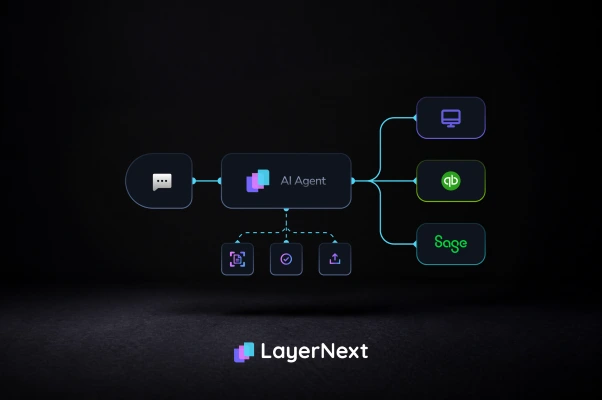
LayerNext takes a different approach from the accounting platforms above. Rather than replacing the nonprofit's general ledger, it uses AI agents to automate the manual finance work surrounding it. For organizations using QuickBooks Online, LayerNext can handle workflows such as invoice and receipt intake, transaction categorization, and bank reconciliation. For larger organizations using legacy or desktop finance systems, its agents can also validate invoices, match POs, enter transactions into the ERP, reconcile activity, and route exceptions to a human when judgment is required. LayerNext is therefore most relevant when the existing accounting system is adequate but maintaining it still consumes significant staff time.

Best Nonprofit Accounting Software by Organization Type

Churches and faith-based organizations: Aplos is the strongest fit because it combines native fund accounting with giving statements built around tithes and designated offerings, without requiring accounting training to operate.

Grant-heavy or federally funded nonprofits: Sage Intacct and MIP Fund Accounting are both built for FASB and GASB compliance across many simultaneous funding sources, which matters most once an organization is managing several federal or state grants at once.

All-volunteer groups, PTAs, booster clubs: MoneyMinder and Wave are the best fit because neither requires accounting training to operate day to day, which matters when the person doing the books changes every year or two.

Growing nonprofits with staff but a tight budget: QuickBooks Online through TechSoup balances cost, support availability, and familiarity for a new hire or an outside accountant better than any other option on this list.

Large, multi-entity nonprofits and institutions: Blackbaud Financial Edge NXT is the standard choice for organizations already inside the Blackbaud fundraising ecosystem. Sage Intacct is the better fit for everyone else at this scale.

Free Nonprofit Accounting Software: What's Actually Free

Three options are realistically free for a nonprofit operating on a tight budget:

  1. Wave, for free core bookkeeping: income, expenses, and invoicing. Best for all-volunteer or newly formed organizations.
  2. MoneyMinder, for a free tier built specifically around volunteer treasurers.
  3. GnuCash, for a free, offline general ledger, if someone on staff or the board is comfortable managing it without vendor support.

None of these three include true fund accounting or Form 990-ready reporting. They're the right call for a small, all-volunteer organization, and the honest plan is to treat them as a starting point rather than the system the organization will still be using once it's managing restricted grants or preparing for its first audit.

Accounting Software Doesn't Eliminate the Manual Work

Choosing the right ledger solves an important problem, but it does not automatically remove the work happening around the ledger.

Invoices still arrive. Receipts still have to be captured. Vendor information still has to be checked. Transactions still need the correct account, department, project, grant, or other coding. Purchase-order differences still need investigation.

Entries still have to reach the accounting or ERP system. Bank and statement activity still needs reconciliation. And when something does not match, someone still has to decide what happens next.

This distinction becomes particularly important when comparing accounting software with finance automation.

A nonprofit may have the correct ledger and still lose dozens of staff hours every month getting information into it.

Where LayerNext Fits

LayerNext is not a replacement for QuickBooks, Sage, Blackbaud, MIP, or another accounting ledger.

It operates on the workflow layer around financial systems.

For organizations using QuickBooks Online, LayerNext's AI agents can automate bookkeeping-related work such as transaction categorization, invoice and receipt intake, and bank reconciliation while keeping the underlying accounting system in place.

For larger organizations, LayerNext can configure finance workflows around invoice ingestion, document reading, validation, PO matching, coding, ERP entry, reconciliation, and exception handling. Its enterprise system can also operate legacy and desktop finance applications through their user interface when a conventional API integration is unavailable.

When an exception requires judgment, the system creates a task for human review rather than silently forcing the transaction through. The resulting activity remains traceable through the workflow.

That makes accounting software selection and finance automation two separate decisions:

First: Which ledger gives the organization the right financial structure?

Second: How much manual work should employees still have to perform to keep that ledger current?

For an organization that already has the right ledger but still spends substantial time entering, checking, posting, and reconciling financial information, automating that surrounding work may deliver more value than replacing the accounting system again.

How to Choose

  • All-volunteer with no restricted funds: Wave or MoneyMinder.
  • Staff on board, a few grants, cost-conscious: QuickBooks Online through TechSoup.
  • Restricted funds and grant reporting are central to the work: Aplos.
  • Large, multi-entity, or managing federal grants: Sage Intacct or MIP Fund Accounting.
  • Already inside the Blackbaud ecosystem: Blackbaud Financial Edge NXT.
  • Any of the above, but losing hours to manual entry and reconciliation every month: pair the ledger with an automation layer instead of trying to fix the problem with software alone.

One habit worth avoiding while setting this up: don't over-split the chart of accounts by program. A separate account for every program variation makes it hard to answer a simple question like how much the organization spent on meals last year. Keep account categories simple and use classes, tags, or dimensions to track programs and funds instead. It's far easier to slice clean data later than to untangle an overbuilt chart of accounts.

FAQ

1. What is fund accounting?

Fund accounting is a method that tracks money by the purpose it was given for, rather than by category alone. Restricted funds, such as a grant or a building campaign, are tracked and reported separately from unrestricted operating money, so an organization can show every dollar was spent as intended.

2. Does QuickBooks have a nonprofit version?

Not a separate edition. QuickBooks Online works for nonprofits using classes and tags to approximate fund tracking, and eligible 501(c)(3) organizations can get Plus or Advanced at a discounted rate through TechSoup.

3. What is the best free nonprofit accounting software?

Wave is the strongest genuinely free option for small or all-volunteer organizations needing basic bookkeeping. MoneyMinder is a strong free alternative built specifically for volunteer treasurers. Neither includes true fund accounting.

4. Do nonprofits use cash or accrual accounting?

Either can work day to day, and many small nonprofits start on cash basis for simplicity. Accrual accounting is generally required for a financial statement audit and expected by most grantors, so it's worth choosing software that supports both as the organization grows.

5. How much does nonprofit accounting software cost?

Costs range from free, with Wave and MoneyMinder, to $25 to $80/mo for small-team tools like Xero and discounted QuickBooks, to $79 to $229/mo for dedicated fund accounting platforms like Aplos, up to custom enterprise quotes for Sage Intacct, Blackbaud, and MIP Fund Accounting.

6. What's the difference between nonprofit accounting software and a donor CRM?

Accounting software tracks funds, expenses, and financial reporting. A donor CRM tracks relationships, pledges, and fundraising campaigns. Some platforms, like Aplos, offer light versions of both, but most nonprofits eventually run separate tools connected through an integration.

Written by,
Team LayerNext
Team LayerNext is made up of experienced writers with backgrounds in finance, engineering, accounting, data analytics, AI, and business operations, sharing practical insights on AI-powered bookkeeping and smarter financial decision-making.
Already Have the Right Accounting Software?
LayerNext can automate the work around your ledger, including invoice processing, transaction categorization, reconciliation, and finance workflows that still depend on manual effort.
Talk to Sales