Summary
2 way match in accounts payable is an AP control that compares each supplier invoice to an approved purchase order before payment, to confirm that vendor, quantities, prices, and totals align with what was originally authorised. For enterprise CFOs, 2‑way match is a practical way to reduce overpayments, prevent unauthorised spend, and create audit‑ready evidence that invoices are paid only against valid commitments, especially for recurring and service‑based spend where full 3‑way matching is not needed.
In this article, you will see how 2‑way match fits into the broader AP control stack, how the matching workflow and exception handling actually work, when to use 2‑way versus 3‑way matching by spend category, what makes implementation difficult in multi‑ERP enterprises, how LayerNext enforces 2‑way match even on legacy systems, and what questions CFOs should ask when evaluating vendors for invoice‑matching and invoice‑control capabilities.
What Is 2 Way Match in Accounts Payable for Invoice Control
For an enterprise CFO, 2‑way match is not just an AP term. It is a specific internal control that determines whether your teams pay invoices based on an approved commitment, or based on whatever lands in the inbox.
2‑way match connects each invoice to a purchase order (PO) and enforces the rules you set for what “good” looks like. Done well, it reduces overpayments, supports auditability, and gives you a lever to standardise invoice control across multiple entities and ERPs.
The real problem 2‑way match is trying to solve
Why invoice control breaks down without structured matching
In many large organisations, AP still receives invoices by email, portals, and shared folders, then keys them into one or more ERPs with minimal validation. Without a structured match back to POs, the door is open for overbilling, duplicate payments, and unauthorised spend that only surfaces during audits or year‑end reviews.
Consider a global IT services vendor that bills you monthly for managed support. If AP is not systematically checking each invoice against a PO or agreed rate card, a 5–10 percent rate increase can slip through for months before anyone notices. Multiplied across dozens of vendors, those “minor” variances become material leakage that is hard to explain to the audit committee.
Where 2‑way match fits in the AP control stack
2‑way matching sits alongside approvals, vendor‑master controls, and account reconciliations as a preventive control in your AP framework. It prevents bad invoices from being paid by requiring a match between the supplier invoice and an authorised PO before payment is released.
For finance leaders, that means you can document 2‑way match as a system‑enforced control in your risk and controls matrix, with clear evidence of operation via logs and exception reports. It supports compliance with internal policies, external audit requirements, and, where relevant, SOX‑style expectations.
What 2‑way match in accounts payable actually is
Definition in plain language
2‑way matching in accounts payable is the process of comparing each supplier invoice to its related purchase order and approving it only when key fields match within predefined tolerances. In practice, the system or AP team checks that:
- The vendor on the invoice matches the vendor on the PO.
- The PO number exists, is open, and has sufficient remaining value.
- Quantities and unit prices are in line with the PO, often within small percentage or value tolerances.
- Taxes, discounts, and totals reconcile sensibly with the order.
If the invoice falls outside those rules, it is held for review rather than pushed into the payment run. That is where invoice control becomes tangible for CFOs.
The core documents: PO and invoice
In 2‑way match, there are only two core documents in scope: the purchase order and the supplier invoice. The PO represents the approved commitment: vendor, items or services, negotiated prices, and limits. The invoice represents the supplier’s claim that those terms have been fulfilled and payment is now due.
Because there is no goods receipt or service confirmation step in 2‑way matching, the control focuses on “Did we order this at these terms?” rather than “Did we receive it?”. That makes 2‑way match faster and leaner than 3‑way match, but it also means it must be applied to the right spend categories where physical receipt risk is lower.
How the 2‑way matching process works step by step
Standard manual 2‑way matching workflow
In a typical enterprise AP environment, a 2‑way match looks like this:
- A buyer or requisitioner raises a PO in the ERP or procurement system, with vendor, lines, quantities, and prices.
- The PO is approved according to your delegation‑of‑authority policy.
- The supplier ships goods or starts providing services, then submits an invoice quoting the PO number.
- AP captures the invoice data, either manually or via OCR or automation, and the system attempts to match it against the PO.
- The system applies matching rules and tolerances to check fields such as vendor, PO number, amounts, and tax.
- If everything matches within thresholds, the invoice is approved for payment and scheduled according to terms.
- If not, the invoice goes into an exception queue for investigation and approval or correction.
Example: your company has a PO for 100 software licenses at 50 USD each, total 5,000 USD. The supplier invoice arrives for 5,050 USD due to rounding or a tax variance. If your 2‑way match tolerance is 1 percent, the system may auto‑approve that invoice. If it arrives for 5,500 USD with the same quantity but a higher unit price, it will be held as an exception.
Exception handling, holds, and approvals
Exception handling is where a lot of AP effort is spent, and where control can either strengthen or break down. In a controlled 2‑way match setup, invoices that do not meet the rules are automatically routed to the right business owner or buyer for review. They can either:
- Correct the PO, for example if the original PO price was wrong.
- Reject or dispute the invoice with the supplier.
- Approve an override with justification, which is logged for audit.
For CFOs, you want this exception flow to be consistent, auditable, and measurable. Exception statistics by business unit, category, or vendor are valuable indicators of control design issues, policy non‑compliance, or poor supplier discipline.
2‑way vs 3‑way matching for invoice control
The difference in simple terms
2‑way vs 3‑way matching for invoice control, in simple terms, is about how many documents you compare before paying an invoice and how strong you want the control to be. In a 2‑way match, AP compares the supplier invoice to the purchase order and checks that vendor, quantities, prices, and totals align with what was approved. This answers the question: “Does this invoice match what we ordered?” and keeps the process relatively fast and straightforward.
3‑way matching adds a third document: a goods receipt or service receipt, which confirms that what you ordered was actually delivered. Here, the invoice must match both the PO and what was received, so the question becomes: “Does this invoice match what we ordered and what we received?” This adds stronger protection against paying for missing, short‑shipped, or incorrect items, but also adds more steps and data requirements.
In practice, finance teams often use:
- 2‑way match for services, subscriptions, and low‑risk recurring spend where quantity risk is low.
- 3‑way match for physical goods, inventory, capital items, and high‑value purchases where delivery and quantity risk are higher.
When 2‑way match is enough
For enterprise finance teams, 2‑way match is typically fit for purpose in spend categories where the main risk is price and terms drift, not physical quantity. Common examples include:
- SaaS and software subscriptions.
- Telecoms and connectivity services.
- Professional services retainers.
- Cloud infrastructure billed on predictable or contracted models.
- Facilities and maintenance contracts with fixed monthly fees.
Using 2‑way match across these categories allows AP to auto‑approve a high percentage of invoices while still preventing unauthorised price changes or scope creep. Many organisations deliberately apply 2‑way matching to low‑value or low‑risk categories to keep control strong without slowing down the close.
When you should not rely only on 2‑way
2‑way matching alone is not adequate for categories where delivery and quantity risk are significant, such as:
- Raw materials and components for manufacturing.
- Capital equipment and large asset purchases.
- Logistics, freight, and complex third‑party warehousing.
- Construction and large installation projects.
In these areas, 3‑way or even 4‑way matching, adding inspection or quality checks as a fourth document, is standard. Cutting to 2‑way match here might reduce cycle time, but it increases the risk of paying for goods not received, short shipments, or lower‑quality items than specified. An enterprise‑scale controls framework usually applies different matching levels by category, value, and risk profile.
How 2‑way matching works in practice with legacy ERPs
Typical implementation challenges
Enterprise CFOs rarely operate in a single, modern cloud ERP. More often there are multiple ERPs, legacy on‑prem platforms, and regional systems that all process invoices slightly differently. Even when those ERPs support PO‑to‑invoice matching, challenges include:
- Limited or no API access to drive automated matching from external tools.
- Inconsistent PO data quality across entities, which weakens automatic matching rules.
- Difficulty configuring fine‑grained tolerances and exceptions in older systems.
- Fragmented visibility across entities, making it hard to see how consistently 2‑way match is applied.
The result is that AP teams fall back to email, spreadsheets, and off‑system checks, even though the ERP technically has matching capabilities. That undermines the strength and auditability of the control.
Using automation to enforce 2‑way match for invoice control
Modern AP automation platforms aim to restore control by reading invoices, matching them to POs, and routing exceptions automatically. These solutions typically:
- Capture invoice data from email, portals, and file shares into a structured format.
- Match invoice lines to PO lines using rules for vendor, PO number, SKU, quantities, and pricing.
- Apply tolerances and tax logic, then auto‑approve clean invoices.
- Route exceptions with all supporting documents and a clear reason code.
However, many tools assume modern APIs and standard ERPs. For enterprises with Windows‑based or heavily customised ERPs, you need automation that can operate through the user interface, not just via integration endpoints. This is where LayerNext’s computer‑use agents become relevant.
Why LayerNext specifically for 2‑way match
Working with legacy ERPs without APIs
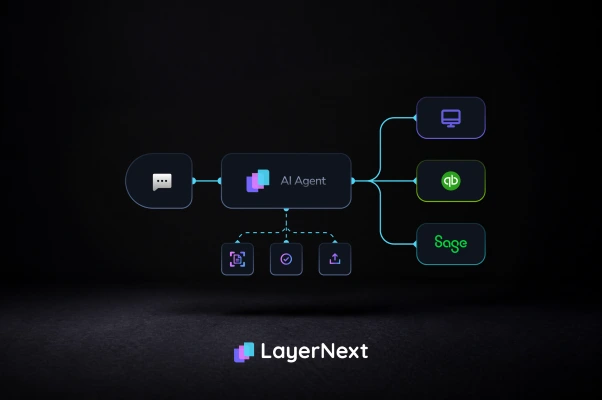
LayerNext uses computer‑use agents that can log into desktop or Windows‑based ERPs and accounting systems, navigate screens, and perform actions through the UI, similar to a trained AP analyst. That means you can enforce 2‑way matching even in systems that lack modern APIs or consistent integration options across entities.
From a CFO’s perspective, this allows you to standardise 2‑way match policies at the group level, while the agents execute those rules inside each local ERP without long, fragile custom integrations. You get a uniform control, even if your technology landscape is anything but uniform.
Plain‑English business rules and invoice ingestion
LayerNext ingests invoices from typical enterprise sources such as shared mailboxes, network folders, cloud storage, databases, and ERP retrieval, then centralises them in one automation layer. Entity‑level business rules can be written in plain English, for example:
“For IT services under 50,000 USD, apply 2‑way match with 1 percent price tolerance and no quantity variance.”
“For marketing POs over 100,000 USD, route any variance to the regional marketing director.”
These rules drive how agents match invoices to POs, apply tolerances, and flag exceptions, while a task‑based human review model ensures that approvers see the context and decision history. The full audit trail provides evidence for auditors that the control is designed and operating effectively.
Visibility through a single automation portal
Enterprises access and monitor automations via a single portal and an Insight Board that surfaces real‑time metrics. Finance leaders can see:
- Auto‑match rates by entity, category, or vendor.
- Exception volumes and top exception reasons.
- Cycle times from invoice receipt to approval and payment.
This level of visibility transforms 2‑way match from a technical ERP setting into a measurable control that you can manage, tune, and report to the board.
What finance teams gain from robust 2‑way matching
Reduced leakage, fewer disputes, cleaner audits
When 2‑way matching is enforced consistently and automated where possible, enterprises see fewer overpayments, duplicate invoices, and billing errors, particularly for recurring and service‑based spend. Supplier disputes are reduced because there is a clear, shared record of what was ordered and what is being billed.
For auditors, system‑enforced matching with clear logs and exception reports simplifies testing. They can verify the design and operating effectiveness of the control by sampling invoices, checking match results, and reviewing exception handling, instead of chasing email approvals and spreadsheet checks.
Faster close and better cash control
High auto‑match rates directly reduce manual review effort. When the majority of invoices pass 2‑way match cleanly, AP can focus on true exceptions, not routine processing. This accelerates invoice approval, reduces late payment fees, and gives treasury a more accurate view of committed but not yet paid liabilities.
In practical terms, if an enterprise currently reviews 60 percent of invoices manually and automation with strong 2‑way matching brings that down to 15–20 percent, the impact on AP capacity and month‑end close is significant. It also becomes easier to shift AP’s role from data entry to control oversight.
How to evaluate vendors for 2‑way matching and invoice control
Functional questions to ask
When assessing AP automation or finance AI vendors, enterprise CFOs and controllers should probe deeply into their 2‑way matching capabilities, including:
- Whether the system can match at both header and line level and support complex POs with partial receipts and multi‑currency.
- How flexible tolerance settings are by amount, percentage, tax, freight, category, or vendor.
- Whether it supports robust audit trails, including who approved exceptions and why.
- Whether it can handle invoices and POs from multiple ERPs and entities in a single control framework.
These details determine whether 2‑way match is a genuine control or just a marketing bullet.
Integration, implementation, and risk
Beyond features, the implementation reality is often the deciding factor. Key questions include:
- Can the vendor work effectively with your legacy ERPs without multi‑year integration projects?
- How do business users interact with exceptions, and does the workflow fit how your organisation actually operates?
- What reporting and dashboards are available for finance leadership to monitor control performance over time?
Choosing a partner that can apply consistent 2‑way matching over your existing landscape reduces transformation risk while still delivering meaningful improvements in control and efficiency.
FAQ: 2‑way match in accounts payable