Summary
Healthcare AP automation is software that extracts invoice data, applies matching rules, routes exceptions, and logs every decision across an organization's supplier file. For health systems and care organizations, that definition understates the actual problem. HIPAA obligations, ERP systems with no integration pathway, and supplier categories that each require different matching logic make healthcare AP structurally harder than what standard AP tools were built to handle. This article explains why healthcare AP is structurally harder than it looks, where API-first automation tools fail in practice, how a properly configured system handles supplier-level rules and exception documentation, and what finance leaders should verify before selecting a vendor.
Why Healthcare AP Is Harder Than It Looks
A health system below $500M in revenue does not run a clean AP environment. It runs a mix of legacy clinical software, an aging ERP the clinical team owns but the finance team depends on, and a supplier file spanning a dozen spend categories, each with different billing formats, payment terms, and compliance obligations. The finance team did not choose that stack. It inherited it.
That combination does not make AP automation impossible. It does mean that tools built for the general enterprise market hit specific walls in healthcare settings, walls their sales process does not mention and their standard implementation timelines do not account for.
The Supplier Mix Problem
A regional health system or long-term care chain with 300 active suppliers does not have 300 versions of the same invoice. A pharmaceutical distributor bills daily against standing purchase orders, with quantities that change based on patient census. A biomedical equipment vendor invoices against a lease schedule with fixed monthly amounts tied to a contract. A linen service bills weekly against department headcounts. A food service vendor submits invoices by facility, each coded to a different cost center.
Each of these categories needs different matching logic. The pharmaceutical invoice needs a 2-way or 3-way PO match depending on whether goods receipt confirmation is part of the workflow. The lease payment needs a match against the contract schedule, not a PO. The linen invoice needs approval from a department manager who can confirm headcount. Applying one processing rule to all of them produces errors in every category.
For a healthcare finance team with four AP staff managing 300 suppliers, those errors mean one of two things: either the team spends most of its time resolving mismatches manually, or invoices move through without adequate validation and the errors surface at audit.
The Compliance Layering Problem
Healthcare AP operates inside a compliance stack that general AP tools are not designed around. HIPAA governs how protected health information is handled, and in an AP context that matters most when invoices reference patient identifiers, when processing patient refunds, or when clinical supply invoices contain PHI embedded in line-item descriptions. A Business Associate Agreement with an AP software vendor is not optional if that vendor's system will touch PHI at any point in the workflow.
Beyond HIPAA, healthcare organizations face audit exposure from CMS, state Medicaid agencies, and internal compliance functions that expect documented control evidence. The question an auditor asks is not whether exceptions were resolved. It is whether the resolution was documented, by whom, based on what information, and within what timeframe. An AP system that handles exceptions through email threads and verbal approvals does not produce that evidence. The documentation gap only becomes visible when an audit is already underway.
The ERP Reality
Many mid-market health systems and long-term care operators run ERP systems that are 10 to 15 years old. Some are desktop applications with no web interface. Some are clinical systems that were extended to handle financial functions, but were never designed for AP integration. Some are heavily customized versions of older platforms where the standard API was modified or disabled years ago to accommodate clinical workflow requirements.
For these organizations, AP automation that requires API connectivity is not a budget problem. It is an architecture problem. The integration pathway does not exist, or exists only after a 6-to-12-month IT project that costs more than the AP team's annual salary. That is why a large share of healthcare finance teams that have evaluated AP automation have concluded it is not viable for their environment, not because they were wrong about the need, but because the tools they evaluated required conditions they could not meet.
Where Standard AP Automation Solutions Fall Short
The market-leading AP automation platforms, including Tipalti, MineralTree, and Stampli, are built on three assumptions that frequently do not hold in healthcare settings: that the ERP has an API, that suppliers can be processed through a standard workflow, and that exceptions are an edge case rather than a structural feature of the workload. When those assumptions fail, the tools do not fail gracefully.
API-First Design Excludes Legacy Systems
Every major AP automation platform leads with ERP integrations. The integration list is long: Oracle, SAP, NetSuite, QuickBooks, Microsoft Dynamics, Sage Intacct. What that list does not include is the healthcare organization's 2011 version of a clinical ERP that was customized by a regional IT consultancy and has no published API documentation. Or the long-term care operator's Windows-based accounting system that was installed on-premise when the organization had three facilities and has never been replaced because replacing it would require migrating 15 years of cost-center history.
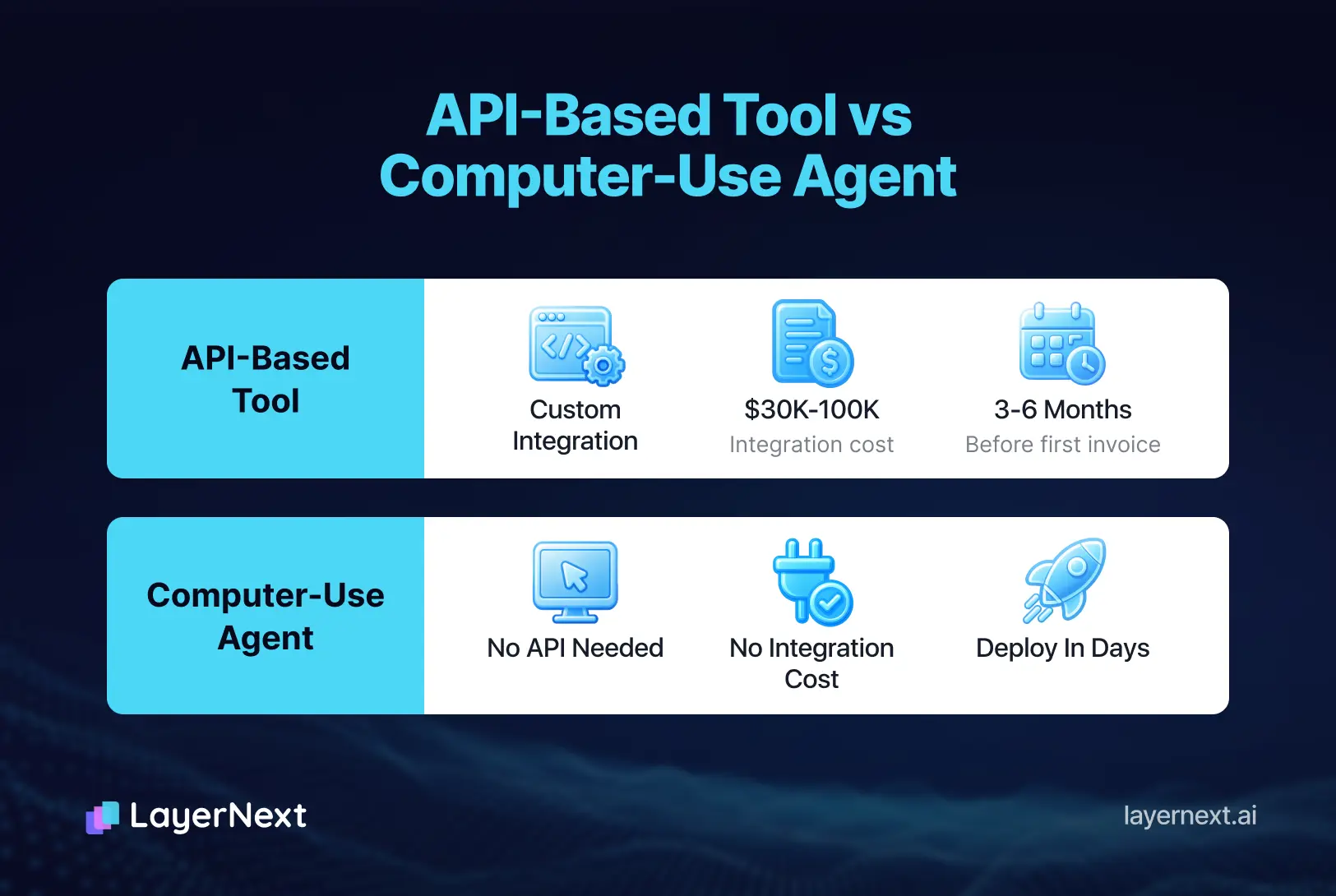
When a healthcare finance team asks an AP automation vendor how they handle legacy systems without APIs, the typical answer is a custom integration project, quoted at $30,000 to $100,000 and 3 to 6 months of elapsed time. That answer ends the evaluation for most mid-market healthcare organizations. The tool is technically capable, but the entry cost exceeds what the organization can absorb.
One Matching Rule for All Suppliers
Standard AP automation applies a uniform processing workflow across the full vendor file. For a healthcare organization, that uniformity is the problem. The difference between processing a pharmaceutical distributor invoice and a biomedical equipment lease is not a configuration detail. It is a fundamentally different control question. One requires verification against a goods receipt. The other requires verification against a contract schedule. Running both through the same matching logic produces exceptions for the wrong reasons and passes invoices that should have been held.
Most AP tools allow some level of workflow customization, but configuring supplier-specific or category-specific rules typically requires either IT involvement or vendor professional services. A healthcare finance team that needs to add a new pharmaceutical supplier with a specific 3-way match requirement, or update the payment terms for an equipment vendor mid-contract, cannot do that on a Tuesday afternoon without opening a support ticket. That lag in rule updates is where invoice errors accumulate.
Exception Handling That Does Not Hold Under Audit
When a standard AP tool flags an invoice exception, it typically creates a notification: an email, a queue item, or a dashboard alert. The AP team investigates, resolves the issue, and marks the exception closed. What the system does not always capture is why the exception was resolved the way it was, who made that decision, and what information they had at the time.
Under a CMS review or a Medicaid audit, those are the exact questions auditors ask. A closed exception queue entry is not audit evidence. A documented decision log with a user ID, a timestamp, the specific discrepancy, the applicable rule, and the resolution rationale is audit evidence. The difference between those two outputs determines whether the AP function can demonstrate it operates as a control environment or just as a processing function.
How Healthcare AP Automation Works When Configured Correctly
A properly configured AP automation system in a healthcare environment does not look like a general AP tool with a HIPAA compliance badge. It is designed around the actual conditions of healthcare AP: multiple invoice channels, supplier-category-specific matching logic, and exception documentation that satisfies auditors, not just AP managers.
Feeding Invoices From Where They Already Arrive
A regional home health operator with 12 clinical sites does not control how its suppliers submit invoices. The pharmaceutical distributor submits electronically. The medical supply company sends PDFs by email. The facilities vendor drops files into a shared network folder. The biomedical equipment company mails paper invoices that the local site manager scans and uploads to a cloud folder. The clinical software vendor submits through an EDI connection the IT team set up four years ago.
A properly configured system ingests from all of these without requiring the AP team to consolidate or reformat. Each site's invoices arrive in their existing format, from their existing channel, and are pulled into a single processing queue that applies the correct rules for that site, that supplier, and that cost center. The AP team's job starts at exception review, not at data collection.
Supplier-Category Rules That Reflect Real Contracts
For each supplier or supplier category, the system applies a distinct processing rule. A pharmaceutical distributor is matched against a PO and a goods receipt confirmation before the invoice is approved. A biomedical equipment lessor is matched against the lease schedule on file, with monthly amounts verified against the contract. A linen service invoice is routed to the department manager for headcount verification and approved for weekly payment within two days of submission.
These rules are written in plain English by the finance team, not coded by IT. A Controller can write: "For pharmaceutical invoices from McKesson, require 3-way PO match and flag any line-item variance over 2 percent for supervisor review." That rule is applied consistently to every McKesson invoice without manual intervention, and updated immediately when the contract terms change, without a development cycle or a support ticket.
The distinction between 2-way and 3-way matching by category is not academic in a healthcare setting. For recurring service contracts, 2-way matching against a PO or rate card is adequate and keeps processing fast. For physical goods with delivery risk, 3-way matching that confirms receipt prevents paying for shipments that did not arrive or arrived short. A healthcare AP system that applies only one matching type across all supplier categories is missing half the control structure. For a deeper explanation of when each approach applies, the 2-way vs 3-way matching framework is a useful reference for finance teams building out their matching policy by spend category.
What Happens When an Invoice Does Not Match
When the system cannot resolve an invoice automatically, it does not send an email and wait. It creates a structured task: the invoice number, the specific discrepancy, the rule that failed, the supplier, and the person responsible for resolution. That person looks up the task by invoice number, sees the invoice, the relevant rule, and the exact discrepancy highlighted. They record their decision and the reason. That record is logged with a timestamp and a user ID.
Consider a medical device invoice from a supplier where the tax amount does not match the applicable rate for the province to which the goods were shipped. The system holds the invoice, creates a task that routes to the AP supervisor, and presents the invoice alongside the shipping record and the applicable tax rule. The supervisor either confirms the discrepancy and raises it with the vendor, or approves an override with a documented reason. Either outcome is logged. Neither outcome relies on an email chain that someone will need to reconstruct six months later during an audit.
This is what audit-ready AP looks like in practice. Not a system that never produces exceptions, but a system that produces exceptions with full context and resolves them with complete documentation.
What to Look For in a Healthcare AP Automation Platform
Not every platform that claims healthcare compatibility addresses the same structural gaps. The table below maps the capabilities that matter specifically in healthcare AP environments, and the difference between adequate and inadequate handling of each.
How LayerNext Handles Healthcare AP
LayerNext addresses the three structural problems in healthcare AP by building the system around the actual conditions healthcare organizations operate in, rather than adding compliance features to a standard AP tool.
Computer-Use Agent for Legacy ERPs Without APIs
LayerNext operates legacy ERP and desktop accounting systems through their own user interface, the same way a trained AP analyst would. The agent logs in, navigates to the relevant screens, retrieves vendor records, checks PO data, and posts approved invoices. No API is required. No middleware layer is needed. No IT project is necessary before the first invoice is processed.
For a healthcare organization running a 12-year-old ERP with no integration documentation, this means AP automation can be operational within days rather than months. The finance team defines the workflows. LayerNext executes them inside the existing system. The ERP does not need to change, and the IT department does not need to be involved in the implementation.
For organizations running multiple ERPs across facilities, this matters more. A long-term care chain where each acquired facility brought its own accounting system can apply consistent AP processing rules across all of them without replacing any system or building custom integrations for each one. The same matching logic, the same exception routing, the same audit trail, regardless of which ERP sits at each site.
Per-Supplier Business Rules in Plain English
LayerNext's business rules engine allows the finance team to define processing logic for each supplier, supplier category, or facility in plain English. Rules are indexed and retrieved accurately even when the organization has hundreds of active rules across its supplier file.
In a healthcare context, that means:
"For Medline invoices, require 3-way PO match and route any variance to the supply chain director for amounts over $10,000."
"For biomedical equipment leases from GE Healthcare, match against the monthly contract schedule and auto-approve if the amount is within $50 of the scheduled payment."
"For linen service invoices from Alsco, route to the facility manager for headcount confirmation and approval for weekly payment within two business days."
Each of these rules is written and maintained by the finance team. When a supplier changes its terms, the Controller updates the rule. When a new vendor is onboarded, the AP team writes the rule before the first invoice arrives. No IT ticket, no vendor support request, no development cycle.
The rules engine handles thousands of rules accurately because it uses a well-indexed search structure that retrieves the correct rule for a given supplier, invoice type, and facility combination. A healthcare organization with 400 active suppliers and multiple facilities can have a distinct rule for each meaningful combination without performance degradation or rule conflicts.
Task-Based Exception Management With Full Audit Trail
Every exception in LayerNext becomes a structured task, searchable by invoice number, supplier name, facility, or discrepancy type. The Insight Board shows in real time how many invoices are processed, how many are awaiting human input, how many are complete, and what the top exception reasons are by category and vendor.
For a healthcare CFO preparing for a CMS review, the answer to "show me every invoice that required a manual override in Q3, who approved it, and why" is a search query, not a three-week documentation project. Every task resolution is logged with a user ID, a timestamp, the discrepancy, and the decision. That is the audit trail that demonstrates the AP function is operating as a documented control environment.
Auto-match rates, exception volumes by vendor and category, and cycle times from invoice receipt to payment approval are all visible from a single portal. When a particular supplier is generating exceptions at a rate above the baseline, it surfaces in the dashboard before it becomes a pattern that only shows up at year-end.
Multi-Channel Invoice Ingestion
LayerNext ingests invoices from the channels healthcare organizations use: a dedicated AP email inbox, shared network folders at remote clinical sites, AWS S3 and Google Cloud storage buckets, direct SQL database connections, and ERP retrieval via computer-use agent. EDI connections and direct API feeds from suppliers who support them are also supported.
No manual consolidation step is required before processing begins. The AP team does not reformat, rename, or aggregate incoming invoices. Invoices arrive in their existing format from their existing source and enter the processing queue automatically. For a finance team whose day currently starts with collecting invoices from six different places before any processing can begin, eliminating that consolidation step alone recovers meaningful capacity.
What Finance Teams Actually Gain
The outcomes of a properly configured healthcare AP automation system are measurable in three areas: processing cost and cycle time, audit readiness, and AP team capacity.
Processing Cost and Cycle Time
Manual invoice processing in healthcare averages $12 to $15 per invoice, with a processing cycle of 10 to 15 days from receipt to payment approval, according to IOFM benchmarks for healthcare AP operations. Automated processing in comparable environments brings cost per invoice below $3 and reduces cycle time to under 48 hours for clean invoices.
For a health system or long-term care operator processing 5,000 invoices per month, the cost difference between $14 per invoice and $2.50 per invoice is approximately $570,000 per year. That figure does not include late payment fees avoided, early payment discounts captured, or duplicate payment recovery. Those add to the return, but the base processing cost reduction alone justifies the evaluation for most organizations at that volume.
Faster cycle time also has a cash management implication. When invoice approval moves from 12 days to 2 days, treasury has accurate visibility into committed but unpaid liabilities in near real time rather than discovering them at month-end. That visibility directly improves cash flow forecasting accuracy.
Audit Readiness Without Preparation Sprint
In a manual AP environment, preparing for a CMS or Medicaid audit means pulling paper files, reconstructing approval chains from email threads, and hoping that the documentation the auditors request actually exists in a retrievable form. The preparation sprint for a routine audit can consume two to four weeks of AP manager time and still leave gaps.
With a structured task log and a searchable audit trail, the response to an audit request for any invoice is a search query. The documentation exists because it was created at the time of processing, not reconstructed afterward. For a healthcare CFO who has been through an audit where the documentation was thin, this is the operational change that matters most. The AP function shifts from being a compliance risk to being a compliance asset.
AP Team Capacity Redirected
When the system handles invoice ingestion, matching, rule application, and exception routing, the AP team's time shifts from data entry and status chasing to exception resolution and vendor relationship management.
In practical terms: a healthcare AP team that currently reviews 60 percent of invoices manually, because that is the volume that falls out of the manual process without adequate structure, can bring that to 15 to 20 percent through automation with well-configured matching rules. For a team of four managing 400 suppliers, that shift recovers roughly 60 to 70 percent of processing time. The team does not shrink. It moves to higher-value work: managing the exception patterns that indicate supplier or process problems, handling vendor disputes with full documentation, and supporting the compliance function with on-demand audit evidence.
How to Evaluate Healthcare AP Automation Vendors
The evaluation for a healthcare finance leader should not start with a feature demo. It should start with four structural questions about how the vendor handles the specific conditions of healthcare AP.
Ask About the ERP Integration Approach Before Anything Else
Before reviewing any feature, ask how the tool connects to your ERP. If the answer involves API access, ask for the specific integration documentation for your ERP version, not the ERP brand. Then ask how long the integration takes and who owns it. If the timeline is longer than 60 days or the cost exceeds $20,000 in professional services, factor that into the total first-year cost of ownership. An AP automation tool that requires a six-month integration project before processing the first invoice is not an automation solution for your organization's current fiscal year.
Also ask what happens when the ERP changes. When your clinical team upgrades the platform or the vendor releases a version update, does the AP automation integration break? Who fixes it, and how fast?
Test Exception Handling in a Compliance Context
Request a demo scenario where an invoice fails a compliance check: a tax discrepancy, a PO mismatch, an unauthorized price increase. Observe what the system creates, who is notified, what information they see when they open the exception, and what the audit log looks like after they resolve it. If the exception handling produces an email notification and a checkbox, ask the vendor to show you the audit evidence that would satisfy a CMS reviewer. If they cannot show it in the demo, it does not exist in production.
Verify Supplier-Level Rule Flexibility
Ask the vendor to demonstrate configuring a different approval threshold and matching type for capital equipment purchases versus recurring pharmaceutical supply invoices. If the answer is that the standard workflow handles both, ask how. If the answer is that a professional services engagement is required to configure category-level rules, ask how long that takes and who maintains the rules afterward. A healthcare finance team that cannot update its own processing rules when a supplier changes terms is not in control of its AP function.
Confirm Who Owns Rule Maintenance
In a healthcare organization where supplier contracts change, new vendors are onboarded throughout the year, and volume spikes are seasonal, the ability to update processing rules without opening an IT ticket or a vendor support request is not optional. Ask the vendor to show a finance team member, not a technical administrator, adding a new supplier rule and testing it against a sample invoice. If that workflow requires developer access or vendor involvement, the rules will not be maintained in practice, and the automation will drift from the actual supplier landscape within months.
See how your current supplier file maps to LayerNext workflows
Healthcare AP teams that have been told their ERP is too old, their supplier mix is too complex, or their compliance requirements are too specific for standard automation tools are the exact organizations LayerNext was built for. No API required, no IT project, no generic workflow that ignores your supplier categories.
In a working session with your AP team, LayerNext maps your actual supplier categories and exception types to its business rules engine, shows how your existing ERP is handled through computer-use automation, and produces a processing model specific to your invoice volume and compliance requirements. Your IT department does not need to be in the room.
FAQ: Healthcare Accounts Payable Automation Under Compliance Rules