


Summary
- QuickBooks Desktop Enterprise has no cloud API, so AP tools reach it through a program on your QuickBooks machine, a Windows add-in, a file someone imports, or QuickBooks' own screens.
- Enterprise covers part of AP, with Upload and Review Bills from version 2022 and approval processes in Platinum and Diamond, but a person still enters and pays each bill.
- LayerNext enters bills on the same screens your AP team uses, with no API, no middleware and no integration project.
- A person steps in for an exception, an error, or an approval that a business rule assigns, and a rollout takes weeks and starts with one workflow.
Somebody on your team opens a PDF, finds the PO, checks the prices, keys the bill into QuickBooks and then chases an approval. Multiply that by every bill in a month and it adds up to a lot of hours.
Most AP software would take that off your plate if QuickBooks Desktop Enterprise had an API. It doesn't. So the tools that support Desktop install a program next to QuickBooks, hand you a file to import, or work in QuickBooks the way your clerk does. This guide is for teams on Desktop Enterprise with a lot of invoices and few people to key them. If you're on QuickBooks Online, the options are different, because QuickBooks Online has an API.
Processing an Invoice Averages $9.84 and 8.2 Days, and Nearly One in Five Hits an Exception
Ardent Partners' research puts the average cost of processing one invoice at $9.84, the average cycle time at 8.2 days and the exception rate at 18.4%. Its top-performing teams spend 79% less per invoice and move 79% faster than the rest.
Here's what that gap is worth at different volumes.
Those are averages across a mix of companies, so treat them as a yardstick. Count last month's bills and work out what each one costs you in time. The 18.4% matters as much as the dollars. Automation doesn't remove exceptions. It makes each one visible, with an owner, so the queue stays short.
QuickBooks Desktop Enterprise Covers Part of AP, and a Person Still Keys the Bill
Enterprise handles some of AP on its own, and how much depends on your edition.
Upload and Review Bills gets the document into QuickBooks. The AP workflows Intuit documents still end with a person entering the bill and paying it. With POs, that's create the PO, receive inventory, enter bills against it, pay bills. Without POs, it's enter bills and pay them. The entry step is where an AP tool earns its keep, along with rules that belong to one vendor and invoices that don't match.
AP Tools Reach QuickBooks Desktop in Four Ways, and Each One Changes Who Does the Work
QuickBooks Desktop keeps your company file on your own computer or server. There's no cloud service in front of it, so an outside tool can't simply call it. Intuit gives developers a toolkit and a Windows add-in called the QuickBooks Web Connector, which checks in with a web service on a schedule. That leaves four routes. The question for each is who does the work and what happens when it breaks.
LayerNext takes the fourth route. Its AI agents read the invoice, check it against the vendor's rules and the PO, and enter the bill on the same screens your AP clerk uses. There's no program to install next to QuickBooks and no file for anyone to import. It's the same approach LayerNext uses for AP automation on legacy ERP systems with no API.
An Invoice Moves Through QuickBooks Desktop Enterprise With Validation Gates and Named Exceptions
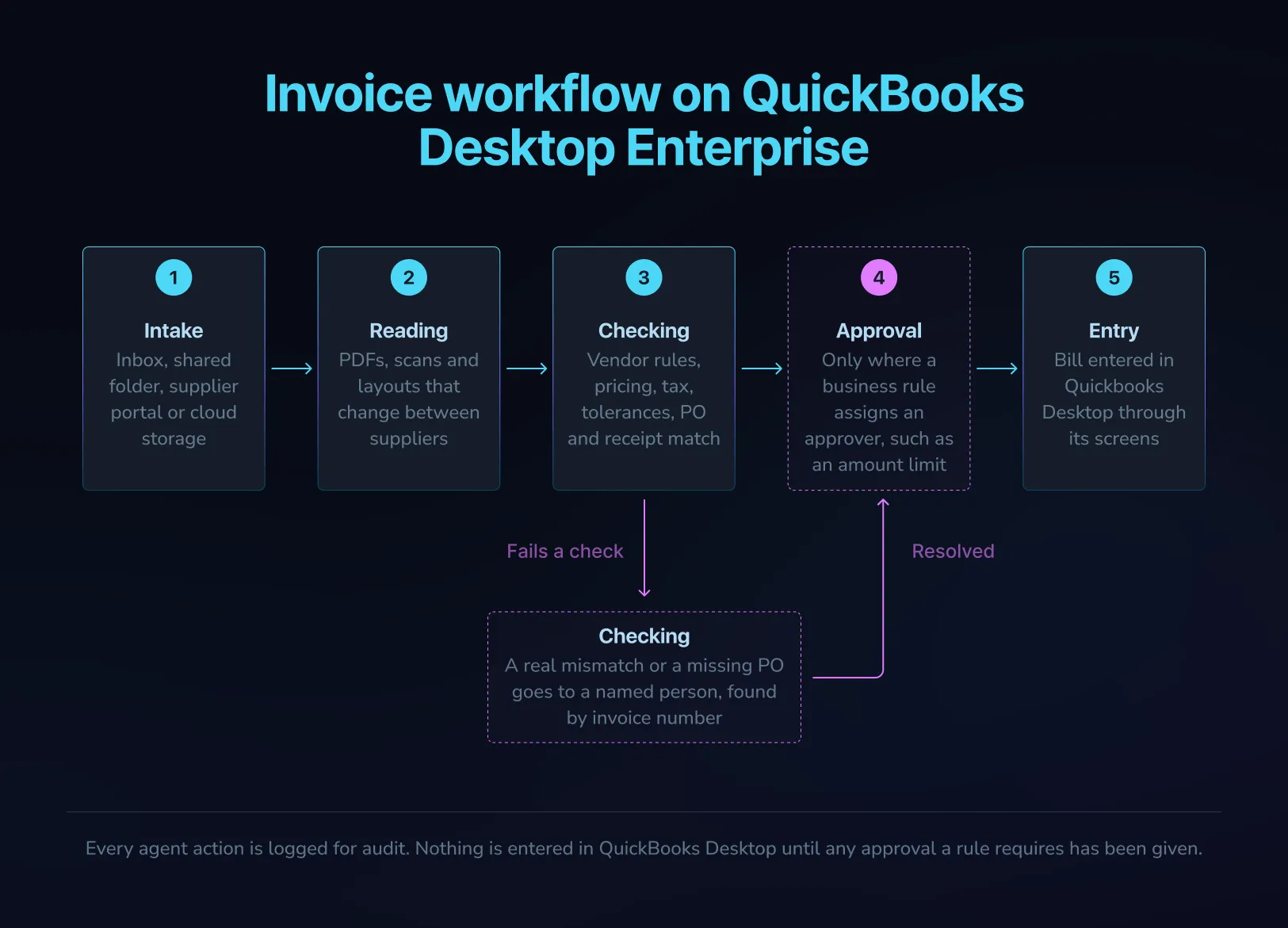
On QuickBooks Desktop Enterprise, LayerNext takes an invoice through intake, checking and entry.
- Intake
Invoices come in from an inbox, a shared folder, a supplier portal or cloud storage.
- Reading
PDFs, scans and layouts that change between suppliers get read.
- Checking
Pricing, tax and tolerances are checked against the rules you set per vendor, and the invoice is matched to the PO and the receipt. You write those rules in plain English.
- Exceptions
A real mismatch or a missing PO becomes a task for a named person, tagged by invoice number, supplier and issue.
- Approval
If one of your rules assigns an approver, such as an amount limit, the invoice waits for that person before it posts.
- Entry
The agent enters the bill in QuickBooks Desktop on its own screens.
For your AP clerk, the day changes. They stop opening PDFs and keying lines, and work the exceptions queue instead, the short list of invoices that didn't match, each with the reason attached.
For you, control stays where it is. Validation gates run before entry, so a wrong price or a missing PO stops the invoice before it reaches the ledger. Nothing is entered until any approval your rules require has been given, and a person steps in for an exception, an error, or an approval a rule assigns. Every action is logged, so when your auditor asks who did what, you can show them.
The first three routes get data into QuickBooks through something that sits beside it, or leave a person to run an import. LayerNext carries the invoice from intake, through your checks, into the company file on QuickBooks' own screens. Across LayerNext deployments, finance teams get back 90 to 165 hours a month. At the top of that range, that's roughly one person's full month. They also see 90 to 100% fewer processing errors and reach 95%+ task accuracy on defined workflows. Your own number depends on your invoice volume and how clean your vendor records are, and a pilot on your own bills is where you see it.
Seven Questions Show Whether an AP Tool Will Finish the Job in QuickBooks Desktop
Put these to every vendor, us included. For Class, Customer:Job and company files, we'll go through your setup in the first conversation, then show it on your own bills.
- Ask how the bill gets into QuickBooks.
A program next to it, the Web Connector, a file or the screens. Get the mechanism, not a list of supported systems.
- Ask who runs the sync or import, and who you call when it fails.
Have them switch off the machine running QuickBooks during the demo and show you what happens.
- Ask what happens when an invoice doesn't match its PO or receipt.
You want a named person and a reason, not a forced match. Try a partially received PO, then add freight.
- Ask which approvals apply.
If you're on Platinum or Diamond, decide whether approvals live in QuickBooks, in the AP tool, or both, so the two never disagree about who approved a bill.
- Ask them to code Class and Customer:Job on a live bill.
If you job-cost, bring a real bill and watch it post.
- Ask how many company files one account can hold.
If you run more than one, connect all of them in the demo.
- Ask how the tool's QuickBooks login is stored and limited.
Get the user role it signs in with and what that role can reach.
A QuickBooks Desktop Enterprise Automation Rollout Takes Only Weeks and Starts With One Workflow
LayerNext phases an Enterprise rollout into discovery in weeks 1 to 2, a pilot in weeks 3 to 6 and full deployment in weeks 7 to 12. You can start with one workflow and add more later. There's no integration to build, so discovery goes to your rules, approval chains and exceptions, and your team's part is explaining how bills get processed today.
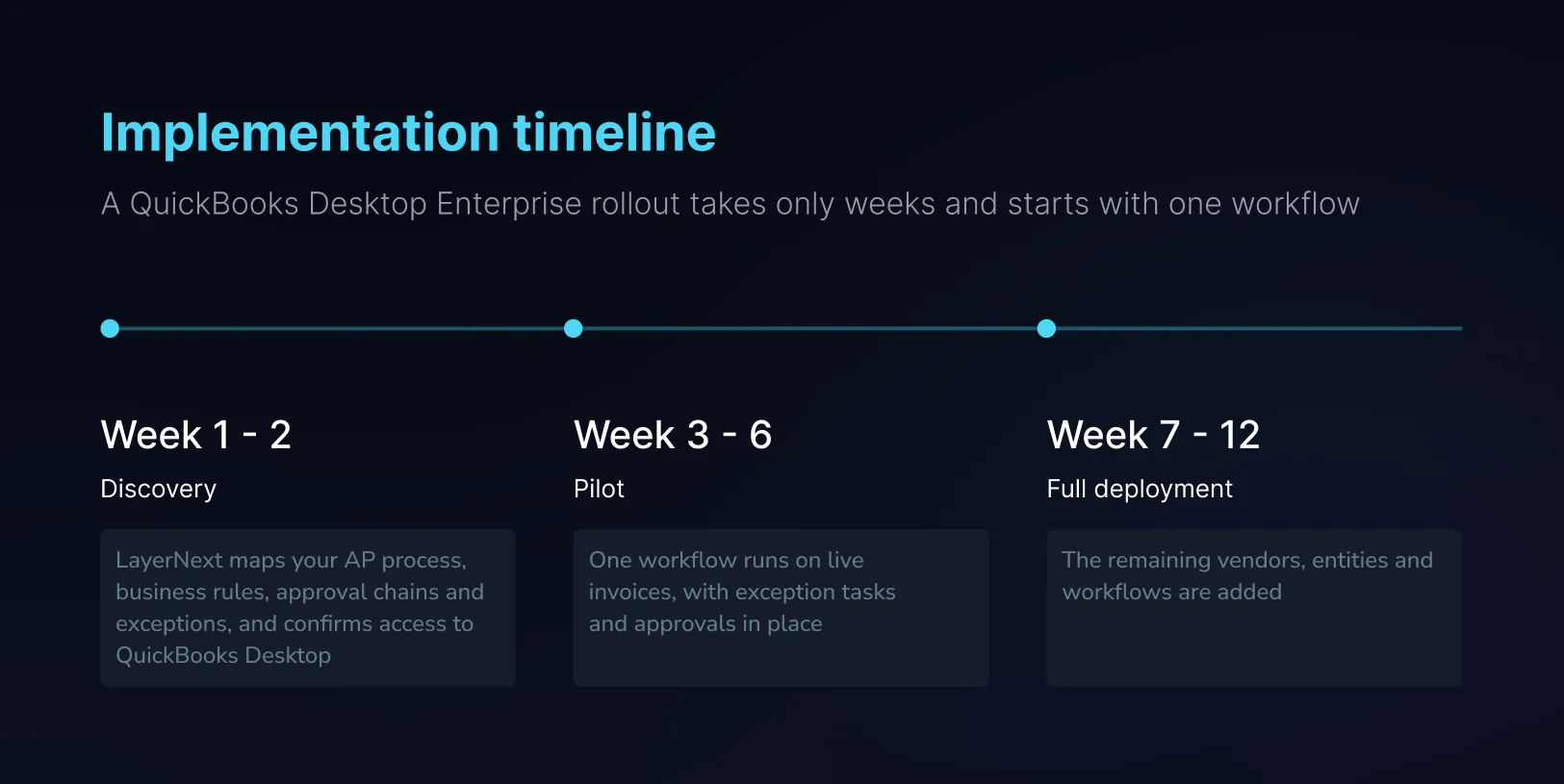
Pick the workflow that costs you the most hours. For many teams that's one vendor whose invoices never match, or the bills that sit in a folder until month end. From week 3 it's running on your live invoices, with a named person on every exception and your approval rules in place. The enterprise page covers the rollout in more detail.
FAQ
