


Summary
Most AP automation projects automate the first five steps of a seven-step process and leave the rest to your team. A guide for US and Canadian finance teams covering the workflow, the ROI, and the questions that separate vendors quickly.
What this guide covers
- The average organisation spends $9.40 to process one invoice and takes 9.2 days. Best-in-class teams do it for $2.78 in 3.1 days.
- Best-in-class touchless processing sits at 49.2%. Even the best-run AP departments still touch more than half their invoices.
- Field-level accuracy is not document-level accuracy. A tool reading 97% of fields correctly still produces an error on roughly a third of invoices.
- Most matching exceptions come from partial deliveries, price variance and missing goods receipts, not from bad extraction.
- The question that separates vendors is what specifically posts the approved invoice into your ERP, and who does it.
- Also covered: a working ROI model, the six mistakes that sink implementations, and a 90-day rollout plan.
For finance teams in the United States and Canada, accounts payable is where operational drag concentrates. Invoices arrive in five formats through four channels. Someone keys them into an ERP. Someone else chases an approval. At month end, the backlog becomes everyone's problem.
Accounts payable automation replaces that with a system that reads, validates, matches, routes and posts. Done properly, it removes the typing without removing the control.
This guide is written for controllers, CFOs and AP managers evaluating that change. It uses published benchmark data rather than vendor marketing figures, and it is explicit about where the technology still falls short.
What is accounts payable automation?
Accounts payable automation is the use of software to handle the supplier invoice lifecycle, from arrival through data extraction, validation, purchase order matching, approval routing and entry into the accounting system, without manual re-keying at any stage.
The distinction that matters is scope. Some tools capture invoice data and hand it back to you. Others carry the invoice all the way into the ledger. Both are sold as AP automation, and the difference determines how much of your team's week actually changes.
Those figures come from Ardent Partners' benchmark research on AP metrics, which is the most widely cited published dataset in this category. They are worth internalising before reading any vendor's claims, because they set the realistic frame.
Average and best-in-class AP performance, per Ardent Partners benchmark research
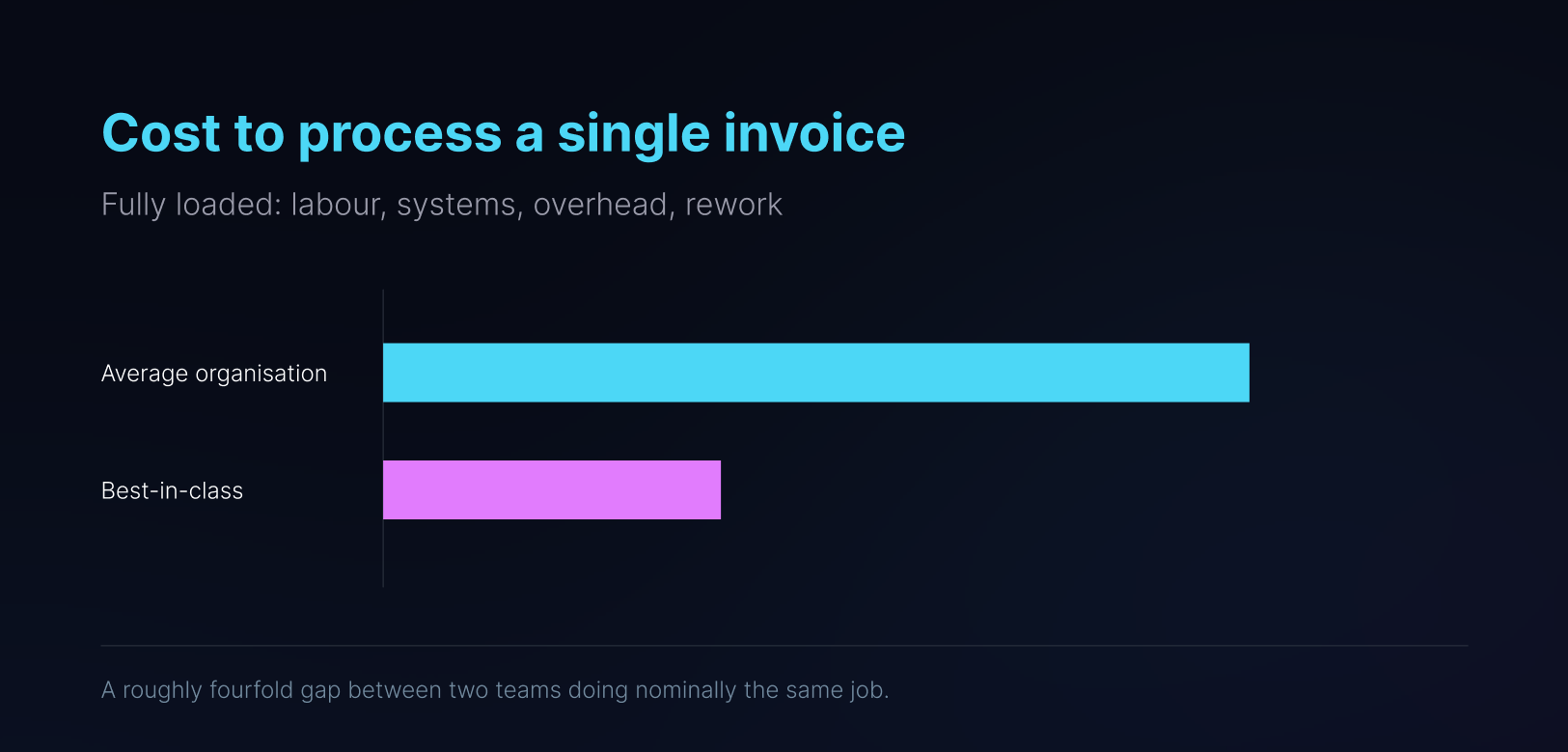
The gap is structural rather than effort-related. Leading teams are not moving faster through the same manual work. Theyare doing less of it.
Why Touchless Processing Matters in AP Automation
Touchless processing rate is the share of invoices that go from arrival to payment-ready without a person intervening. It is the only metric that predicts how much work your team actually keeps.
Best-in-class organisations reach approximately 49.2%. That is not an aspirational target nobody has hit. It is the current ceiling among the highest performers, with the largest budgets and the most mature tooling.
Roughly three quarters of AP departments already use some form of AI. If the best of them still touch more than half their invoices, the constraint is not a shortage of capture technology. It is that capture addresses one stage of a seven-stage process.
Be sceptical of any vendor quoting 80% or 90% touchless as a general outcome. Ask whether that figure describes their whole customer base or their single best account, and whether it counts invoices that were auto-approved because tolerances were set wide enough to let real variances through.
How the AP Automation Process Works
An end-to-end process handles seven stages without the invoice being retyped at any point.
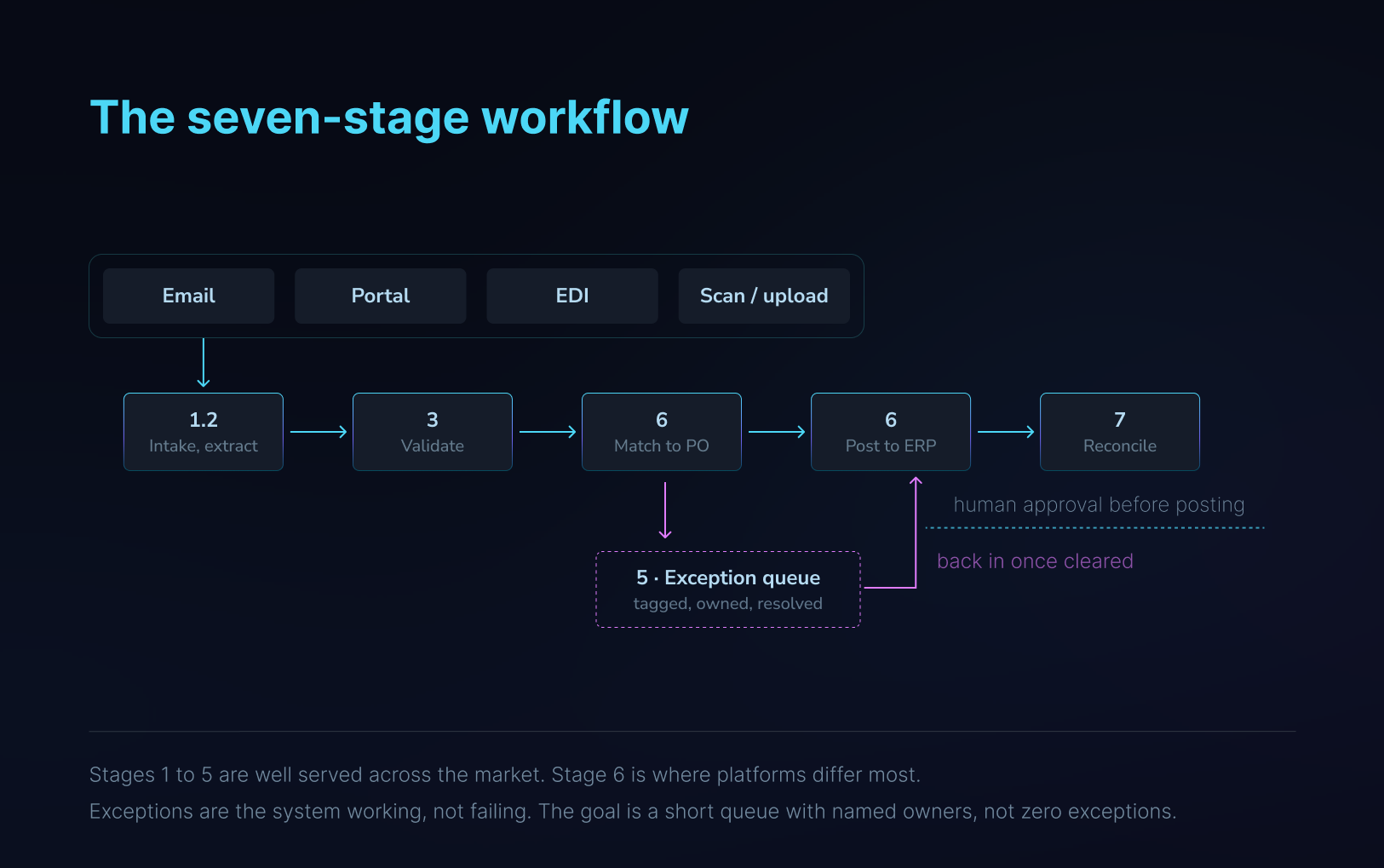
The exception loop is the part buyers underestimate. What matters is not how few exceptions a system produces, but whether each one arrives with enough context to be cleared in minutes.
What has to happen at each stage
How AI Is Changing Invoice Data Extraction
Optical character recognition was a real advance. For a team with a stable supplier base and consistent formats, template-based OCR still works well, and it is fast, predictable and easy to audit.
It runs into three walls.
Templates break
Traditional OCR reads fixed positions on the page, so each supplier layout needs its own template. New supplier, new template. Supplier redesigns their invoice and extraction breaks without warning. For a distributor with four hundred active suppliers, that is not a setup cost. It is permanent maintenance.
What AP Automation Accuracy Really Means
Vendors quote whichever measure flatters them, and the three are not interchangeable.
- Field-level accuracy is the share of individual fields extracted correctly.
- Document-level accuracy is the share of invoices where every field is correct.
- Straight-through processing rate is the share that clear with no human involvement at all.
The gap between the first two is where AP teams lose their time, and it widens fast as the number of extracted fields grows.
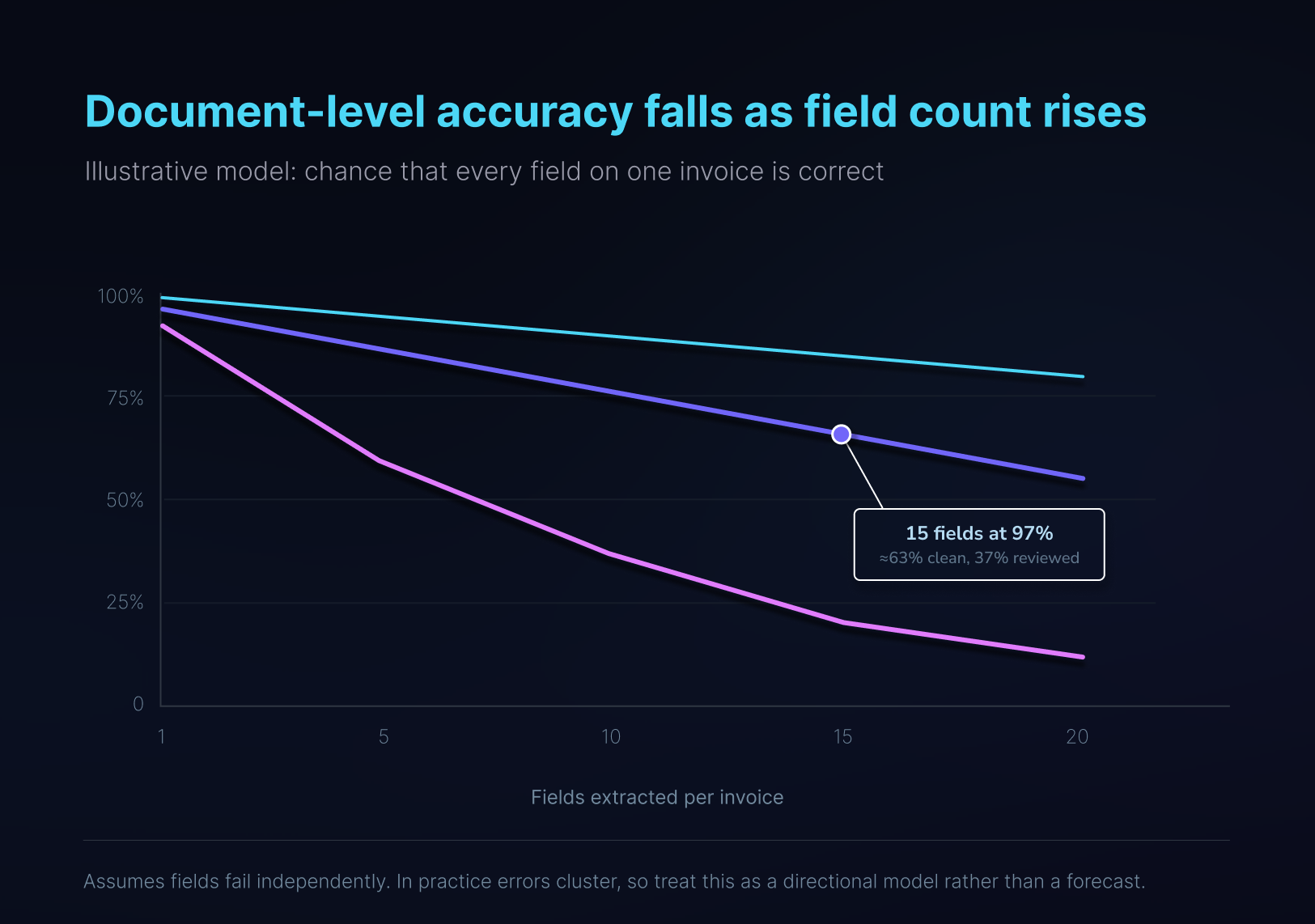
This is why a vendor can honestly claim 97% accuracy while your team still checks a third of invoices. Ask which measure the number refers to.
Why Line-Item Extraction Is More Difficult
Vendor name, invoice number, date and total appear once in predictable places, and almost every tool reads them well. Line items are harder: tables running across pages, headers that vanish on page two, merged cells, units of measure that differ from the purchase order. Multi-page continuation tables are the hardest extraction target in production AP, and they are exactly what distributors and building materials suppliers send.
If you only need the invoice total, header extraction is enough. If you need line-level matching or job costing, it is close to useless.
Why ERP Entry Is a Critical Part of AP Automation
The platform captures the invoice, reads it, routes the approval and marks it complete. Then someone exports the result and keys or imports it into the ERP.
This is the last mile, and in many deployments it is still walked by hand. Manual data entry remains the most cited AP pain point even among organisations that describe themselves as automated.
The cause is architectural. Most AP platforms connect through an API. Where the ERP is modern and cloud-based, that connection is deep and genuinely good. Where the ERP is a fifteen-year-old desktop system, heavily customised, or built for one industry, one of three things happens: the vendor supports a file import that works for simple postings and breaks on line-level detail; the vendor requires a middleware project; or the vendor declines the opportunity.
None of that is dishonest. It is why many mid-market manufacturers, distributors and service businesses have concluded AP automation is unavailable to them, when what is unavailable is API-based AP automation.
Be precise here, because the category overclaims. Several established vendors do support file-based integration where APIs are unavailable, and some ERPs ship their own AP modules. The honest distinction is that file integrations generally stop before the final in-system step, and that step is where the remaining manual work lives.
2-way vs 3-way invoice matching
Two-way matching compares the invoice against the purchase order: are the prices and quantities what we agreed? Three-way matching adds the goods receipt: did the items actually arrive before we pay for them?
Most mid-market teams use three-way for physical goods and two-way for services and subscriptions.
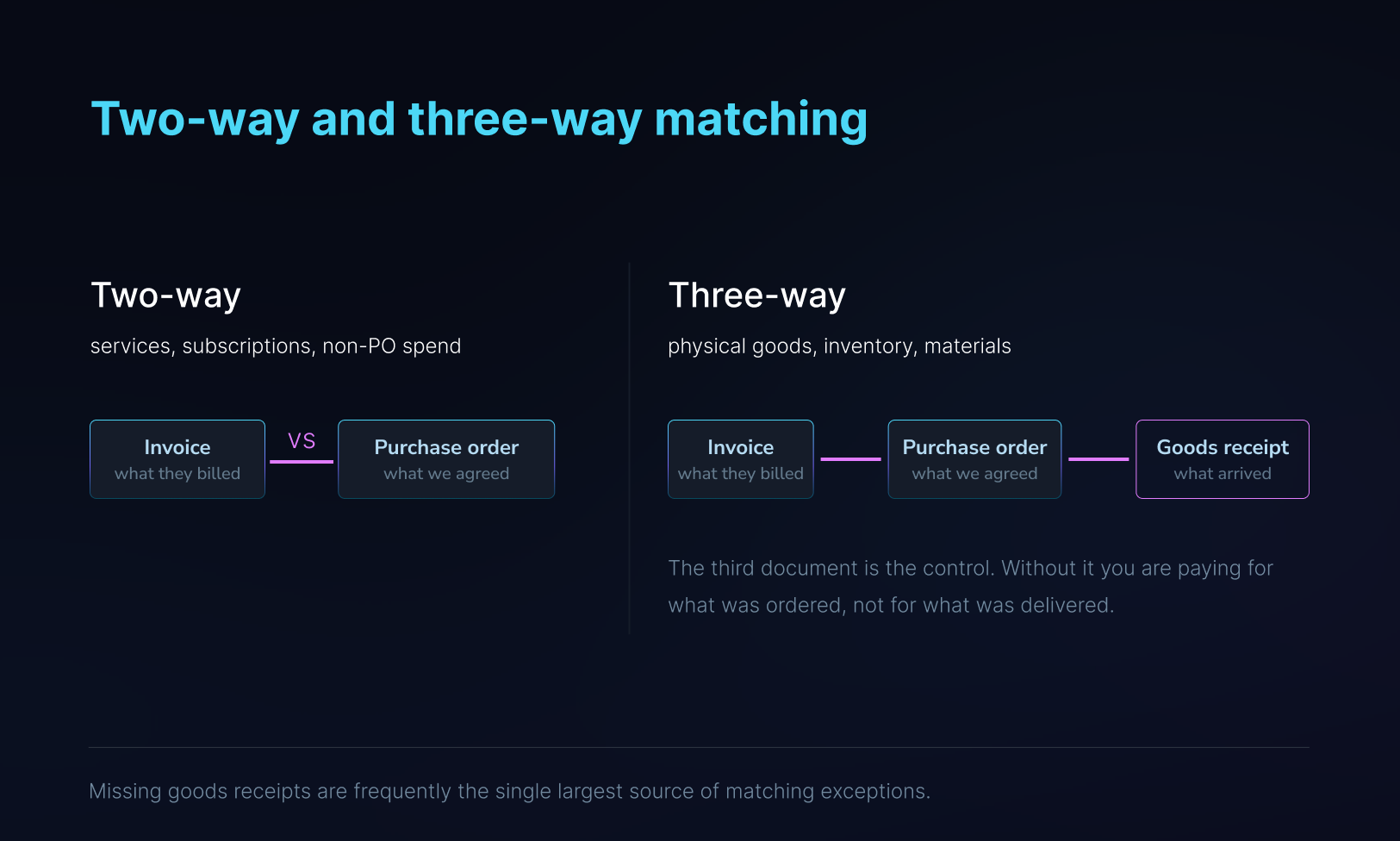
Where three-way matching fails, the fix is usually upstream in receiving rather than inside AP.
In principle this is straightforward. In practice it is where AP time goes, and the failure modes matter more than the concept.
Common matching exceptions and where the fix actually sits.
Tolerances are the lever most teams get wrong. Set them too tight and everything becomes an exception. Set them too wide and real overcharges pass. Either way the controller stops trusting the queue, and once that happens the queue stops being a control and becomes a backlog. When sixty percent of invoices land in exceptions, the team works the easy ones and lets the hard ones age.
Tax and compliance in the US and Canada
North American AP carries two tax regimes with different failure modes, and generic AP guides tend to skip both.
Canada.
Input tax credits depend on correctly separating GST, HST and provincial taxes at line level, and on holding documentation that supports the claim. An invoice where tax is captured as a single blended figure is not enough to substantiate an ITC on audit. Multi-province operations compound this, since the applicable rate follows place of supply rather than the head office address.
United States.
The harder problem is use tax. When a supplier does not charge sales tax on a taxable purchase, the obligation does not disappear. It becomes the buyer's use tax liability, and unaccrued use tax is one of the most common findings in state audits. Separately, vendor classification drives 1099-NEC and 1099-MISC reporting at year end, and that depends on clean vendor master data captured at onboarding rather than reconstructed in January.
Cross-border.
Multi-entity groups operating in both countries need the exchange rate applied at the correct date and consistent treatment across entities, or intercompany reconciliation becomes a month-end problem rather than an AP one.
The practical requirement is line-level tax extraction mapped to the right GL accounts, not a total that someone splits later.
How to Calculate the ROI of AP Automation
ROI is the section most guides fill with round numbers. Here is a model you can run against your own figures, using published benchmarks as the reference points rather than as promises.
There are three levers, in descending order of size.
Lever 1: processing cost per invoice
Cost per invoice is the fully loaded expense of getting one invoice from arrival to payment-ready. It includes keying and intake, matching and exception handling, approval chasing, filing, payment execution, and the rework caused by errors. Most teams underestimate it because the salaries are already being paid, so the work feels free.
The average is $9.40. Best-in-class is $2.78. A realistic first-year target for a mid-market team is $3.00 to $4.00, not $1.00. Anyone promising you a dollar an invoice in year one is selling a number, not a plan.
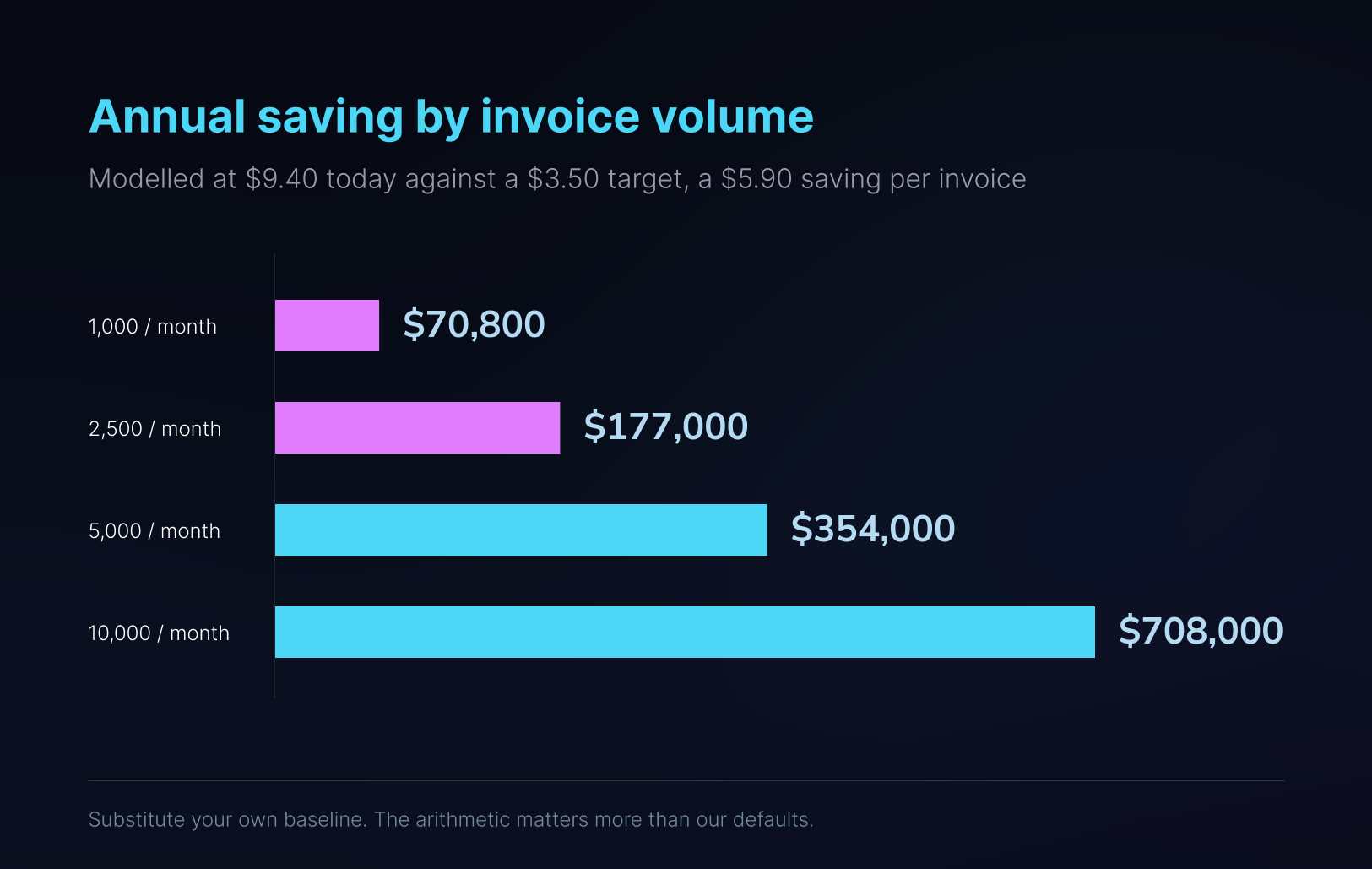
Savings of this shape usually appear as redeployed capacity rather than a smaller payroll. Model it as capacity unless you actually intend to reduce headcount, or the business case will not survive contact with your CFO.
Lever 2: cycle time
The average invoice takes 9.2 days to process. Best-in-class takes 3.1. That six-day difference has direct financial value in two places.
Early payment discounts.
Terms of 2/10 net 30 offer 2% for paying twenty days early, which annualises to roughly 36%. It is among the highest risk-free returns available to a business, and teams miss it constantly because a 9-day cycle plus an approval delay puts them past day 10. If 15% of your annual AP spend carries discount terms you currently forfeit, on $20 million of spend that is $3 million of eligible invoices and $60,000 left on the table each year.
Late fees and supplier escalation.
Harder to quantify and usually larger than finance teams assume, because the cost includes the hours spent handling supplier calls about invoices nobody has processed yet.
Lever 3: exception volume
The average exception rate is 22%. Best-in-class is 9%. On 30,000 invoices a year, closing that gap means roughly 3,900 fewer investigations, each of which currently pulls someone away from work that matters more.
This lever is the one most dependent on you rather than on the software. Exception rates are driven by PO discipline, receiving workflow and vendor master hygiene. Software surfaces the exceptions faster; it does not create the receipt that nobody entered.
How to Estimate Your AP Automation Savings
- Count invoices processed last month, including credits and non-PO spend.
- Add the fully loaded cost of everyone who touches AP, including the portion of the controller's time spent on it, plus software and storage.
- Divide. That is your real cost per invoice, and it is usually higher than expected.
- Measure cycle time from arrival to payment-ready on a sample of fifty invoices, and count how many became exceptions.
- Model the target at $3.00 to $4.00 per invoice and a three to four day cycle, then ask any vendor to justify anything better than that against your own volume.
Payback for a mid-market deployment typically lands inside the first year on lever 1 alone. If a vendor cannot model payback against your actual volume and instead points to a case study from another company, treat that as an answer about their confidence.
Payback for a mid-market deployment typically lands inside the first year on lever 1 alone. If a vendor cannot model payback against your actual volume and instead points to a case study from another company, treat that as an answer about their confidence.
6 Common AP Automation Implementation Mistakes
Most failed AP automation projects fail for reasons that have nothing to do with the software.
- Automating a process that is not standardised.
Building rules around inconsistent approval hierarchies and ad hoc GL coding encodes the mess rather than fixing it. Standardise coding policy and approval thresholds first.
- Migrating dirty vendor master data.
Duplicate suppliers, inactive records, stale banking details and malformed item codes generate exceptions forever. Audit and purge before you migrate, not after.
- Removing the human entirely on day one.
Keep approval with people, particularly for high-value invoices and low-confidence extractions. Loosen the controls once you have measured the system's actual accuracy on your own documents over a couple of months.
- Weak segregation of duties.
Automation makes it easy to collapse roles by accident. The person who submits an invoice should not be able to approve it or alter supplier banking details.
- Skipping supplier communication.
Suppliers will keep sending invoices however they always have unless told otherwise. Publish the intake address, the accepted formats and the required PO reference before go-live.
- Setting tolerances once and never revisiting them.
Tolerance bands should be tuned quarterly against your actual exception data. The right threshold for freight is not the right threshold for raw materials.
What an AP Automation Rollout Looks Like
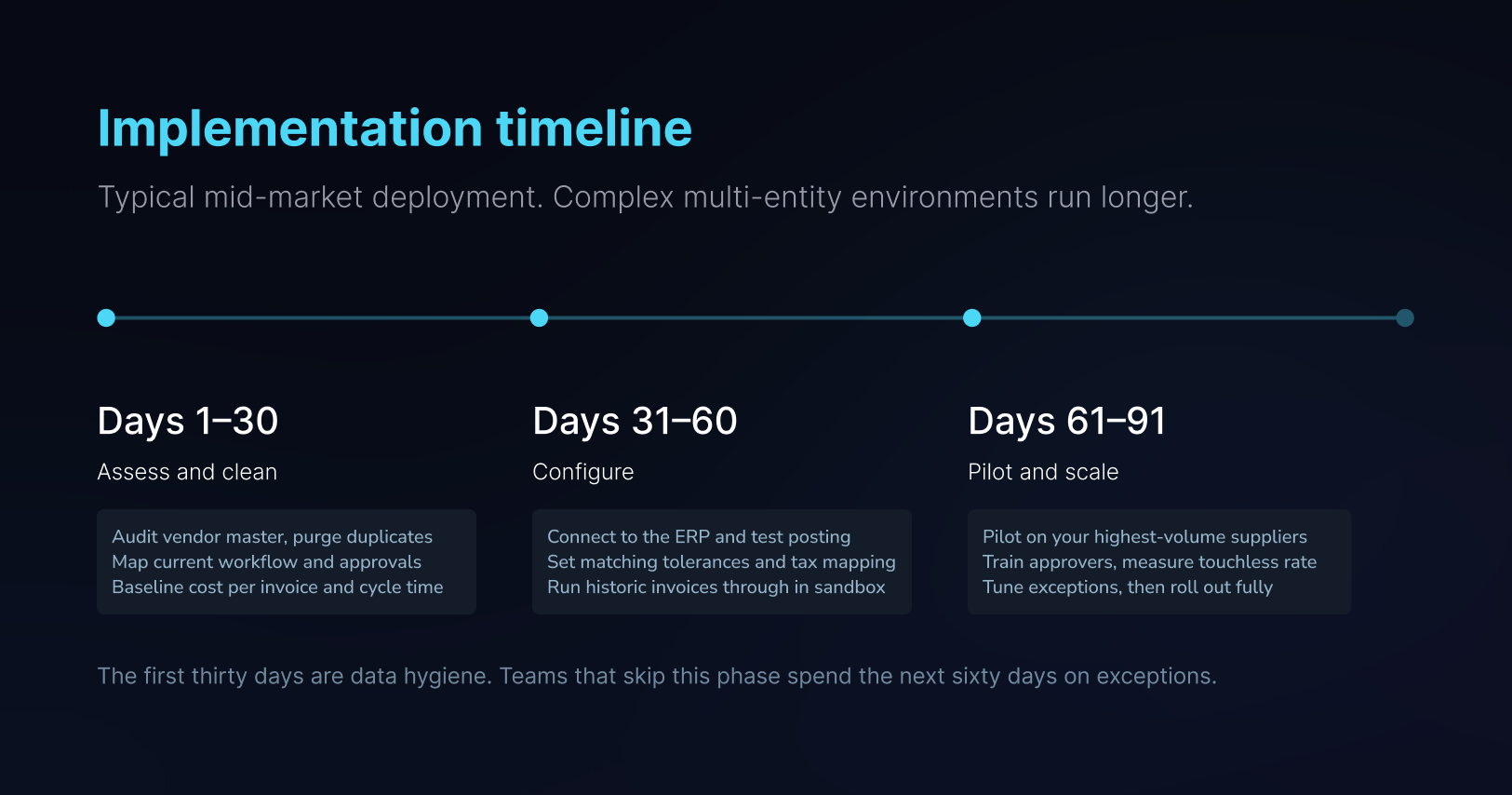
Deployment length is driven by data quality and integration complexity, not by software configuration time.
Why Every AP Process Is Different
Here is the assumption underneath most AP software: that there is a standard AP process, and your job is to adopt it.
There is not. The differences between two finance teams in the same industry are operational, not cosmetic.
- Chart of accounts structures differ, and so does how deep the coding goes: department, job, cost centre, entity, or all four.
- Suppliers have habits. One always bills freight on a separate line. One consolidates a month of deliveries into a single invoice. One splits a single PO across three shipments and invoices each separately.
- Approval thresholds vary by entity, department and spend category, and often by who is on holiday.
- Tolerance appetite is not uniform. The right variance band for freight is not the right band for raw materials.
- Some teams run strict PO discipline. Others have substantial non-PO spend that will never match against anything.
Most platforms answer this with a configuration screen and a support ticket. What happens next is that the finance team bends its process to fit the tool, and the parts that will not bend stay manual. That is a large part of why the touchless ceiling sits where it does.
How LayerNext works
How LayerNext Adapts to Your AP Workflow
Four layers, each owned by finance rather than IT.

The first three layers are set during deployment. The fourth is why the exception rate should fall over the first few monthsrather than staying flat.
The distinction that matters is the second layer. In most systems, a supplier who always bills freight separately generates an exception every single month, forever. Written as a rule, it stops being an exception at all. Multiply that across the thirty suppliers who account for most of your volume and you have moved your touchless rate more than any extraction improvement will.
The fourth layer is what separates a deployment that plateaus from one that improves. When someone corrects a GL code or resolves a match the agent got wrong, that correction is an input rather than a one-off fix.
How LayerNext Connects With Your ERP
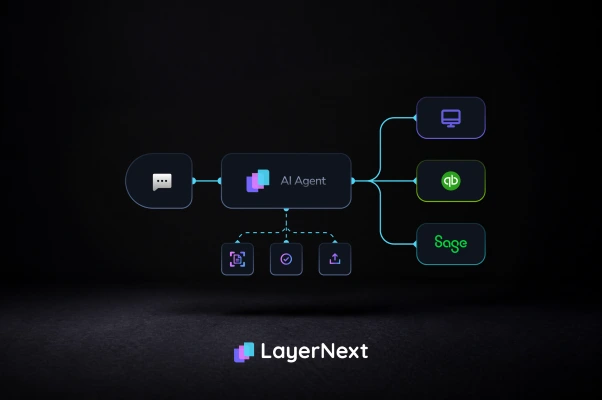
Computer-use agents are our core capability, but they are not the only path, and using one where a clean API exists would be the worse engineering decision. LayerNext runs on both, which means the question is not whether your system is supported but which path it takes.
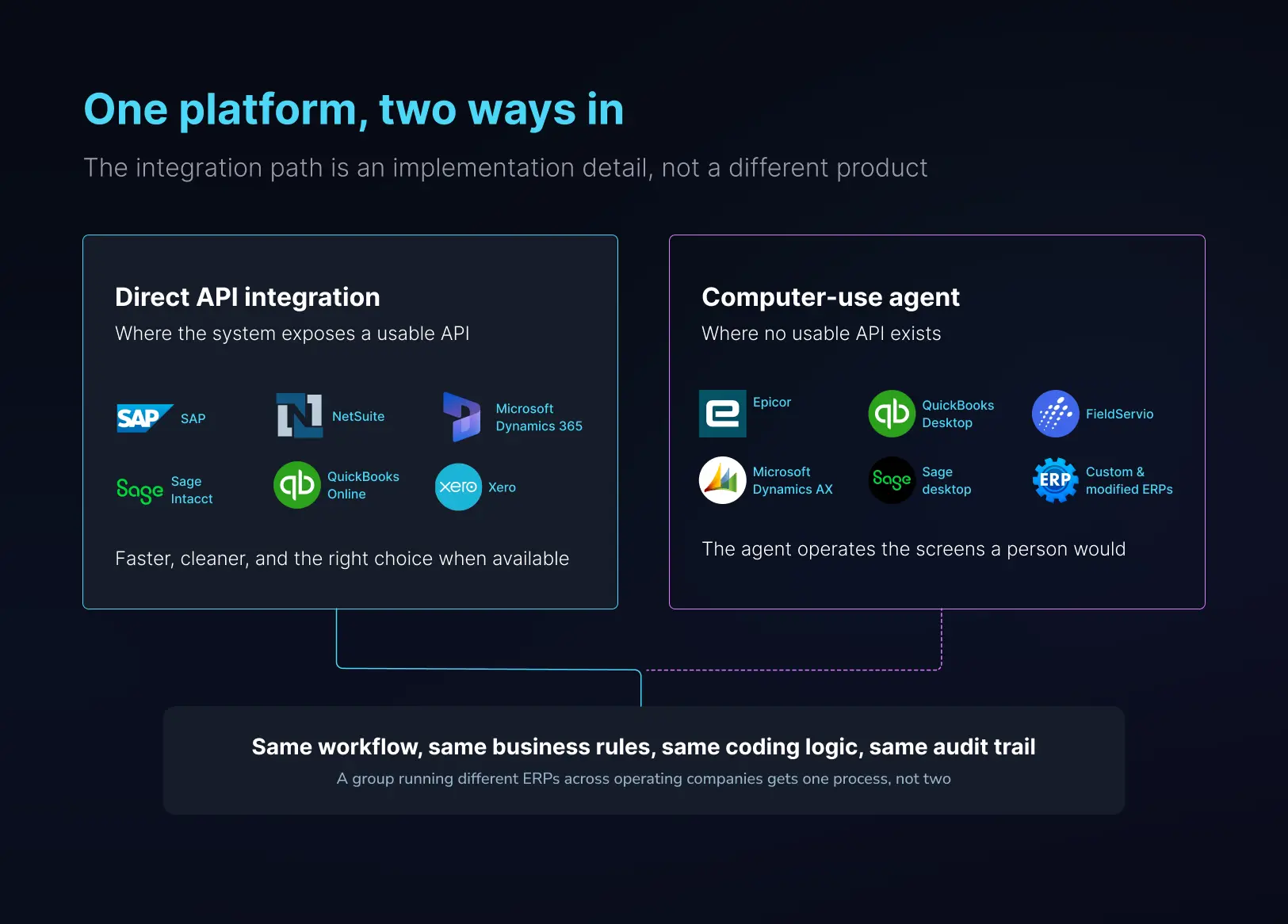
Note how often the same vendor family appears on both sides. Sage, QuickBooks and Dynamics each ship cloudproducts with open APIs and desktop products without them, which is exactly why a platform needs both paths rather thanpicking one
The workflow, the rules, the coding logic and the audit trail are identical on either path. That matters most for groups that have grown by acquisition and now run two or three different ERPs across their operating companies. They get one AP process rather than one per system.
Automating ERP Entry Without Manual Re-Keying
LayerNext runs all seven stages. The part worth explaining is stage six, because it is the one the category leaves unfinished.
Our agents operate the ERP through its own interface, the same screens and fields a person uses. There is no API requirement and no middleware layer, which means the system does not have to expose anything it was never built to expose. That is what lets the process complete rather than stopping at an export file.
What that produces, in the environments where AP automation has historically been treated as impractical:
One detail explains the gap between reading an invoice and finishing the work. At a distributor we deploy for, the operating company enters line-level packing slip detail and tracks inventory, and its item master carries duplicate and malformed codes accumulated over years. Matching a line to the right item is not an extraction problem. It means working out which of several near-identical codes is correct, and sometimes creating the item that should exist and does not. A template cannot do that. Neither can a file import.
Keeping Human Oversight in the AP Process
Nothing posts without approval. Validation gates run before entry, exceptions route to a person with the context attached, and every agent action is logged and traceable. Finance teams are accountable for what enters the ledger, and "the system did it" is not an answer a controller can give an auditor. The objective is to remove the typing, not the oversight.
What to ask any vendor, including us
- What happens at the moment of ERP entry?
Ask for the mechanism: API, file import, middleware, or direct interface operation. A vague answer, or a pivot to a list of supported modern ERPs, is itself the answer.
- Which accuracy number is that?
Field-level, document-level, or straight-through processing rate. Only the third predicts how much work your team keeps.
- Line items or headers?
Ask for a demonstration on a multi-page invoice with a continuation table.
- What is your touchless rate across all customers, not your best one?
The benchmark to compare against is 49.2%.
- Will you run our worst invoices?
Not the clean samples. The poor scan, the handwritten annotation, the supplier who changed their layout last month, the one covering three deliveries. Any vendor confident in their extraction agrees immediately.
We ask prospects for their ugliest invoices for exactly this reason. Curated demo documents tell you nothing about production.
Frequently asked questions

.webp)