


.webp)
Summary
- AP automation for wholesale distribution on SAP Business One means capturing each supplier invoice, matching it to the purchase order and goods receipt PO, applying written price and quantity rules, and posting the approved invoice into Business One without rekeying.
- SAP Business One stores vendors and purchase orders and posts A/P invoices, but a person still reads, matches, codes and routes each supplier invoice.
- Distributor invoices fail 3-way matching mostly on item codes, units of measure, partial deliveries, price variance and delivery tickets missing from the invoice, and each of those needs a written rule instead of a manual check.
- LayerNext, an AI-powered financial operations platform, works with SAP, including Business One, runs the chain from invoice ingestion to ERP posting and reconciliation, and requires human approval before anything posts.
AP automation for wholesale distribution on SAP Business One means capturing each supplier invoice, matching it to the purchase order and goods receipt, applying written price and quantity rules, and posting the approved result into Business One without rekeying. This guide walks through that workflow for a distributor, including vendor rebate credits, and compares the tools that connect to Business One, LayerNext included.
It is written for the controller or AP manager at a distributor whose AP team is small relative to its invoice count. The same sequence applies to a manufacturer or distributor on any ERP, and the Business One specifics are called out where they matter.
What SAP Business One Does and Does Not Do for Accounts Payable in Wholesale Distribution
SAP Business One, often shortened to SAP B1, posts the A/P invoice and leaves the invoice processing to the AP team. It is a sound financial core for a distributor. It stores vendor and item master data, holds purchase orders and goods receipt POs, posts A/P invoices and runs payment wizards. It does not read the supplier's PDF, match it line by line, code it or send it to an approver.
For a distributor, the right-hand column is large. Hundreds of vendors send invoices in their own formats, and every line has to land on the right item and the right cost account.
The Distributor Invoice Workflow on SAP Business One, Step by Step
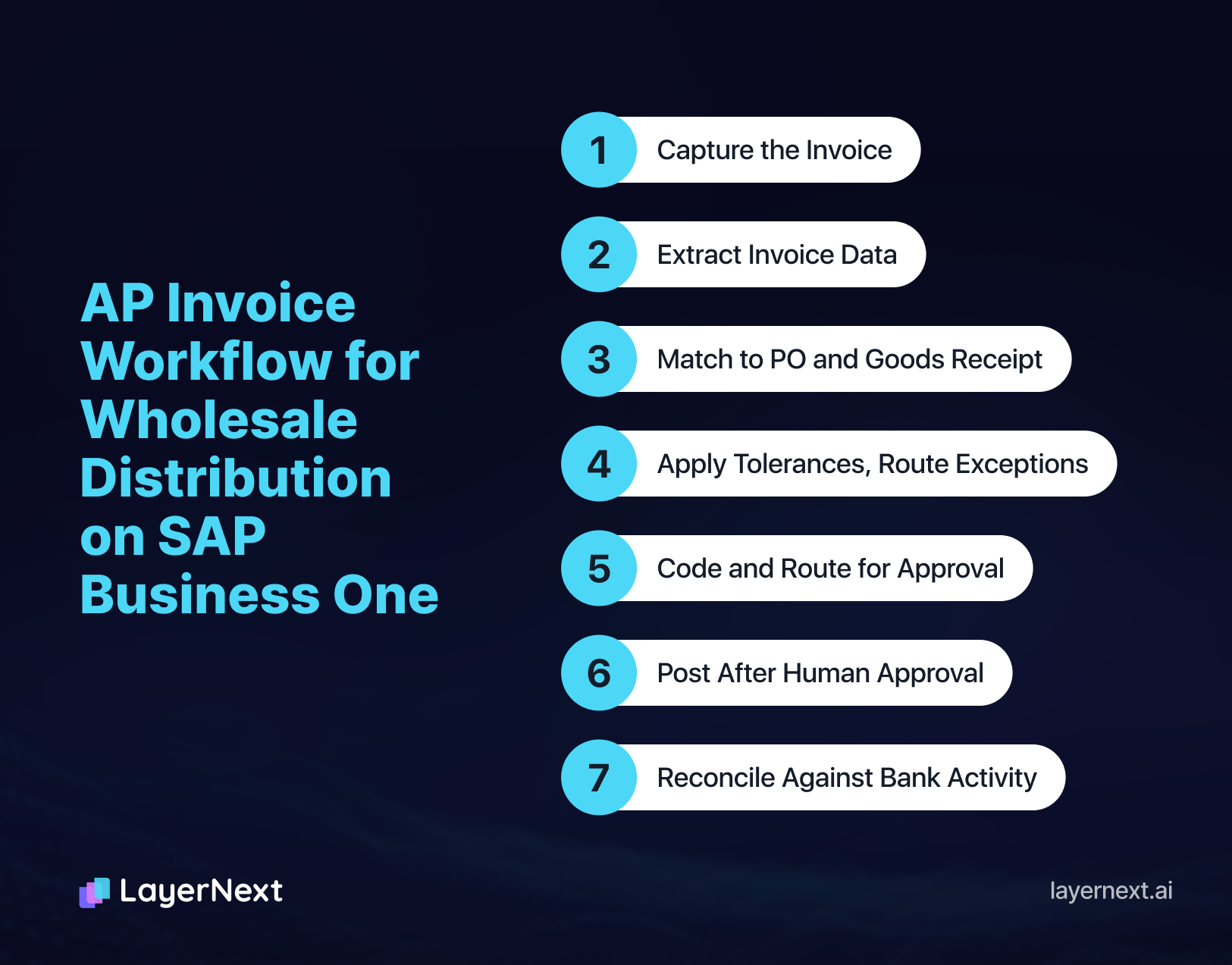
The sequence is the same whichever tool does the work. For a distributor on Business One it runs as follows.
- Capture the invoice from the shared inbox, a folder or an upload, including scanned and photographed documents.
- Extract the vendor, invoice number, dates, item codes, quantities, unit prices, tax and freight.
- Find the purchase order and goods receipt PO for that vendor and match the invoice line by line.
- Apply the price and quantity tolerances, and send anything outside them to a named person.
- Code the lines and route the invoice for approval.
- After a person approves, post the A/P invoice in Business One.
- Reconcile the payment against bank activity as it clears.
Where Distributor Invoices Fail 3-Way Matching in SAP Business One
Three-way matching compares the invoice, the purchase order and the goods receipt PO. Distributor invoices fail it in a few recurring places, and each needs a written rule rather than a manual check.
1. Item Codes and Units of Measure Cause Most Mismatches
A supplier's part number rarely equals the distributor's item code. The supplier bills by the case, and the warehouse received by the each. Neither is an error, and neither matches.
The problem grows with age. At a distributor LayerNext deploys for, the item master carries duplicate and malformed codes accumulated over years. Matching an invoice line to the right item is a judgment about which of several similar codes the supplier means, so it is not an extraction problem. The fix sits in item master cleanup and per-vendor mapping rules that finance maintains, which is why vendor master and item cleanup is the first phase of any deployment.
2. Partial Deliveries and Price Variance Need Written Limits
A supplier ships 480 of 500 units and invoices for 500. The goods receipt shows 480, the PO says 500, and nothing matches cleanly. The usual rule is to pay on the received quantity and hold the balance until the rest arrives or the vendor issues a credit.
Prices drift between the PO and the invoice, and surcharges appear. Most of these changes are legitimate. Tolerance bands set by category and vendor separate the small differences that pass from the ones a buyer has to review.
3. Delivery Tickets and Contract Pricing Leave Invoices With No PO to Match
Distributors that buy in bulk or on contract pricing often have no PO per delivery. Each load is counted or weighed on arrival, and a warehouse, dispatch or scale system produces a delivery ticket or receiving record. The supplier invoices later, sometimes with the ticket attached as a second page, and sometimes with the ticket number nowhere on the invoice.
In that case the ticket is the matching document. Someone has to find the ticket that belongs to the invoice, read both numbers, check them against the receiving record, and only then create the A/P invoice in Business One. The receiving record may sit in a warehouse or dispatch system that the AP team does not work in.
Three rules cover most of the work:
- A quantity or weight tolerance set by finance. Counts and weights vary legitimately between origin and destination, so anything inside the tolerance passes and anything outside goes to a person.
- A duplicate check on ticket number. The same ticket on two invoices has to be caught before either one posts.
- A received-not-invoiced check at month end. Someone compares the receiving report with the A/P ledger and books an accrual for goods that arrived without an invoice, and the two reports are usually matched by hand.
4. Duplicates, Credit Memos and Vendor Statements Need Their Own Checks
The same invoice can arrive by email and by post. The check on vendor, invoice number and amount has to run before the invoice posts, and it has to look across the whole vendor history, not only the current batch.
Credit memos and vendor statements add a second reconciliation. A distributor that short-pays a damaged shipment raises a debit memo, the vendor answers with a credit memo, and someone has to apply it to the right open invoice. The vendor's statement is the cross-check on whether that happened.
5. Vendor Rebate Credits Reach AP After the Spend Has Happened
Volume rebates are earned through the year and settled after the period closes, so AP sees the money, or the shortfall, late. SAP documents purchasing rebates for S/4HANA through supplier condition contracts, accruals and settlement documents, and a Business One distributor should confirm how its own setup records rebate agreements, because that process is not confirmed for Business One. Either way, the vendor's settlement reaches AP as a credit memo or a deduction.
Enable, a rebate software vendor, surveyed more than 100 manufacturers and distributors across 13 industries for its 2024 State of Volume Rebates Report, released December 12, 2023. The distributor findings are a reasonable picture of how rebates are tracked, with the caveat that the survey is vendor-run and almost three years old.
- 87% of distributors said rebates are central to profitability.
- 43% knew the rebate amount earned from each manufacturer they buy from.
- 52% did not believe they receive all the rebates they earn.
AP has a defined role when a rebate credit arrives. The checks are specific.
- The credit memo traces to a known rebate agreement with the vendor.
- The amount matches the distributor's own tracked accrual, or the difference is documented.
- The credit is posted as an A/P credit memo against the right vendor and GL account.
- The credit is applied to an open invoice or collected, and it appears on the vendor's next statement.
Differences between the vendor's figure and the distributor's tracking are raised with the vendor before year end.
AP Automation Options for SAP Business One Compared
The options differ mainly in how they connect to Business One and in where the process stops. The descriptions below come from each vendor's own pages as of October 1, 2026, and details change, so confirm them before buying.
A short list of statements separates the options better than feature lists do. Each should have a plain answer from any vendor, LayerNext included.
- The tool posts the A/P invoice in Business One itself, or it produces a file that someone imports.
- Matching reads the distributor's own purchase orders and goods receipt POs, not a copy.
- Item codes and units of measure map per vendor, with the rules kept by finance.
- Where there is no PO, the tool can match to a delivery ticket or receiving record.
- Exceptions go to a named person with the invoice number and the issue.
- The vendor can name a reference running on the same Business One version and deployment type, cloud or on-premises.
For a wider comparison that is not specific to SAP, LayerNext's own roundup of AP automation tools covers legacy ERPs through enterprise systems.

How LayerNext Runs the Distributor Invoice Workflow on SAP Business One
LayerNext is an AI-powered financial operations platform, headquartered in San Francisco and Winnipeg, whose AI agents run the invoice workflow from ingestion through ERP posting and reconciliation. Most AP tools capture invoice data and stop, and the team then keys it into the ERP and reconciles it later. LayerNext carries the same invoice through each stage below.
Stage 1: Ingestion
LayerNext collects invoices from a dedicated email address, shared folders, cloud storage such as S3 or Google Cloud, a connected SQL database or mobile capture. It reads scanned, handwritten and non-standard documents without a template per vendor. Vendors keep sending invoices the way they do today.
Stage 2: Validation and PO Matching
LayerNext runs 2-way and 3-way matching against purchase orders, and against the goods receipt where one applies. Where contract pricing means there is no PO per delivery, it matches to the delivery ticket or receiving record. It checks for duplicates and flags discrepancies before they reach the ledger. The team sets the price and quantity tolerances.
Stage 3: Business Rules
LayerNext applies the coding and approval rules finance has written, by vendor, entity, amount or category, and finds the right rule among thousands. The team writes and changes the rules in plain English, with no IT ticket.
Stage 4: Exception Handling
Anything that does not match cleanly becomes a task in a shared portal, tagged with the invoice number, the supplier and the issue type. The team resolves each task, such as a short-shipped line or a price outside tolerance.
Stage 5: Approval
LayerNext routes the invoice to the approver, sends reminders on pending approvals and tracks how long each approver takes. The approver decides, and nothing posts without a person's approval.
Stage 6: ERP Entry
After approval, LayerNext posts the entry into SAP. It uses the SAP API where a usable one exists and operates the application screens where it does not. The team reviews the audit trail when needed.
Stage 7: Reconciliation and Reporting
LayerNext matches posted transactions against bank feeds as they arrive, through Plaid, and keeps a full audit trail. An Insight Board shows items processed and clarification requests pending. The team reviews matches and open items instead of reconciling by hand at month end.
The item-code, unit-of-measure and price-variance problems described earlier are handled through the rules in stage 3 and the tasks in stage 4. A mapping from a supplier's part number to the distributor's item code is a vendor-specific rule that finance writes once and the agent applies to later invoices from that vendor.
LayerNext works with SAP, including Business One. The workflow, business rules and audit trail are identical on either connection path, and which path fits a given Business One version and deployment, cloud or on-premises, is settled in discovery. SAP is one of several systems LayerNext works with, alongside QuickBooks, Dynamics 365, Sage, Xero, NetSuite and legacy or custom ERPs, so a distributor group running more than one ERP gets one AP process instead of one per system.
More detail on each stage is on the AP automation page. Bank matching is covered under account reconciliation.
A Price Tolerance Rule Written in Plain English
A controller can write a price limit as a sentence and have it applied to every invoice. LayerNext's Custom Workflows and Business Rules take approval chains, coding logic and tolerances in plain English, and finance manages them without an IT ticket. The examples below are for a distributor. The percentages are illustrative, and real limits come from a team's own invoice history.
For vendors in the fasteners category, accept invoices where the unit price is within 2% of the purchase order price. Between 2% and 5%, send the invoice to the purchasing manager for approval. Above 5%, hold the invoice and create a task for the AP manager. Never accept a quantity higher than the goods receipt shows.
A second rule can cover bulk loads billed against a delivery ticket.
For vendors billed against delivery tickets, accept the invoice where the billed quantity is within 1% of the ticket quantity. Above 1%, create a task for the AP manager. If the ticket number already appears on another invoice from this vendor, hold the invoice.
Each category and vendor can carry its own version. Fast-moving commodity lines usually take tighter limits than freight-heavy or special-order lines.
.webp)
Deployment Timeline and Controls for AP Automation on SAP Business One
LayerNext phases enterprise deployments as discovery in weeks 1 to 2, a pilot in weeks 3 to 6 and full deployment in weeks 7 to 12.
Teams that skip the vendor master cleanup spend the later weeks clearing exceptions that were avoidable.
On control, a person approves before anything posts, validation gates run before entries reach the ledger, and a full audit trail is kept. Data is encrypted in transit and at rest, access is restricted, security practices are SOC 2-aligned, and customer financial data is never used to train models.
LayerNext measured platform metrics of 90 to 165 hours saved per month for finance teams and 95%+ task accuracy on defined workflows. A distributor's own results depend on its invoice mix and data quality, which is the reason the pilot runs on real invoices.
Frequently Asked Questions
