


Summary
- The checklist has 20 controls across six points in the payment path, each with a test.
- Five come first: keeping vendor and bank-detail changes away from payment release, a callback on every bank change, an independent approver, a payment-run check and an independent bank reconciliation.
- Seven pairs of duties in the matrix should never sit with one person.
- With no receiving record, a named person outside AP confirms services, and the delivery or scale ticket stands in for bulk loads.
- LayerNext applies the intake, matching, approval and reconciliation controls on top of the ERP you already run.
The accounts payable internal controls that matter most keep one person from creating a vendor, approving its invoices and releasing its payments, and put someone outside AP in charge of confirming that the goods or work were received. The checklist below has 20 controls, each with a test.
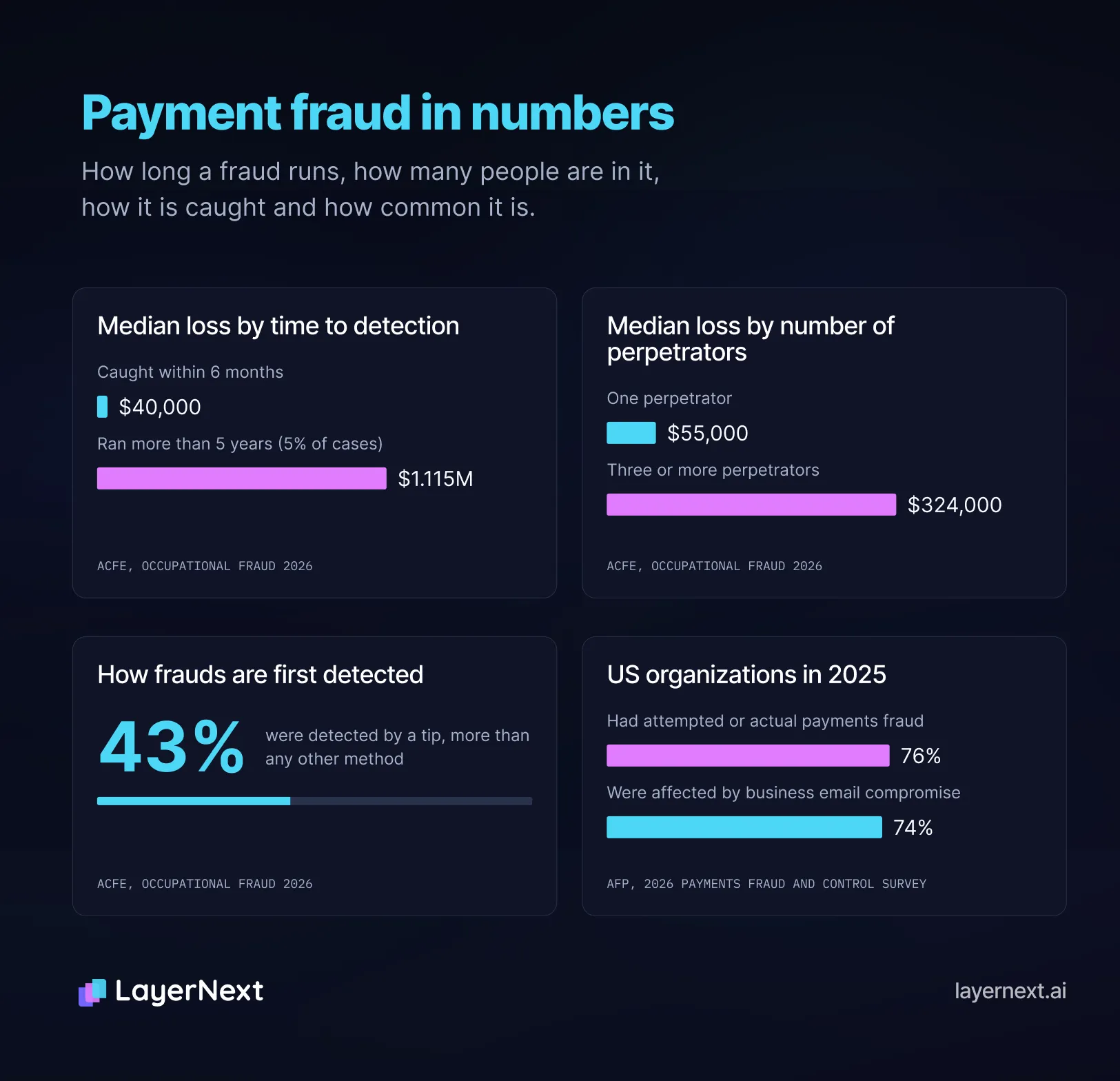
Controls drift in ordinary ways: a permission added for leave cover never comes off, and a branch manager approves an invoice with no receiving record to check it against. In the AFP's 2026 Payments Fraud and Control Survey, 76% of US organizations had attempted or actual payments fraud in 2025, and 74% were affected by business email compromise. In the ACFE's Occupational Fraud 2026, frauds caught within six months had a median loss of $40,000, against $1.115 million for the 5% that ran more than five years.
The Accounts Payable Internal Controls Checklist
Run each test quarterly on your own records and keep each result with its date, which is the evidence an auditor asks for. Set thresholds to your own volumes.
The Five Controls to Put in Place First
Each closes a gap where one person, or one email, could move money alone.
- Keep vendor creation and bank-detail changes away from anyone who can release a payment (controls 1, 2 and 13).
- Call back on every bank change, to a number already on file (control 2).
- Keep the approver apart from the person who entered the invoice (control 11).
- Compare each payment run with the approved invoice list before release (control 14).
- Have someone with no payment authority reconcile the bank (control 16).
Vendor Master Controls
Invoice Intake Controls
Matching Controls
Approval Controls
Payment Release Controls
Reconciliation and Oversight Controls
Confirming Receipt Without a Receiving Record
Matching controls assume a receiving record exists. Services and bulk loads often have none.
Services
Maintenance, repairs and contractor work leave no receipt, and a coordinator usually chases the responsible manager by email. Control 7 asks for a dated confirmation from a named person outside AP, recorded in the system and not in an email thread. In LayerNext, an approval chain by vendor or GL code sends the invoice to that manager, a reminder follows if it sits, and the approval is logged automatically. If the requester is the only possible confirmer, a second person reviews that vendor's services spend monthly.
Bulk loads and blanket contracts
Loads are weighed or counted on arrival, and a scale house, warehouse or dispatch system produces a ticket. Contract pricing means no PO per load and the ticket number may not be on the invoice, so the ticket is the matching document. Control 6 sets a tolerance because origin and destination weights differ legitimately, and control 5 catches one ticket on two invoices.
An Accounts Payable Segregation of Duties Matrix
X means never combine the two duties in one person; if the team is too small, move one duty to the owner or the bank. A ! means combine only with a named compensating control. ok means a later control reviews the pair.
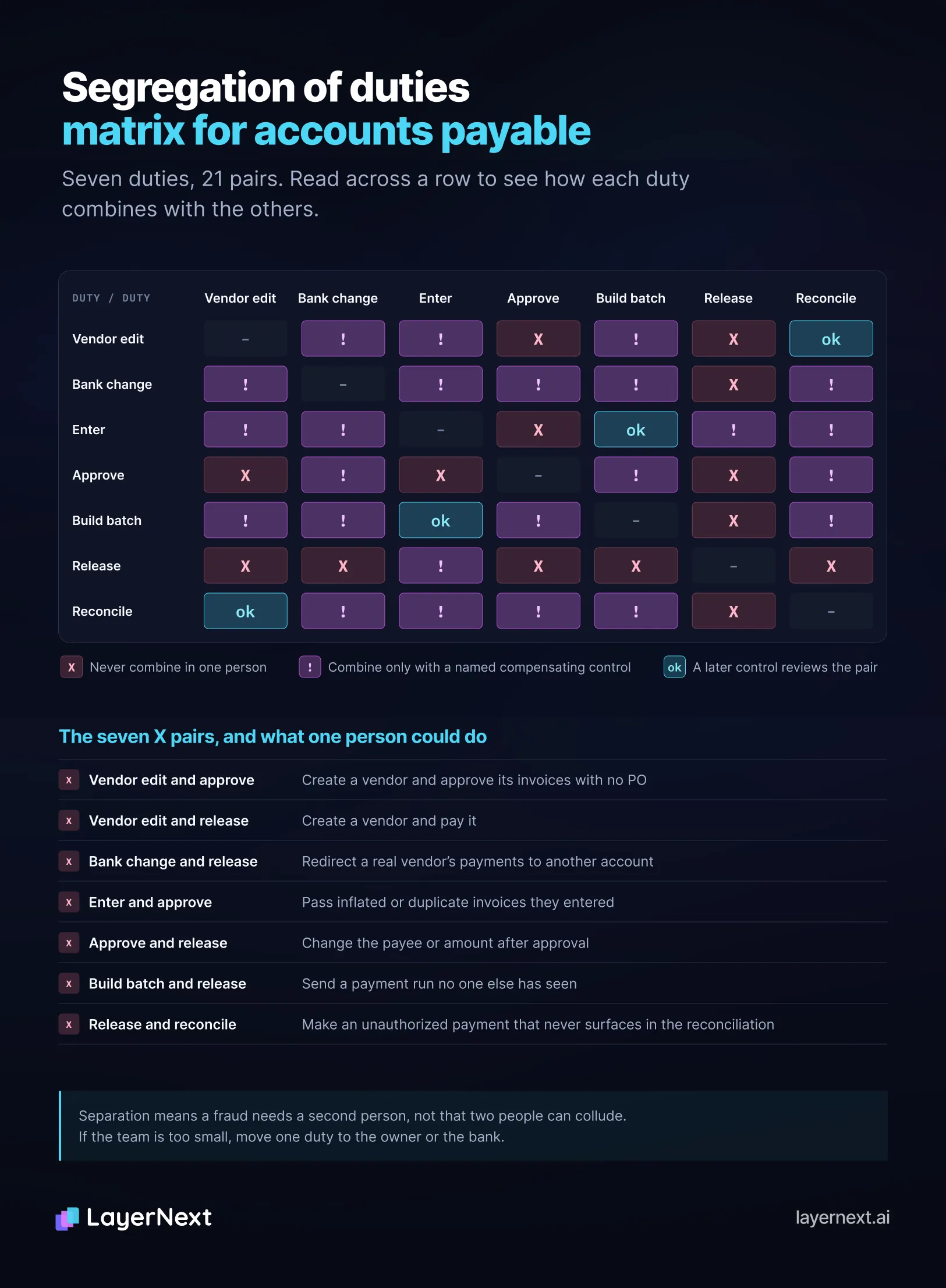
In LayerNext, role-based permissions keep the person who submitted an invoice from approving it, which covers the enter and approve pair. Separation means a fraud needs a second person, not that two people cannot collude. In the ACFE's cases, three or more perpetrators had a median loss of $324,000, against $55,000 for one.
Segregation of Duties Across Branches, Plants and Small Teams
Few AP teams reach textbook separation, so split the costliest pairs first and add outside review.
Write each compensating control down: the risk, who performs it, how often, what they examine and the record it leaves.
Checking Real Permissions and Change History
Job titles hide conflicts, so export every user and role from the AP system, the ERP and the bank portal, mark each user against the seven duties, and fix anyone who holds both duties of an X pair first.
For Epicor and other ERPs, ask your administrator for the same two exports.
Accounts Payable Fraud Schemes, Prevention and Detection Signals
Each scheme maps to the controls that stop it and a signal to test each month.
LayerNext raises four of these signals as they occur: duplicates, prices above the PO, invoices with no PO and bank-detail changes. The monthly test then confirms the flags were worked. Tips detected 43% of the ACFE's frauds, more than any other method. The largest drops in median loss followed management review (55%), proactive data monitoring (53%), surprise audits (50%) and job rotation or mandatory vacation (49%), which map to controls 19 and 20.
How LayerNext Applies These Controls from Intake to Posting
LayerNext is an AI-powered financial operations platform. Its AI agents take an invoice from intake to posting in the ERP you already run, following rules your finance team writes. These stages are common starting points, and business rules and custom workflows carry any other step you define.
Intake and duplicate checks
Invoices arrive by email, shared folder, cloud storage or phone photo, and the agents read scans and unfamiliar layouts without a template per vendor. The audit trail starts at receipt, which gives control 4 its intake record. Duplicates are flagged at capture, before an invoice reaches the ERP, and control 5's quarterly export is your evidence that the check is working.
Matching to the PO and receipt
Each invoice is compared line by line with its PO, receipt or packing slip and vendor record, against tolerances you define. Price drift, quantity mismatches, missing POs and wrong or closed POs become named tasks before anything posts, each tagged with the invoice, supplier and issue type. A missing PO or receipt prompts a specific question to the right person (controls 6 and 8).
Vendor bank-detail changes
A change to a vendor's bank details is flagged for review. The callback in control 2 stays a person's call to a number already on file, and the flag starts it.
Approval
Approval chains are written in plain English by vendor, amount or GL code, and routing can also use entity, location, department or exception type, so a branch and a plant follow the same logic. Reminders go out on pending approvals, approver turnaround is tracked, and approvers can act from the iOS and Android apps. Role-based permissions limit access to each finance workflow and keep a submitter from approving their own invoice, and nothing posts without human approval (controls 10 and 11).
Posting to the ERP
After approval, the agent enters the invoice in the ERP and confirms it saved. It uses the API where one exists, as with NetSuite and Microsoft Dynamics 365, and the ERP's own screens where it does not, as with QuickBooks Desktop and Dynamics SL, with the same rules and audit trail on both paths. Payment release and bank authorization (controls 13 to 15) keep running in your ERP and bank portal, now fed by invoices that were matched, approved and logged first.
Reconciliation
Supplier statements are reconciled against open AP, with discrepancies flagged and supplier credit memos applied (control 18). A separate bank reconciliation workflow takes a live bank feed or an uploaded statement, matches each line to the ledger as it lands, and sends only exceptions to a person. It also flags anomalous amounts, new payees and duplicate payments. Control 16 asks that whoever reviews those exceptions holds no payment authority.
Audit trail
Every action the AI takes and every decision a person makes, including each approval and human correction, goes into one unified log from receipt to posting, and nothing is deleted or overwritten. Admins and superadmins can export it, which gives control 12 the data to count backup approvals and a surprise review (control 20) a record to sample. Edits to a business rule show who made them and when.
How deployment starts
Deployment starts by mapping your existing process, business rules, approval chains and exceptions, then runs a controlled subset of the workflow with human review before it scales.
FAQ
