


Summary
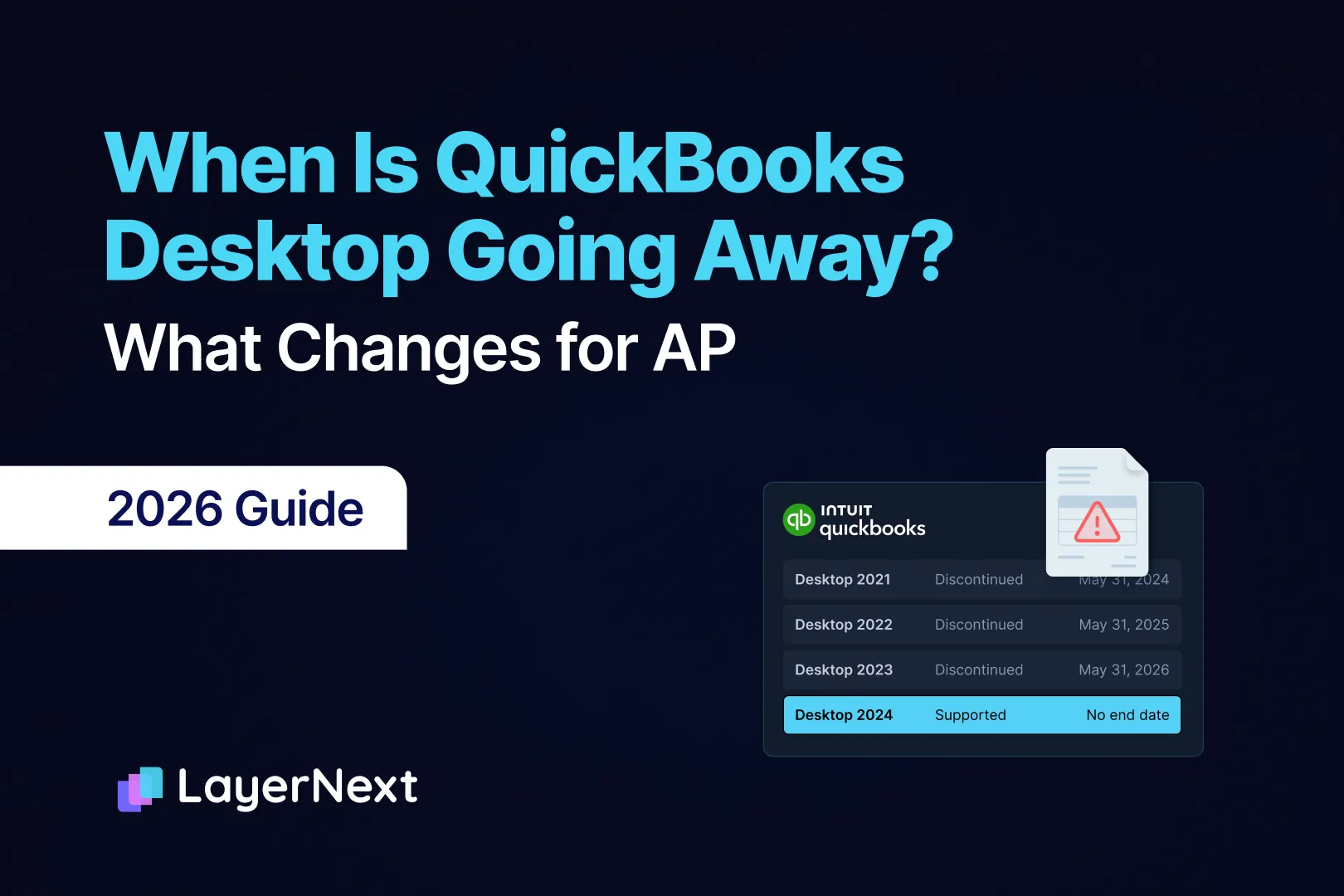
- QuickBooks Desktop has no single end date. Intuit retires each version's online services about three years after release: 2021 on May 31, 2024, 2022 on May 31, 2025, and 2023, including Enterprise Solutions 23.0, on May 31, 2026.
- Intuit has withdrawn the May 2027 cutoff for Desktop 2024. Pro Plus, Premier Plus and Enterprise Solutions 24.0 have no end date, and Intuit has released no new Desktop version since 2024.
- Pro Plus, Premier Plus and Mac Plus have not been sold to new US customers since September 30, 2024. Enterprise is the only edition still sold. Pro Plus and Premier Plus renewal prices rose on February 1 and again on October 1, 2026.
- On a discontinued version the bank feed, online payments sent from QuickBooks, emailed POs, multi-currency and security patches stop. QuickBooks can still be used and bills can still be entered.
- On Desktop 2024 and Enterprise, bills are still keyed by a person. Bill Pay and Enterprise approvals work within limits that AP teams run into, including approvals that skip bills created from item receipts.
- A move to QuickBooks Online turns item receipts into bills, removes the link between bills and POs, and changes how approvals are built.
- LayerNext reads, checks and enters bills on QuickBooks Desktop through its own screens and on QuickBooks Online through Intuit's API, with exceptions routed to a named person.
QuickBooks Desktop does not have one end date. Intuit retires each version's online services about three years after release, and Desktop 2023 reached that point on May 31, 2026. Intuit has withdrawn the May 2027 cutoff for Desktop 2024, so Pro Plus, Premier Plus and Enterprise now have no date at which support ends.
For an AP team, the date matters less than which of Intuit's services your version still has. On a discontinued version QuickBooks can still be used and bills can still be entered, but the bank feed stops downloading, online payments sent from QuickBooks stop, POs can't be emailed to vendors, and the file that holds every vendor's bank details stops getting security patches.
Quick answer
- QuickBooks Desktop is not going away on one date. Each version loses Intuit's online services about three years after release.
- Desktop 2023 and earlier are already discontinued, 2023 on May 31, 2026. Desktop 2024 now has no end date, so any article giving 2027 as the end date is out of date.
- For AP, a discontinued version loses the bank feed, online payments sent from QuickBooks, emailed POs and security patches. A supported version keeps AP as it is today, including the limits in Bill Pay and Enterprise approvals.
- A move to QuickBooks Online converts item receipts to bills and removes the link between bills and POs.
Your Version Decides the Date
Open QuickBooks and press F2. The Product Information window shows the version year, and every date below depends on it.
Intuit ended services for Desktop 2021 on May 31, 2024, Desktop 2022 on May 31, 2025 and Desktop 2023 on May 31, 2026. It stopped selling new Pro Plus, Premier Plus, Mac Plus and Enhanced Payroll subscriptions after September 30, 2024.
A discontinued version isn't switched off. Intuit has told customers on one that they can keep using it as long as their operating system supports it, without updates or support.
Subscribers on an active Desktop Plus or Enterprise plan get version 2024 at no extra cost, so a company on 2023 with a current subscription can fix this by installing the update.
Intuit Withdrew the 2027 Cutoff for Desktop 2024
Until recently the plan was the usual three years. Desktop 2024 would lose its services in May 2027, the way 2023 did in May 2026.
Intuit now says Pro Plus, Premier Plus and Enterprise Solutions 2024 won't be discontinued in May 2027. It is moving away from the three-year lifecycle and will keep version 24.0 up to date with security patches, tax law compliance, support and product updates. Changes now arrive as releases inside 24.0, such as R21 on June 9, 2026, so Intuit has released no Desktop 2025, no Desktop 2026 and no Enterprise 25.
The change removes the deadline. It does not reopen sales. A company whose Pro Plus or Premier Plus subscription lapses can't buy it again as a new customer, and Enterprise is the only way back onto Desktop.
Pro Plus and Premier Plus Renewals Rose Twice in 2026
Intuit raised prices across Desktop on February 1, 2026, taking single-user Pro Plus from $999 to $1,149 a year. A second repricing of Pro Plus, Premier Plus and Mac Plus subscriptions took effect on October 1, so the price on your renewal notice is the one to use.
QuickBooks Online went up too. For subscriptions renewing on or after August 1, 2026, Plus is $140 a month and Advanced is $340. Advanced matters for AP because it includes multi-step bill approval and payment release workflows.
The subscription price is one cost. The time the team spends keying bills and matching payments by hand is another, and the rest of this article looks at where that time goes.
What Stops in AP on a Discontinued Version
The software keeps running, so the loss of a service shows up as a manual step. When the bank feed stops downloading, cleared checks sit unmatched until someone matches them by hand.
Each service that ends has an AP equivalent.
What doesn't depend on Intuit's servers keeps working: entering bills, receiving items against POs, printing checks and running the AP aging. The work still gets done, with more hands, and each manual match and re-keyed payment is a place for a mistake.
Whether Bill Pay powered by Melio keeps working on a discontinued version is not something Intuit has stated, so ask Intuit support before relying on it.
How AP Runs on Desktop 2024 and Enterprise Today
A supported version gets the services back. The AP process is the one Desktop has always had.
Bills are still entered by a person. Upload and Review Bills, on Pro Plus, Premier Plus and Enterprise 2022, captures the bill data and proposes a match to an existing transaction or a new bill, and a person reviews, edits and approves it.
Payment runs through Bill Pay powered by Melio on Pro Plus, Premier Plus and Enterprise from 2022. There is no subscription fee. ACH is free, ACH to a paper check costs $1.50, a card payment costs 2.9%, Fast ACH costs 1% where it is available and Fast Check costs $20. The limits are where AP teams feel it.
Approvals exist only in Enterprise Platinum and Diamond. Pro Plus and Premier Plus have none, so approval happens in email or on paper. In Enterprise, an approval process names the approver by name and email, and it can trigger on amount, vendor name or vendor type. Only an admin can create one. The approval list shows the first 101 transactions until some are approved or rejected.
Two exclusions limit what approval covers. Bills created from an item receipt skip approval, and so do transactions created by an admin. For a company that receives against POs, the first one covers every bill it creates from a receipt. For example, with a rule that sends bills over $10,000 to the controller, a $48,000 steel invoice created from an item receipt is saved without that review, and a $12,000 invoice keyed by hand is not.
Staying on Desktop 2024 keeps this process as it is, at a Plus renewal price that has gone up twice this year. For companies where Desktop's inventory, job costing or offline access does real work, staying is a reasonable decision. A count of how many bills the team keys each month shows what staying costs. The guide to AP automation for QuickBooks Desktop Enterprise covers what Enterprise handles and what it leaves to a person.
What Changes in AP When You Move to QuickBooks Online
Intuit's migration tool moves most AP history across. A few records change shape on the way, and AP is where they show up.
The table follows Intuit's rules for what moves from Desktop to Online and its AP data guidance.
Two of these need attention before the move. Item receipts that were waiting for a vendor bill arrive as bills, so a receipt that was never billed now looks like a payable. And with the PO link gone, the next invoice against a partly received PO has nothing to match to. Both are easier to handle before the move. Bill or clear open item receipts, save an open PO report, and cut over right after a close.
Vendors billed in another currency need a check too. Multicurrency is available on Essentials, Plus and Advanced, and QuickBooks Bill Pay isn't compatible with it.
The cut-over also has a clock. Desktop data has to be imported within 90 days of creating the QuickBooks Online company, or 180 days when an accountant creates it.
Approval processes aren't among the records that move, so plan to set approvals up again. Multi-step bill approval in QuickBooks Online is available with Bill Pay Elite or QuickBooks Online Advanced. A step can route to up to seven approvers, a workflow can have up to five sequential layers, and a bill nobody reviews within 30 days is automatically denied. Payment release approvals can only be given by admins. An approver who is away for a month comes back to bills that were denied automatically.
Where LayerNext Fits on Either Side of the Decision
The bills arrive whichever version you run. LayerNext is an AI-powered financial operations platform whose AI agents do AP work on QuickBooks Desktop or QuickBooks Online. The agents run whatever workflow your finance team defines, so the steps below are common starting points. A person steps in for an exception, an error or an approval a rule assigns.
For the bills LayerNext enters, approval happens before entry, so the item-receipt exclusion in Enterprise approvals does not apply to them.
Payment release stays in QuickBooks and your bank, fed by bills that were matched, approved and logged first.
Across deployments, finance teams see 90 to 165 hours saved a month and 90 to 100% fewer processing errors. The figures are not specific to QuickBooks, and they depend on bill volume and data quality.
A Short Plan Before Your Next Renewal
- Press F2 and write down the version year. A 2023 or earlier version has already lost its services.
- Read the price and date on the renewal notice, and compare it with the QuickBooks Online plan you would need.
- List the AP steps that depend on Intuit's services: the bank feed, payments sent from QuickBooks, POs emailed from QuickBooks and vendors billed in other currencies.
- Count the bills the team keys each month, and how many pass through Enterprise approval.
- If Online is on the table, bill or clear open item receipts, save an open PO report and pick a cut-over date inside the import window.
- Clean the vendor list. Duplicates, inactive vendors and old bank details are cheaper to fix before a migration than after.
- Write down who approves what, wherever it lives today.
FAQ
