


Summary
- QuickBooks works as an HVAC or plumbing company's books when the plan has classes and Projects, field service software runs dispatch, and every supplier bill is coded to its job.
- Projects need QuickBooks Online Plus (5 users, 40 classes and locations) or Advanced (25 users, unlimited).
- Housecall Pro, Jobber and ServiceTitan send invoices and payments to QuickBooks, but none documents a sync of supplier bills.
- LayerNext reads those bills, codes them to the Project and reconciles bank accounts on QuickBooks.
QuickBooks can carry an HVAC or plumbing company's books when the plan includes classes and Projects, field service software owns dispatch and customer invoices, and every supplier bill is coded to the job it belongs to. The coding is the part that breaks.
A job's cost arrives from several directions: equipment from a distributor, parts from a counter account, refrigerant from a wholesaler, electrical work from a subcontractor. Each bill names a job, work order or truck in a different place, and when one lands on the wrong job a profitable install looks average and a small repair looks like a loss. The sections below cover the QuickBooks setup briefly, then the supplier bills and month-end work that grow with the company, and how they can be automated.
Which QuickBooks Plan an HVAC Company Needs
Projects group the estimates, invoices, bills and expenses for one customer job and show income, costs and profit margin. They need Plus or Advanced, and estimate versus actuals needs Advanced. Technicians can be time-tracking-only users, unlimited from Essentials up, so five office users and a class per line of business fit on Plus. The 40 classes and locations run out once you add a class per truck.
Desktop Enterprise supports up to 40 users on Diamond, and includes a Construction and Contractors edition with job cost tracking.
Set Up Classes and Projects, Then Bill the Install
- Create classes for your lines of business, such as Service, Installation, Maintenance Plans and Commercial. Add a class per branch or truck only if you stay under the cap.
- Turn on class tracking (Settings, Account and settings, Advanced in QuickBooks Online; Edit, Preferences, Accounting in Desktop) and Projects.
- Open one Project per install and one per larger repair. Assign a bill, check or expense to its project by selecting the project in the Customer/Project field.
- Write the work order number in the memo of every bill. Custom fields on bills are an Advanced feature.
An install is sold from an estimate and billed in stages. In QuickBooks Online, progress invoicing creates several invoices from one accepted estimate once you turn on "Create multiple partial invoices from a single estimate" under Settings, Account and settings, Sales.
Deposits take more care. QuickBooks Online does not process a prepayment automatically. Invoice the deposit against an Other Current Liabilities account, then deduct it on the final invoice. Intuit's guidance on this dates from 2018, so confirm the treatment with your accountant.
How One Wrong Bill Throws Off Job Costing
A job carries five kinds of cost. Equipment, materials, subcontractors and permits arrive on bills coded to the Project. Labor comes from technician time, which can be added to a project as labor cost from timesheets.
The figures below are made up for illustration. Job 5120 is a furnace and air conditioner replacement billed at $11,800, with equipment of $4,300, materials of $620, labor of $1,300, an electrical subcontractor at $950 and a permit of $180. Job 5127 is a drain cleaning billed at $520 with $180 of labor.
.webp)
What QuickBooks Leaves to Other Tools
Maintenance plans bill from recurring transactions, which save as drafts someone reviews, and AutoPay needs QuickBooks Payments. Visits and renewals live in the field service software.
Intuit's pay types article names hourly, salary and commission as base pay and does not describe a flat-rate or per-job type, so check with Intuit before paying technicians by the job.
QuickBooks Online has no true multi-location inventory, and multi-site stock needs Advanced Inventory, which is tied to a Platinum subscription.
What Housecall Pro, Jobber and ServiceTitan Send to QuickBooks
None of the three documents a sync of supply house, distributor or subcontractor invoices. Ask any vendor what it creates in QuickBooks and in which direction. That gap is where the hand entry happens.
The Supplier Bills Your Team Enters by Hand
Hand entry fails two ways: lines coded to the wrong job or none, and credits nobody claims.
To size the problem, count last month's supplier bills across supply houses, distributors, subcontractors and fuel cards. The average cost of processing one invoice is $9.84 (Ardent Partners, The State of ePayables 2025). At that average, 100 bills a month costs about $11,800 a year, 300 about $35,400 and 600 about $70,800 (our arithmetic: bills x 12 x $9.84). The benchmark is an average and your own cost per bill may be lower, so count your hours too.
One Supplier Bill, Start to Finish
Take a $412 counter ticket from a supply house, photographed by a technician with "WO 5120" and a truck number written on it. The same morning a distributor emails an invoice for the $4,300 furnace and air conditioner on that job.
- Intake.
The photo and the emailed invoice are read without vendor templates, and a duplicate check runs at capture. - Coding.
A rule reads the work order number and assigns the QuickBooks Project for job 5120 (Customer:Job on Desktop). A second rule sets the class from the truck number. - Checks.
The distributor invoice is compared with the PO and comes in $150 above it. The difference becomes an exception task for a named person. - Approval.
The approver gets the request on a phone, acts on it, and the action is logged. - Posting.
The bill posts to QuickBooks with the Project already on it, through Intuit's API on Online or QuickBooks' own screens on Desktop. - Month end.
One card deposit that covers seven invoices, net of fees, is matched to them. The supplier statement shows a credit that was never applied, and it is flagged and applied. - Reporting.
The monthly pack shows profit by Project and class from the same QuickBooks file.
The $4,300 bill never reaches job 5127, so the margins in the table above stay correct. The FieldServio guide follows a similar purchase from work order to job-coded bill.
Ivan Cruz
VP of Finance, CHB Group

Month-End Checklist: Card Deposits, Statements and Reports
Card payments reach the bank as one deposit that covers several invoices, net of fees. With Housecall Pro and QuickBooks Desktop, card payments must be reconciled manually, with a journal entry for fees. A close covers six checks.
- Reconcile every bank and card account.
- Match each processor deposit to the invoices it paid, and record the fees.
- Clear Undeposited Funds, where your payment tool posts payments there.
- Compare each supplier statement to open bills, and claim the credits.
- Confirm every bill from the month has a Project or class.
- Review job margins and the monthly pack, which is only as accurate as the coding behind it.
How LayerNext Works With QuickBooks for HVAC and Plumbing Companies
LayerNext is an AI-powered financial operations platform whose AI agents do finance work on QuickBooks Online or Desktop, starting with AP automation, real-time reconciliation and financial reporting. The agents run whatever workflow your finance team defines, so the steps below are the common starting points and not a fixed feature set. A person steps in for an exception, an error or a rule-assigned approval. It does not replace field service software, dispatch or payroll.
The steps below follow a supplier bill from arrival to the report.
- Invoice intake
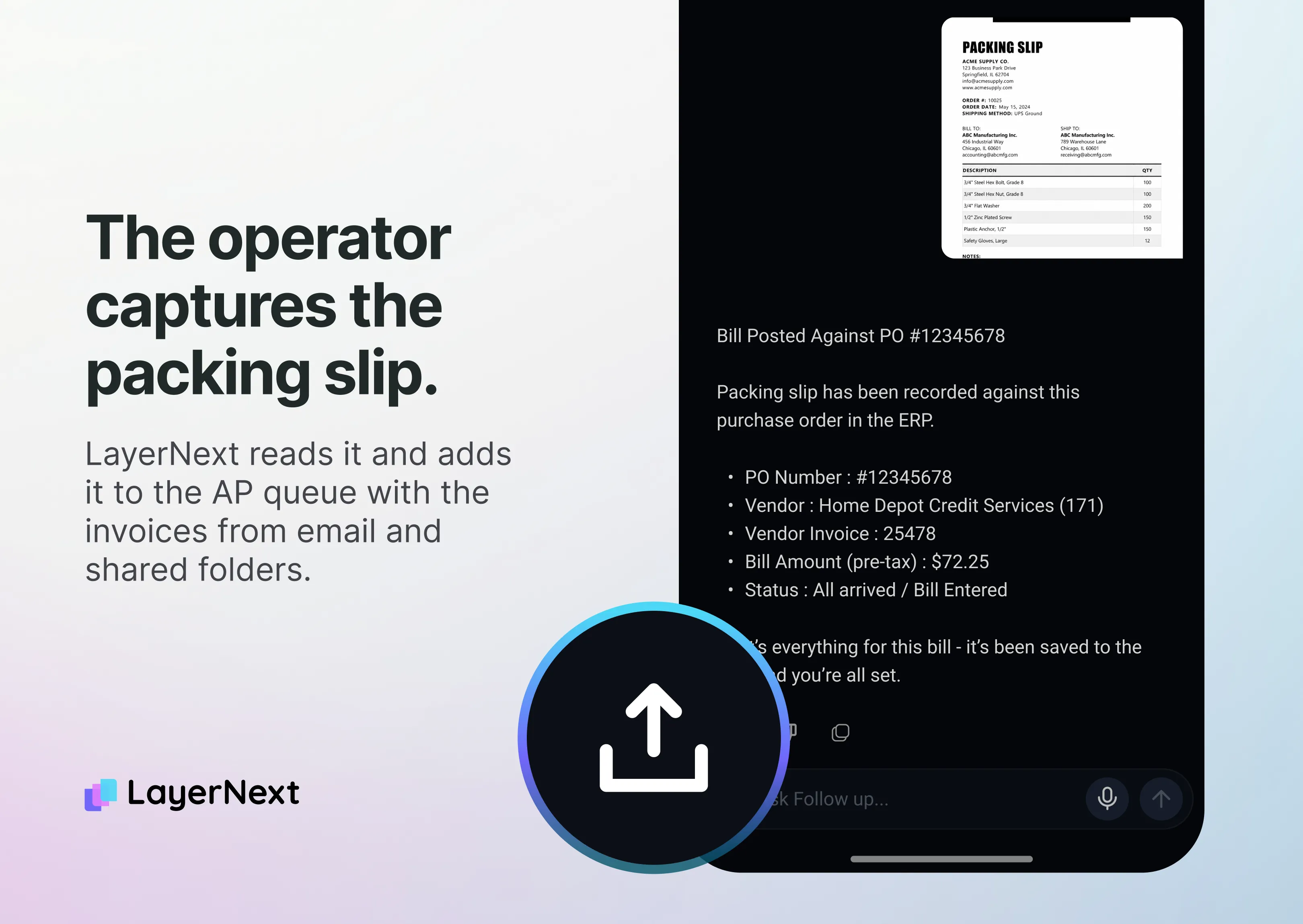
Bills arrive by AP inbox, shared folder, supplier portal, cloud storage or mobile photo, are read without vendor templates, and duplicates are flagged at capture.
- Work order, branch and technician coding
LayerNext's field services workflow connects supplier invoices to the work order, branch and technician. A rule can assign the QuickBooks Project (Customer:Job on Desktop) from the work order number, and set the class from a truck number on the invoice.
- Business rules in plain English
Your team writes business rules in plain sentences, such as "Parts invoices that show a truck number take that truck's class" (illustrative).
- Matching and checks
Each bill is checked against that vendor's rules and, where you issue POs, the PO and receipt (matching).
- Exception tasks and approvals
A price difference, tax mismatch or missing PO becomes a task for a named person. Approvers act from a phone, and every action is logged.
- Posting to QuickBooks
On QuickBooks Online, bills post through Intuit's API. Desktop has no cloud API, so the agent enters bills on QuickBooks' own screens, with no middleware.
- Bank and card reconciliation
Transactions come from bank feeds through Plaid or an uploaded statement and are matched as they arrive, with credit card reconciliation for card charges. One deposit can clear against several invoices, net of card fees, which is the shape of a card deposit. Short payments, duplicate charges and missing credits are flagged. See account reconciliation.
- Supplier statement reconciliation
Supplier statements are reconciled against open AP, and supplier credit memos are applied.
- Monthly report pack
You describe the pack once in plain English and financial reporting builds each period from live data, including profit by class or Project from your QuickBooks file and cash position across every account and entity.
A step specific to your shop, such as a different approval route for subcontractor bills or a branch-specific coding rule, is set up the same way, through business rules and custom workflows.
FAQ
